Unreal Resource Guide

Unreal Texture Generator for Engine-Ready PBR Materials

An Unreal texture generator helps create seamless texture sources, generate PBR material maps, review channels, and package outputs so Unreal Engine artists can build materials with less setup ambiguity.

What an Unreal texture generator is

An Unreal texture generator is a production path for turning a concept, source image, photo, scan, or cleaned tile into Unreal Engine-ready textures. The workflow should preserve seamless tiling, create coherent normal, roughness, metallic, AO, height, and emission maps where needed, and support ORM-aware material setup.

How PLAYTEX creates Unreal Engine-ready textures

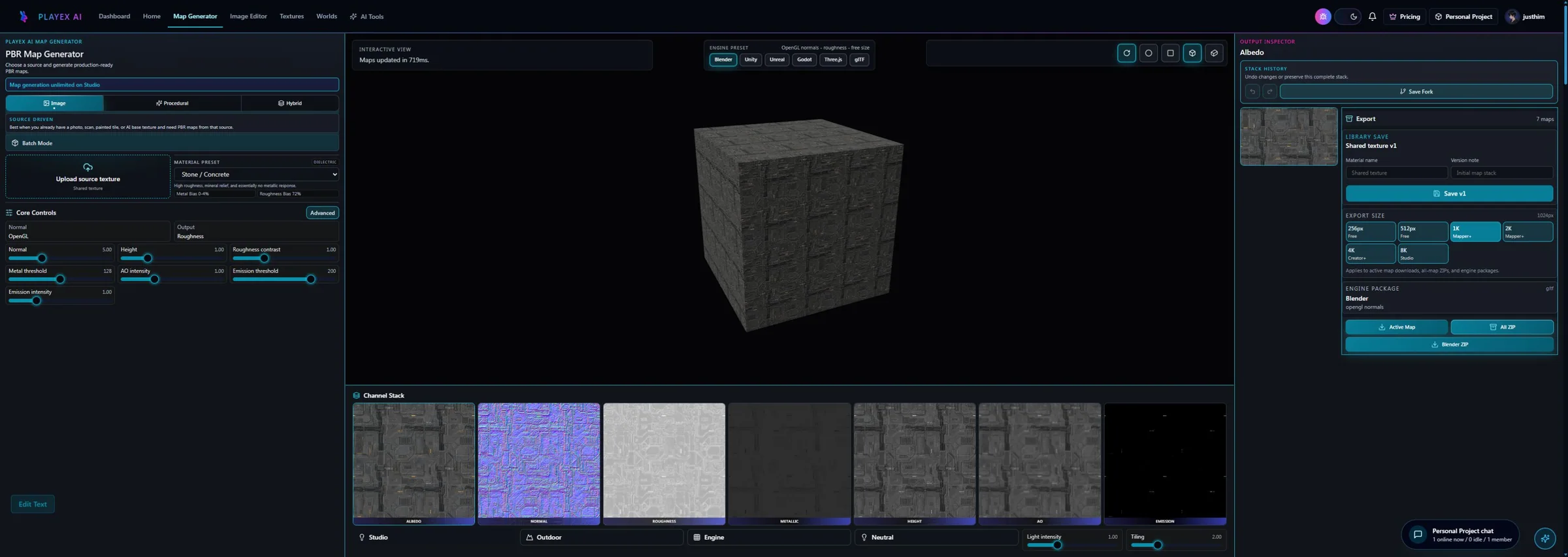
PLAYTEX helps with the front half of the Unreal material pipeline: source creation or intake, cleanup, PBR map generation, channel review, and export-side metadata. Use AI Texture Generator for new material ideas, Image to Texture for photo or scan conversion, and PBR Map Generator for the map stack.

Seamless texture generation for Unreal materials

Unreal Engine scenes can expose repeating texture problems quickly on landscapes, modular kits, floors, and large architectural surfaces. PLAYTEX workflows keep seamless source review upstream so edge breaks, baked lighting, and visible repetition are checked before export.

PBR map outputs for Unreal workflows

PLAYTEX can generate albedo, normal, roughness, metallic, ambient occlusion, height, and emission outputs for Unreal material workflows. Channel review matters before ORM packing, because a packed texture only preserves the quality of the maps feeding it.

  • Normal maps should be strong enough to read but not so aggressive that they shimmer in motion.
  • Roughness maps define highlight response and should be reviewed under the material intent.
  • Metallic maps should only mark real metal regions.
  • AO supports contact detail and can feed Unreal-style ORM packing.
  • Height and emission maps are optional outputs when the material calls for them.

Export and handoff considerations for Unreal Engine

Unreal handoff should make map intent obvious. PLAYTEX export packaging can include available source maps, ORM-aware notes, validation metadata, and setup references so another artist or technical artist can understand how the material should be wired in the engine.

Common Unreal material workflow questions

Does PlayTEX generate a finished Unreal material asset?

No. The current workflow generates the texture package and supporting metadata. You still import and wire the result inside Unreal according to your project standards.

When does packed ORM get included?

Packed ORM is included when ambient occlusion, roughness, and metallic maps are all present in the current generated set.

Why keep both exported textures and setup metadata?

The textures are the asset. The metadata explains the intended hookup and reduces ambiguity when the package changes hands or is reviewed later.

What is the most common mistake in an Unreal texture workflow?

Skipping map review. Many material issues blamed on Unreal are already visible in the roughness, AO, or metallic channels before export.