3D texture painting comparison
PLAYTEX AI vs Substance 3D Painter: Speed or mesh-level control?
PLAYTEX AI starts with a surface and gets it to a reviewed PBR package quickly. Painter starts with a 3D asset and gives an artist much deeper control over where every material, mask, decal, and wear pattern lands.
Short answer: Choose PLAYTEX AI for fast source-to-material production. Choose Painter for hero assets whose texture must respond to UVs, bakes, geometry, and art direction. Many professional pipelines benefit from both.
Fact-checked against primary sources. Reviewed by PLAYTEX AI Editorial Team.
Choose PLAYTEX AI when
You need a browser-first route from prompt, photo, or texture to a reusable PBR map stack, with versions and engine packaging kept together.
Choose Painter when
You need to paint directly on a mesh, bake high-to-low information, author masks and decals, manage UDIMs, or control asset-specific wear.
What the current first-party sources change
Painter 12.1.2 is the current 2026 build
Adobe shipped Painter 12.1 in June with continuous rebaking, on-mesh skew correction, edge protection, OpenPBR 1.1 defaults, and hard-surface automatic UVs, then followed with 12.1.1 and the 12.1.2 bug-fix release on August 3, 2026.
Its advantage is mesh context
Painter’s Smart Materials and Smart Masks can use baked curvature, normals, AO, position, thickness, and other mesh maps; that is fundamentally different from converting one flat source image.
The cost is a broader desktop commitment
Adobe sells Painter through Substance 3D subscriptions. The US Texturing plan was listed at $24.99/month after the March 2025 price change; regional and current checkout pricing can differ.
PLAYTEX AI vs Painter decision matrix
“Best fit” means the more direct workflow for this criterion, not a universal quality ranking.
| Decision | PLAYTEX AI | Painter | Best fit |
|---|---|---|---|
| Fast flat image → PBR stack | Purpose-built: one source, aligned channels, live review, version, export. | Possible, but Sampler is Adobe’s more direct image-to-material app; Painter adds mesh/project setup. | Leans PLAYTEX AI |
| Direct painting on a 3D model | Not a full mesh-painting workstation. | Core workflow with multi-channel paint, fill layers, projections, stencils, and masks. | Leans Painter |
| High-to-low baking | Generates maps from the chosen surface source, not a high-poly mesh transfer. | Dedicated bake mode for normals, AO, curvature, position, thickness, ID, and more. | Leans Painter |
| No-install access | Runs in a modern browser and keeps the workflow attached to the saved material. | Desktop application with project files, GPU requirements, and local asset setup. | Leans PLAYTEX AI |
| Asset-specific wear and decals | Good for base surfaces and reusable material sources. | Geometry-aware masks, painting, projection, anchors, and bake-driven effects. | Leans Painter |
| Repeatable material handoff | Named versions, channel review, and destination-oriented packages live in one browser workflow. | Export presets are deep and flexible; project/version governance is usually handled in the surrounding pipeline. | Depends on the task |
| Learning curve | Guided around a small set of material decisions. | More concepts—texture sets, channels, bakes, layers, masks, shaders, and export templates—but far more control. | Leans PLAYTEX AI |
Interface and output evidence
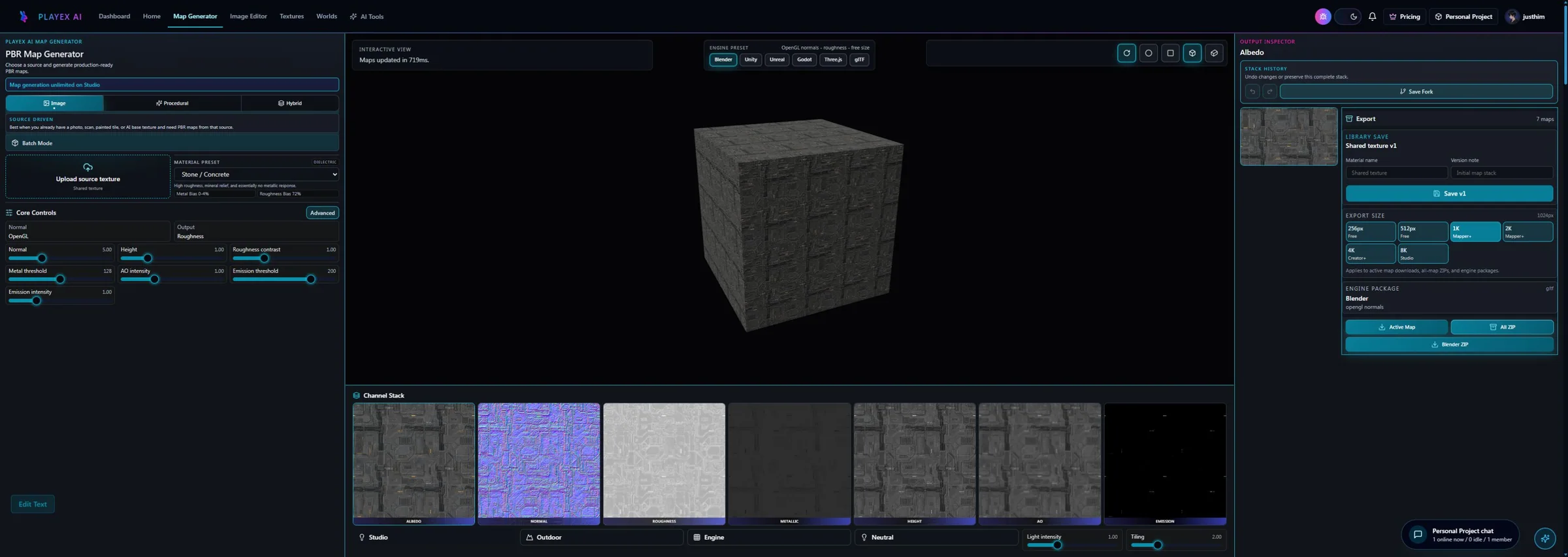
Workflow anatomy
PLAYTEX AI: source to reviewed material
- Start with the material. Upload a photo, scan, painted image, or existing texture—or generate a new source with AI.
- Generate aligned channels. Run deterministic image-processing math—not AI inference—to build normal, roughness, metallic, AO, height, and emission from the same source.
- Inspect, tune, and version. Review channels beside the live material preview, adjust the response, and save a named version.
- Package for the destination. Export individual maps, a full ZIP, or an engine-oriented package for the next production step.
Painter: 3D texture painting workflow
- Prepare and import the mesh. Confirm UVs, texture sets, shader template, document resolution, and color-management expectations.
- Bake mesh maps. Transfer or derive geometry information such as normal, AO, curvature, position, thickness, and IDs.
- Build the layer stack. Combine paint layers, fill layers, materials, masks, generators, filters, and folders.
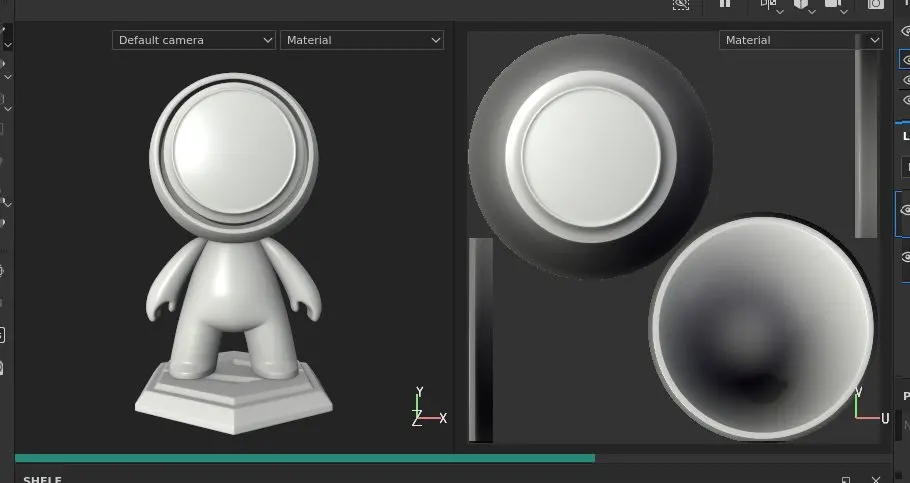
- Paint the asset in context. Project details onto the model, tune masks, and inspect the 3D and UV views.
- Export with a target preset. Choose the shader/export template, bit depth, file type, naming, padding, and channel packing.
How the connected PLAYTEX AI tools hand off the work
Image to Texture Generator
Correct perspective and lighting, isolate a surface, and prove the tile before PBR conversion.
PBR Map Generator
Build and review a seven-map stack from one source with deterministic, non-AI processing and per-channel advanced controls.
Texture Budget & VRAM Analyzer
Estimate decoded GPU memory, mip overhead, compression tradeoffs, and practical savings before delivery.
PBR Engine Converter
Repack maps and naming for Unity URP/HDRP, Unreal, Godot, Blender, Three.js, glTF, and Roblox workflows.
Choose from the production task
| Real task | Start with | Why |
|---|---|---|
| Turn 40 photographed surfaces into reusable environment materials | PLAYTEX AI | The repeated source-to-stack workflow and saved versions reduce per-material setup. |
| Texture a hero vehicle with edge wear, decals, and unique damage | Painter | The art direction depends on geometry, masks, bakes, and direct mesh painting. |
| Create a base material, then customize it on one prop | Use both | Generate and approve the reusable surface first; finish the prop-specific wear in Painter. |
| Work from a lightweight laptop without installing a DCC | PLAYTEX AI | The browser workflow removes desktop project and GPU setup from the first pass. |
| Maintain a studio-standard UDIM character pipeline | Painter | Painter is designed for model texture sets, bakes, masks, and detailed export presets. |
When the answer is both
The strongest combined workflow treats PLAYTEX AI as the surface-development front end and Painter as the asset-specific finishing room.
- Develop the surface language. Create or convert the base surface in PLAYTEX AI and approve its roughness/normal character.
- Package the clean source set. Export the map stack at the resolution and normal convention needed by the asset pipeline.
- Apply it to the mesh in Painter. Use the approved maps in fill layers, then add bake-aware masks, decals, and localized wear.
- Export the hero texture set. Use Painter’s target preset for the final asset while retaining the reusable PLAYTEX AI source material.
Limitations and evidence
PLAYTEX AI limitation
PLAYTEX AI does not replace a full UV-aware mesh painting, high-to-low baking, or UDIM authoring application.
Painter limitation
Painter’s depth adds setup, subscription cost, hardware needs, project-file management, and a larger skill surface than a focused image-to-PBR task requires.
Primary sources checked August 25, 2026
- Painter complete release notes — Painter 12.1 through the current 12.1.2 maintenance release.
- Painter baking documentation — Bake mode and mesh-map role.
- Painter layer stack documentation — Layers, channels, masks, and hierarchy.
- Painter viewport documentation — 3D/2D views and official screenshot.
- Adobe Substance 3D plans — Current plan packaging and purchase reference.
PLAYTEX AI vs Painter questions
Is PLAYTEX AI a full replacement for Substance 3D Painter?
No. It can replace the early source-material and image-to-PBR portion of some workflows, but Painter remains the stronger tool for direct mesh painting, bake-driven masks, UDIMs, decals, and detailed texture-set control.
Which is faster for converting an image into PBR maps?
PLAYTEX AI is the more direct route because the workflow starts with the image and keeps generation, channel review, versioning, and export together. Painter is better when those maps must be authored or corrected in the context of a specific mesh.
Can the two products be used together?
Yes. A practical pipeline is to create or approve a reusable surface in PLAYTEX AI, export its maps, then use them as fill-layer inputs in Painter before adding mesh-specific bakes, masks, and painted detail.
What should a studio test before choosing?
Run the same representative asset through both workflows and record setup time, bake needs, iteration count, export correctness, versioning overhead, and the amount of mesh-specific art direction the asset actually requires.
Test the comparison with a real asset
Use the same source, destination, and acceptance criteria. Compare iteration time, output coverage, provenance, memory, and engine handoff—not a landing-page promise.
Search every comparison · Browse every PLAYTEX AI tool · Check live pricing