Procedural materials comparison
PLAYTEX AI vs Material Maker: Guided output or procedural authorship?
PLAYTEX AI compresses the route from an idea or image to a reviewed material package. Material Maker exposes the recipe itself: a Godot-based graph where hundreds of nodes create and transform procedural textures, materials, shaders, and experimental paint brushes.
Short answer: Choose PLAYTEX AI when delivery speed and a connected workflow matter. Choose Material Maker when the node graph is the asset and you want open-source, inspectable, reproducible procedural authorship.
Fact-checked against primary sources. Reviewed by PLAYTEX AI Editorial Team.
Choose PLAYTEX AI when
You want a browser-based, no-install route to strong results from prompts or source images, without constructing a shader graph or owning desktop and engine-specific export setup.
Choose Material Maker when
You want to design procedural material logic, build reusable node groups, author custom GLSL nodes, or export dynamic shaders.
What the current first-party sources change
Material Maker 1.7 is actively maintained
Version 1.7 shipped in July 2026 with interface work and current Windows, macOS, and Linux downloads. It remains free/open source with name-your-price distribution.
The graph is more than a texture generator
The official release page describes approximately 250 nodes that can be combined or extended with GLSL. Static PBR exports textures; dynamic PBR, raymarching, and unlit materials can export shader logic.
Engine export depth varies by target
Godot and Unity receive configured material files, Unreal 5 uses generated Python plus textures/shader data, while Blender receives maps that still need material assembly.
Free/open source and paid storefront access coexist
Material Maker remains available as free/name-your-price software on itch.io under an MIT code license with CC0 generated assets; its optional Steam release launched at a $14.99 regular price on July 14, 2026.
PLAYTEX AI vs Material Maker decision matrix
“Best fit” means the more direct workflow for this criterion, not a universal quality ranking.
| Decision | PLAYTEX AI | Material Maker | Best fit |
|---|---|---|---|
| First usable material | Fast guided route from prompt/image to map stack and preview. | Requires choosing, connecting, and tuning a procedural graph or starting from a community graph. | Leans PLAYTEX AI |
| No-install access | Runs in a modern browser, so a supported machine can start material work without downloading or maintaining a desktop application. | Requires a Windows, macOS, or Linux desktop download; local projects and application updates remain the user’s responsibility. | Leans PLAYTEX AI |
| Procedural control | High-level controls keep the workflow approachable and output-focused. | Graph-level ownership of noises, shapes, filters, transforms, parameters, and custom GLSL nodes. | Leans Material Maker |
| AI source ideation | Integrated AI texture generation can create new starting surfaces. | Official positioning emphasizes procedural graph authorship; generative AI is not the core creation model. | Leans PLAYTEX AI |
| Reproducibility | Deterministic map generation and saved material versions support repeatable outputs. | The graph, parameters, and random seed expose a highly inspectable procedural recipe. | Depends on the task |
| Dynamic shader output | Primarily exports texture maps and engine packages. | Can author dynamic PBR, unlit, and raymarching material types that export shader logic. | Leans Material Maker |
| Collaboration and review | Hosted projects, versions, and review context remain attached to the material. | Graph/project files are local; collaboration depends on file sharing, Git, or community publishing. | Leans PLAYTEX AI |
| Cost and source access | Free and paid hosted plans plus a separate lifetime deterministic toolkit. | Free/name your price on itch.io with MIT source and CC0 generated assets; Steam is an optional paid storefront. | Leans Material Maker |
Interface and output evidence
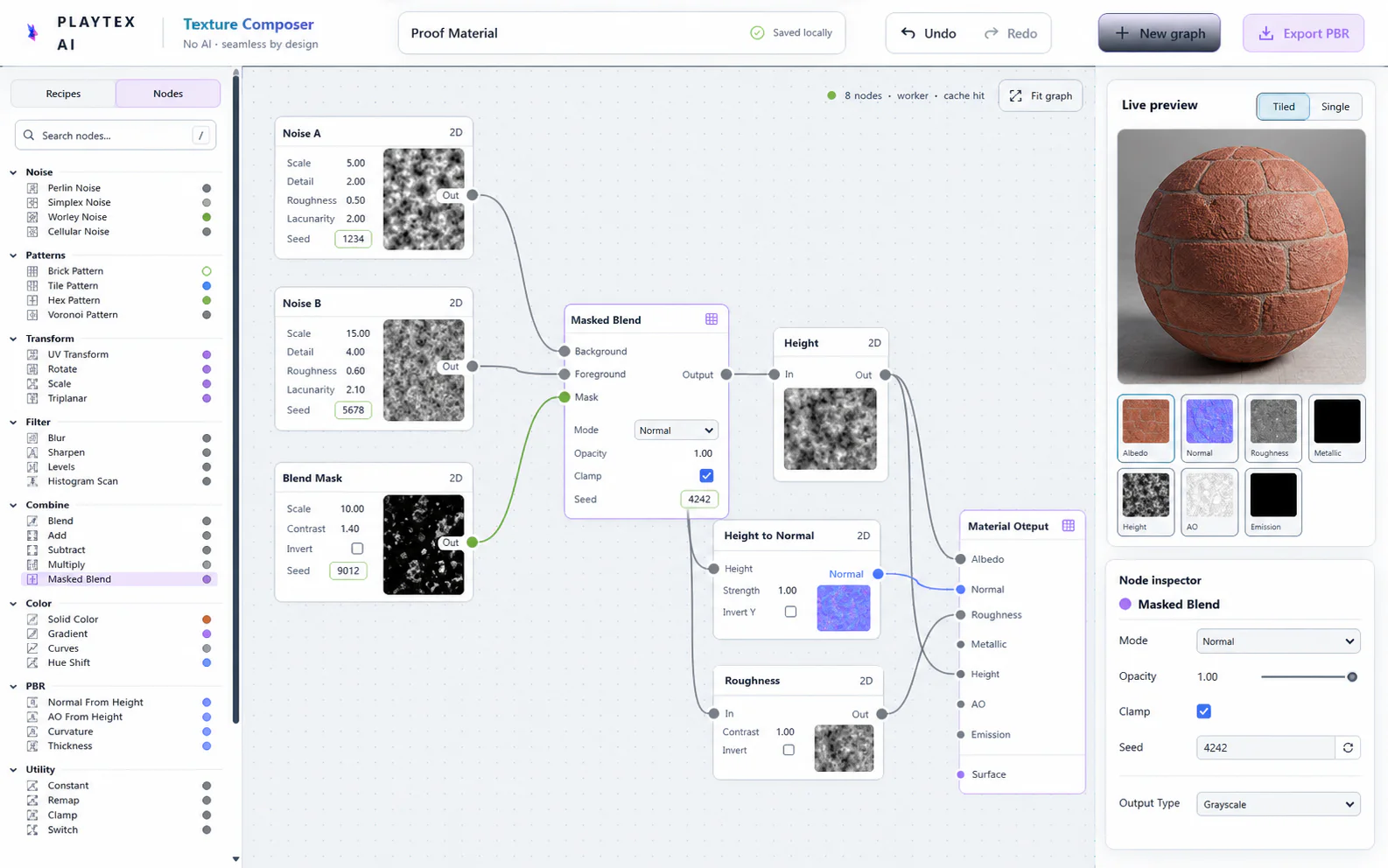
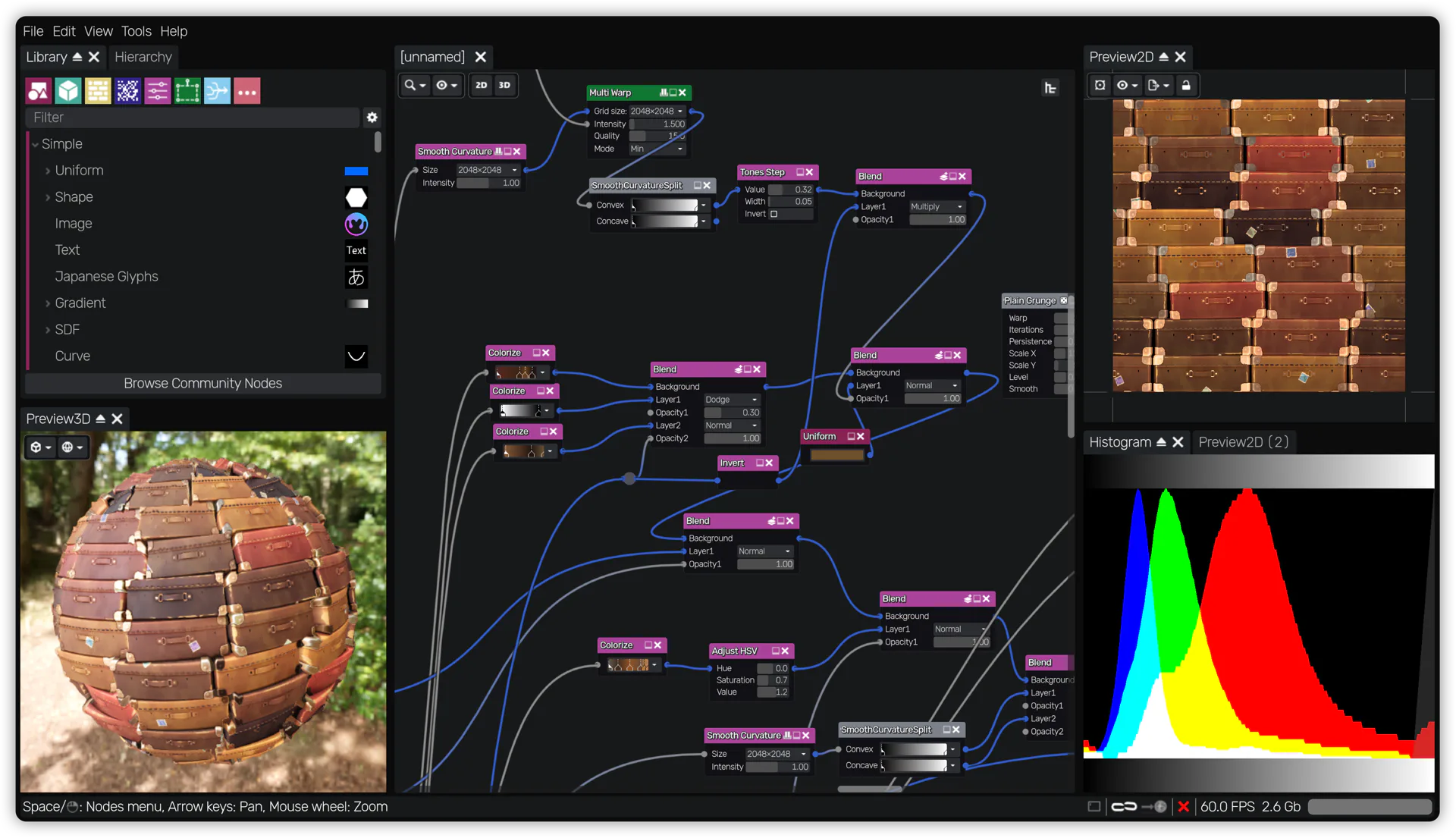
Workflow anatomy
PLAYTEX AI: Recipe or image → checked engine package
- Start with the material. Upload a photo, scan, painted image, or existing texture—or generate a new source with AI.
- Generate aligned channels. Run deterministic image-processing math—not AI inference—to build normal, roughness, metallic, AO, height, and emission from the same source.
- Inspect, tune, and version. Review channels beside the live material preview, adjust the response, and save a named version.
- Package for the destination. Export individual maps, a full ZIP, or an engine-oriented package for the next production step.
Material Maker: Procedural materials workflow
- Choose a graph or template. Start with an empty material, an example, or a community material worth adapting.
- Construct the procedural recipe. Connect noises, shapes, transforms, filters, workflows, and custom groups in the graph.
- Expose useful parameters. Define the controls and randomness that make the material reusable instead of one-off.
- Inspect 2D and 3D previews. Check tiling, tonal distribution, channel behavior, scale, and the material under lighting.
- Export for the target. Choose a material node/export target and generate texture, shader, script, or engine material files.
How the connected PLAYTEX AI tools hand off the work
Image to Texture Generator
Correct perspective and lighting, isolate a surface, and prove the tile before PBR conversion.
PBR Map Generator
Build and review a seven-map stack from one source with deterministic, non-AI processing and per-channel advanced controls.
Texture Budget & VRAM Analyzer
Estimate decoded GPU memory, mip overhead, compression tradeoffs, and practical savings before delivery.
PBR Engine Converter
Repack maps and naming for Unity URP/HDRP, Unreal, Godot, Blender, Three.js, glTF, and Roblox workflows.
Choose from the production task
| Real task | Start with | Why |
|---|---|---|
| Ship an approved source image as PBR maps this afternoon | PLAYTEX AI | The work is conversion and review, not procedural-system design. |
| Author an infinitely variable sci-fi panel generator | Material Maker | The procedural graph and exposed parameters are the durable asset. |
| Give non-technical artists a controlled material workflow | PLAYTEX AI | The smaller decision surface is easier to learn and standardize. |
| Build a custom dynamic shader for Godot | Material Maker | It can author and export shader-based material types, not only baked maps. |
| Prototype a look, then proceduralize the winner | Use both | Use PLAYTEX AI to find the target quickly, then rebuild the approved logic as a reusable Material Maker graph. |
When the answer is both
Use PLAYTEX AI to establish the art target and Material Maker to turn a proven look into a reusable procedural system.
- Explore the visual target. Generate or convert several candidate surfaces in PLAYTEX AI and choose one under a PBR preview.
- Identify the material logic. Break the approved surface into scales, shapes, noise families, color ramps, wear, and channel relationships.
- Rebuild the recipe as a graph. Author the reusable procedural system in Material Maker and expose art-directable parameters.
- Validate both outputs. Compare engine renders at identical scale and lighting before retiring or keeping the original baked source.
Limitations and evidence
PLAYTEX AI limitation
PLAYTEX AI’s guided controls are intentionally less open-ended than a full programmable procedural graph and do not replace custom shader authorship.
Material Maker limitation
Material Maker’s flexibility requires node-graph thinking, local project management, target-specific export knowledge, and time to build a robust reusable graph.
Primary sources checked August 25, 2026
- Material Maker official site — Core features, node count, PBR export, and open-source positioning.
- Material Maker itch.io releases — Version 1.7, current platforms, approximately 250 nodes, pricing model, and licenses.
- Material Maker on Steam — Optional paid storefront, July 14, 2026 release date, and current regular US price.
- Material Maker interface overview — Graph, preview, library, paint, and panel anatomy.
- Material Maker graph documentation — Graph behavior and official screenshot.
- Material Maker export documentation — Blender, Godot, Unity, and Unreal handoff details.
PLAYTEX AI vs Material Maker questions
Is Material Maker easier than PLAYTEX AI?
Not for a simple source-to-PBR task. Material Maker is approachable for a node tool, but the user still designs a procedural graph. PLAYTEX AI exposes fewer decisions and gets to a packaged material faster.
Does Material Maker require a download?
Yes. Material Maker is distributed as a desktop application for Windows, macOS, and Linux. PLAYTEX AI opens in a modern browser without an application install; Material Maker has the countervailing advantage of a local, open-source graph workflow.
Which tool is more reproducible?
Both can be repeatable in different ways. PLAYTEX AI emphasizes deterministic conversion and saved versions; Material Maker exposes the entire graph and seed-driven procedural recipe.
Can Material Maker export to game engines?
Yes, but the handoff varies. Its documentation describes configured Godot and Unity materials, an Unreal 5 Python/script workflow, and texture-only output requiring manual material setup in Blender.
Can the products work together?
Yes. PLAYTEX AI can establish a visual target or provide source maps, while Material Maker can proceduralize, remix, or extend that target into a graph-driven material.
Test the comparison with a real asset
Use the same source, destination, and acceptance criteria. Compare iteration time, output coverage, provenance, memory, and engine handoff—not a landing-page promise.
Search every comparison · Browse every PLAYTEX AI tool · Check live pricing