Procedural filters comparison
PLAYTEX AI vs Filter Forge: Material pipeline or filter platform?
PLAYTEX AI is a focused game-material workflow. Filter Forge is a much broader desktop procedural graphics platform: thousands of community filters, a visual filter editor, seamless textures, photo effects, animation/video processing, and PBR Surface outputs.
Short answer: Choose PLAYTEX AI for a connected source-to-engine material pipeline. Choose Filter Forge when the reusable procedural filter—or the wider photo/video effect library—is the product you need to author.
Fact-checked against primary sources. Reviewed by PLAYTEX AI Editorial Team.
Choose PLAYTEX AI when
You want AI texture sources, PBR channel review, material versions, projects, and engine handoff with less node-authoring overhead.
Choose Filter Forge when
You want to build or customize resolution-independent procedural filters, browse a huge community library, or work across texture, photo, and video effects.
What the current first-party sources change
Filter Forge 15 is broader than a PBR tool
The current product spans procedural textures, photo effects, animation/video processing, a standalone app, host plugins, thousands of library filters, and a visual editor.
PBR is a dedicated filter type
PBR Surface filters can output albedo, height, normal, roughness, metallic, emission, and occlusion, with predefined Unity/Unreal channel sets plus a generic PBR target.
Edition limits can affect production
Basic, Professional, and Studio editions differ in editor access, bit depth, maximum size, CPU use, formats, computer count, and project support—so feature-level comparisons must use the intended edition.
PLAYTEX AI vs Filter Forge decision matrix
“Best fit” means the more direct workflow for this criterion, not a universal quality ranking.
| Decision | PLAYTEX AI | Filter Forge | Best fit |
|---|---|---|---|
| Fast game-material handoff | Source, maps, live preview, versions, and engine packaging form one guided workflow. | Can render PBR channels, but broader filter/app settings and downstream material assembly remain separate. | Leans PLAYTEX AI |
| Procedural filter authoring | High-level material controls rather than a general-purpose filter graph. | Visual node editor for custom filters, parameters, seamless tiling, variants, and reusable library items. | Leans Filter Forge |
| Community library depth | Community textures and connected projects center on game materials. | More than fourteen thousand total community filters were advertised, including thousands of procedural textures. | Leans Filter Forge |
| AI texture ideation | Integrated AI source generation and variation workflows. | Primarily procedural/filter-based; not positioned as a prompt-led texture generator. | Leans PLAYTEX AI |
| Very high-resolution procedural render | Plan-dependent output resolutions tuned for production material packages. | Professional edition documentation lists images up to 65,000 × 65,000 with broad bit-depth/format support. | Leans Filter Forge |
| Browser and collaboration | Browser access, saved versions, projects, and shared production context. | Windows/macOS standalone/plugin workflow with local files and edition-specific project features. | Leans PLAYTEX AI |
| Photo/video effects beyond materials | Focused on textures, materials, maps, and related game-asset tools. | Broad photo effects, host plugins, procedural animation, and video processing. | Leans Filter Forge |
Interface and output evidence
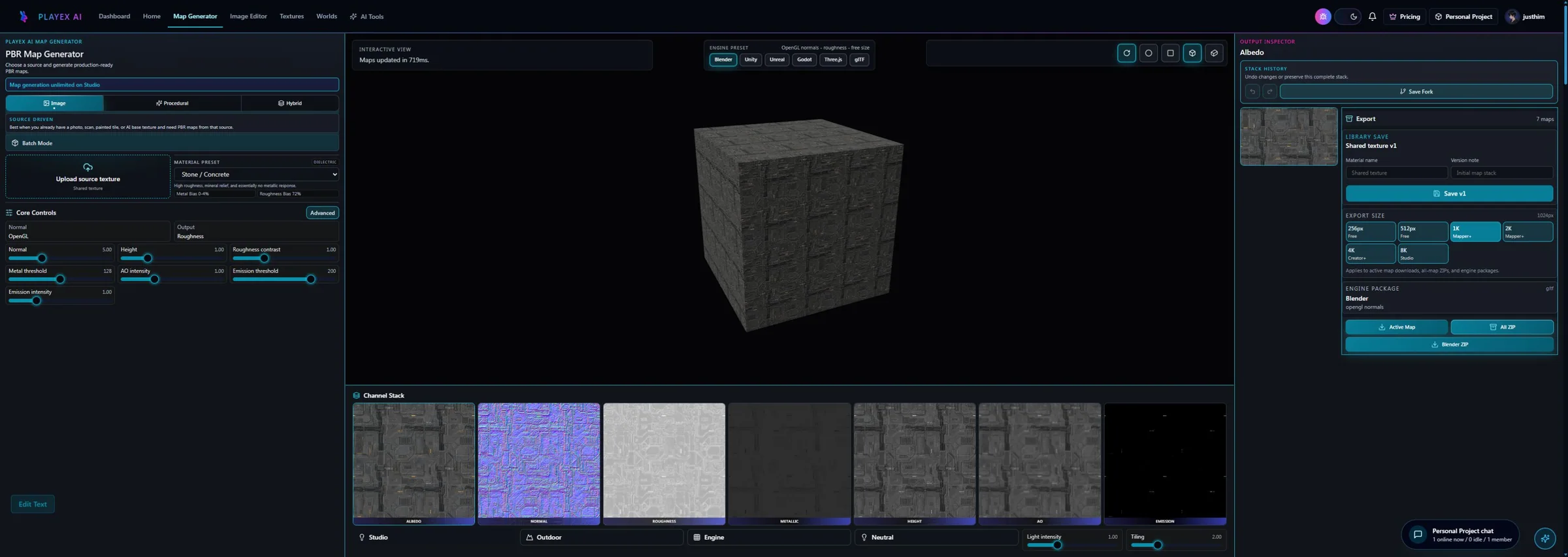
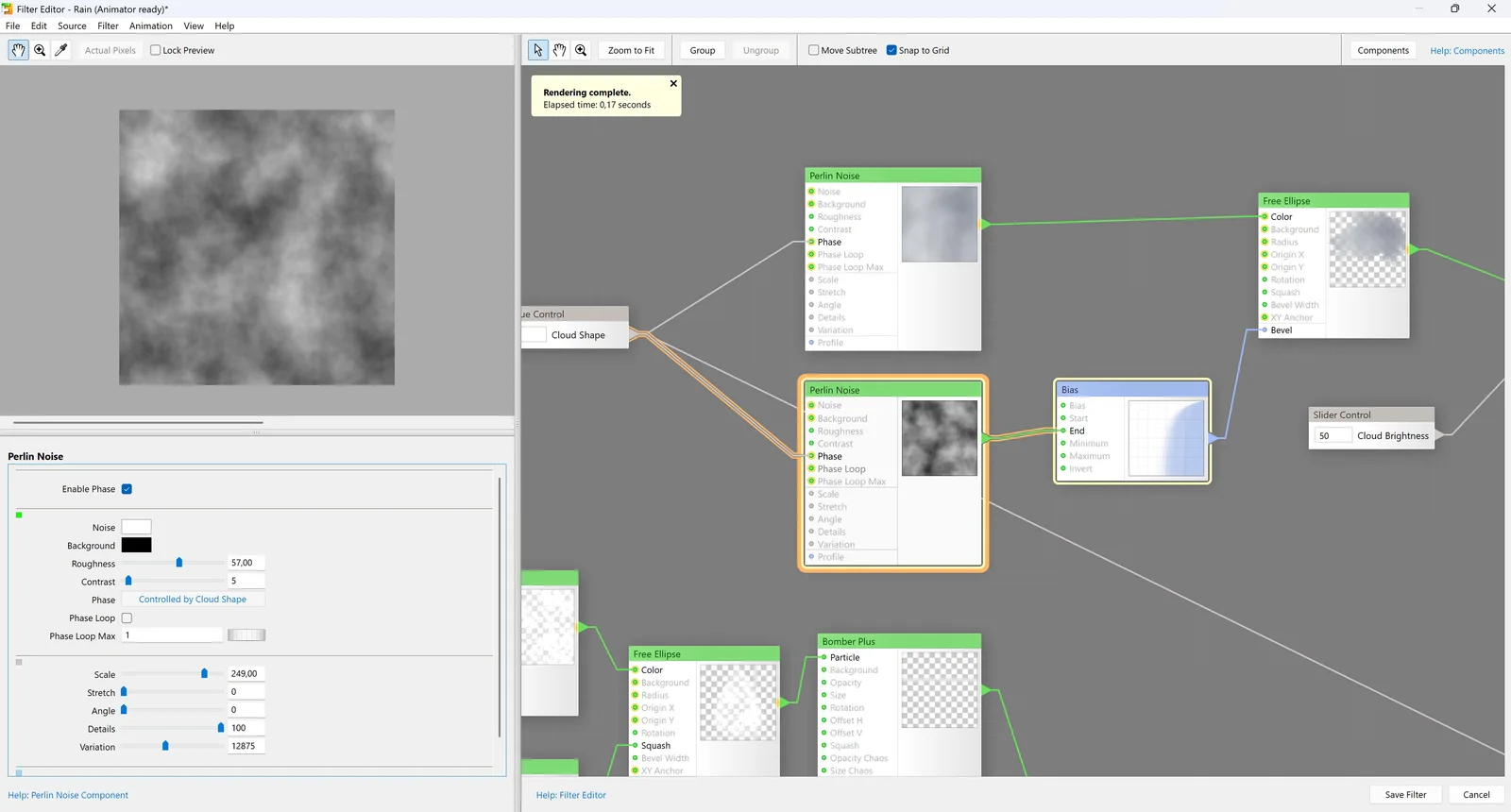
Workflow anatomy
PLAYTEX AI: source to reviewed material
- Start with the material. Upload a photo, scan, painted image, or existing texture—or generate a new source with AI.
- Generate aligned channels. Run deterministic image-processing math—not AI inference—to build normal, roughness, metallic, AO, height, and emission from the same source.
- Inspect, tune, and version. Review channels beside the live material preview, adjust the response, and save a named version.
- Package for the destination. Export individual maps, a full ZIP, or an engine-oriented package for the next production step.
Filter Forge: Procedural filters workflow
- Choose a library filter or start a graph. Search the community library, open an existing filter, or author a new filter in the editor.
- Edit the procedural network. Connect components for noise, shapes, image operations, controls, blending, and output channels.
- Expose presets and variations. Define user controls, randomization, and seamless behavior that make the filter reusable.
- Configure PBR Surface output. Select generic or engine-oriented channels and verify each generated map.
- Render and assemble downstream. Render at the desired size/bit depth, then import the maps into the DCC or engine material.
How the connected PLAYTEX AI tools hand off the work
Image to Texture Generator
Correct perspective and lighting, isolate a surface, and prove the tile before PBR conversion.
PBR Map Generator
Build and review a seven-map stack from one source with deterministic, non-AI processing and per-channel advanced controls.
Texture Budget & VRAM Analyzer
Estimate decoded GPU memory, mip overhead, compression tradeoffs, and practical savings before delivery.
PBR Engine Converter
Repack maps and naming for Unity URP/HDRP, Unreal, Godot, Blender, Three.js, glTF, and Roblox workflows.
Choose from the production task
| Real task | Start with | Why |
|---|---|---|
| Turn an approved image into an engine package quickly | PLAYTEX AI | The work is material conversion and delivery, not filter-system authoring. |
| Build a reusable procedural texture with hundreds of variations | Filter Forge | Its editor, presets, resolution independence, and filter library are designed for this. |
| Create source textures from written art direction | PLAYTEX AI | Prompt-led AI generation is an integrated starting point. |
| Develop Photoshop-compatible photo and texture effects | Filter Forge | The plugin ecosystem and broader filter types extend well beyond PBR material work. |
| Prototype a look, then turn it into a reusable filter | Use both | Find the target in PLAYTEX AI, then reproduce the controllable logic in Filter Forge if procedural variation justifies the effort. |
When the answer is both
A hybrid workflow is most valuable when PLAYTEX AI supplies art direction or source material and Filter Forge turns the approved logic into a reusable procedural filter family.
- Approve the target material. Use PLAYTEX AI to create or convert the visual direction and validate the PBR response.
- Decompose the pattern. Identify noises, shapes, transforms, blends, color ramps, and channel rules.
- Author the Filter Forge graph. Build reusable controls and presets, then configure PBR Surface output.
- Validate the production render. Compare both versions in-engine at matched scale, bit depth, channel packing, and lighting.
Limitations and evidence
PLAYTEX AI limitation
PLAYTEX AI does not provide Filter Forge’s general-purpose visual filter editor, enormous community filter library, or host-plugin/photo/video scope.
Filter Forge limitation
Filter Forge edition differences, local rendering performance, broader interface, and downstream material assembly can be unnecessary overhead for a simple image-to-PBR job.
Primary sources checked August 25, 2026
- Filter Forge 15 official site — Current version, library counts, platforms, and product scope.
- Filter Forge feature overview — Seamless textures, filter editor, plugin, and version features.
- Filter Forge PBR overview — PBR Surface channels and engine targets.
- Filter Forge editions — Editor, size, bit-depth, CPU, format, and project limitations.
- Filter Forge 15 editor screenshot — Official UI image and current graph connection feature.
PLAYTEX AI vs Filter Forge questions
Does Filter Forge generate PBR maps?
Yes. Its PBR Surface filter type can output albedo, height, normal, roughness, metallic, emission, and occlusion, including predefined engine channel configurations.
Which is easier for a game artist?
PLAYTEX AI is generally easier for a source-to-engine material task. Filter Forge is better when the artist wants to inspect or author the procedural filter graph itself.
Is Filter Forge only a texture tool?
No. It also covers photo effects, standalone and host-plugin workflows, procedural animation, and video processing. That breadth is valuable, but it also makes this comparison less direct.
Can Filter Forge and PLAYTEX AI be used together?
Yes. Use one to create source or target material imagery and the other to proceduralize, vary, or process it. Validate the final channels in the same engine scene because the tools can produce different roughness, normal, and scale assumptions.
Test the comparison with a real asset
Use the same source, destination, and acceptance criteria. Compare iteration time, output coverage, provenance, memory, and engine handoff—not a landing-page promise.
Search every comparison · Browse every PLAYTEX AI tool · Check live pricing