Material mixing comparison
PLAYTEX AI vs Quixel Mixer: New generation or scanned blending?
PLAYTEX AI is an active browser workflow for generating or converting source textures into reviewed map stacks. Mixer is a free desktop layer-based tool for blending scans, Smart Materials, masks, and paint on surfaces or meshes—but it is now a final offline product with no planned feature updates.
Short answer: Choose PLAYTEX AI for a maintained, connected material workflow. Choose Mixer when its scan-blending model and local offline library are already a good fit—and when a frozen toolchain is an acceptable tradeoff.
Fact-checked against primary sources. Reviewed by PLAYTEX AI Editorial Team.
Choose PLAYTEX AI when
You want new AI texture sources, image-to-PBR generation, browser access, saved versions, and an actively maintained production path.
Choose Mixer when
You want to blend Megascans or custom scan assets with layers, masks, and paint in a free offline desktop application.
What the current first-party sources change
Mixer is now a final offline product
Epic’s transition FAQ said the final release would remain free but would not receive additional feature updates or improvements. The 2026 offline release added an option to download more than 800 Megascans assets.
Its real strength is material assembly
Mixer combines surfaces, decals, imperfections, Smart Materials, masks, and paint in a non-destructive layer stack for 2D surfaces or custom 3D assets.
Export is still unusually flexible for a free tool
Mixer can export custom map sets, channel packing, multiple bit depths and file types, models, and masks to disk or its local library.
PLAYTEX AI vs Mixer decision matrix
“Best fit” means the more direct workflow for this criterion, not a universal quality ranking.
| Decision | PLAYTEX AI | Mixer | Best fit |
|---|---|---|---|
| Generate a new texture from a prompt | Built-in AI texture ideation and source generation. | Not the core workflow; Mixer assembles and edits imported/library material assets. | Leans PLAYTEX AI |
| Blend scanned materials | Can combine sources through broader material tools, but scan-library mixing is not the defining model. | Core strength: surfaces, atlases, imperfections, layers, masks, and Megascans-oriented workflows. | Leans Mixer |
| Active product evolution | Connected SaaS workflow with ongoing tool, export, and collaboration development. | Final offline release; Epic said no additional feature updates or improvements are planned. | Leans PLAYTEX AI |
| No-install access | Open the material workspace in a modern browser without installing a desktop application or maintaining a local asset library. | Requires the final desktop build plus local project and asset-library setup before material work begins. | Leans PLAYTEX AI |
| Offline work | Requires a modern browser and hosted services for the connected workflow. | Final build is designed to work offline with a local asset library. | Leans Mixer |
| Direct image → map stack | Guided source-to-PBR generation, preview, versions, and packages. | Can import custom surfaces and export PBR channels, but the workflow centers on mixing layers. | Leans PLAYTEX AI |
| 3D asset texturing | Creates reusable surface materials rather than painting a full mesh project. | Supports custom meshes, multiple texture sets/UDIMs, painting, masks, and geometry-aware components. | Leans Mixer |
| Team handoff and history | Saved materials, named versions, projects, and destination packages in one connected workspace. | Local Mix files and exports; teams own file distribution and version control around the app. | Leans PLAYTEX AI |
Interface and output evidence
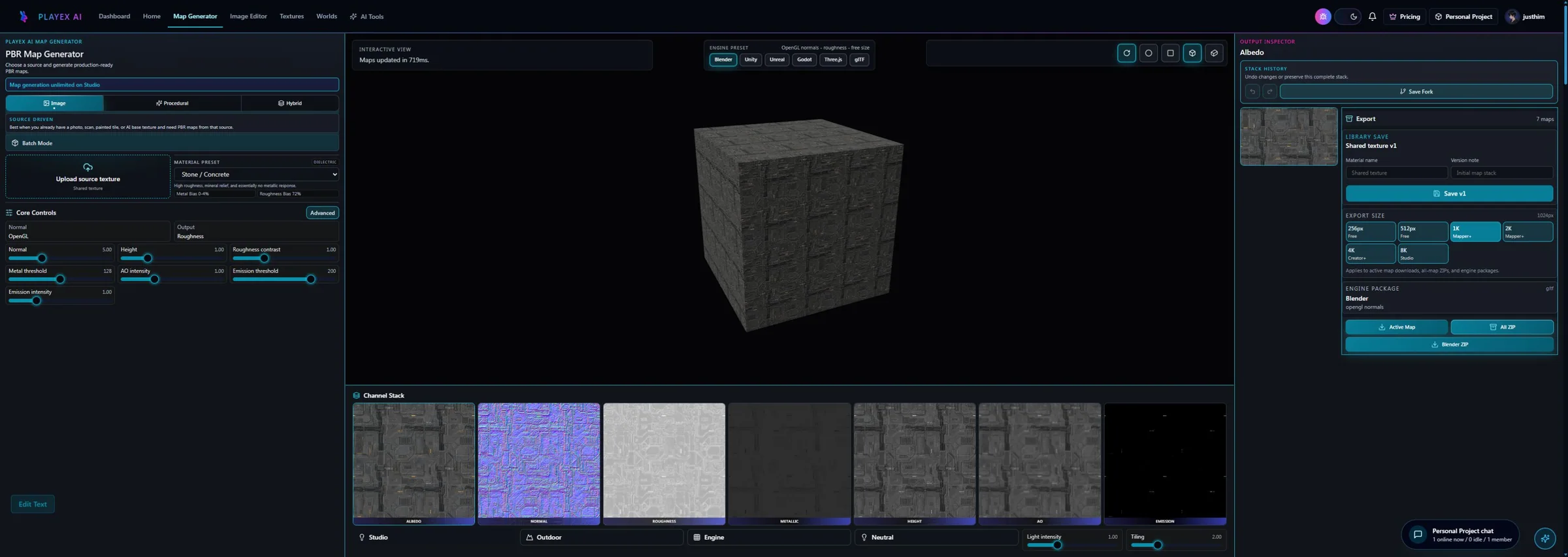
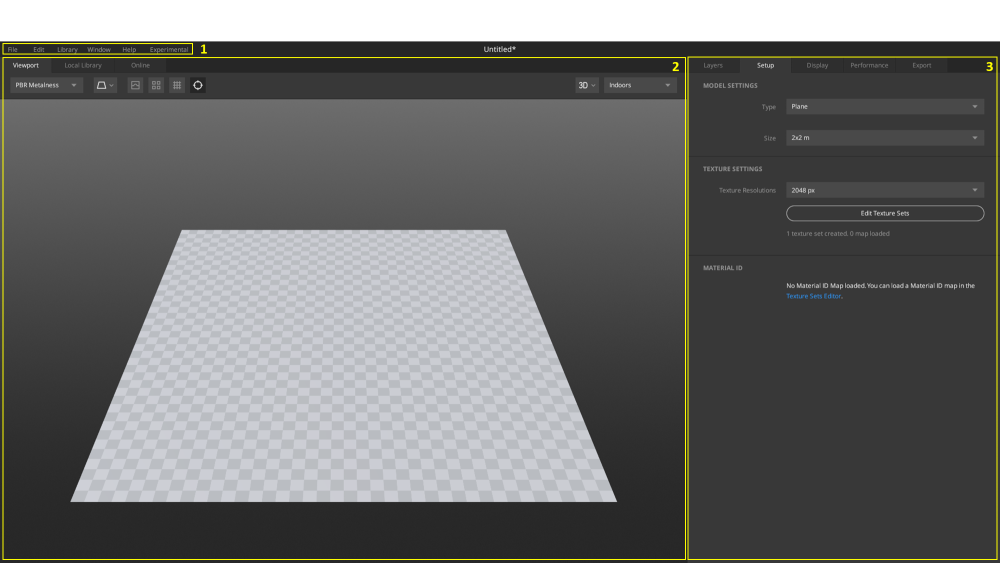
Workflow anatomy
PLAYTEX AI: source to reviewed material
- Start with the material. Upload a photo, scan, painted image, or existing texture—or generate a new source with AI.
- Generate aligned channels. Run deterministic image-processing math—not AI inference—to build normal, roughness, metallic, AO, height, and emission from the same source.
- Inspect, tune, and version. Review channels beside the live material preview, adjust the response, and save a named version.
- Package for the destination. Export individual maps, a full ZIP, or an engine-oriented package for the next production step.
Mixer: Material mixing workflow
- Install the final build and assets. Set up the offline Mixer release and choose which bundled or custom assets live in the local library.
- Choose a surface or mesh workflow. Start on a plane, Megascans asset, shader ball, or imported custom mesh.
- Build the Mix. Blend scan surfaces, atlases, solids, liquids, noise, paint, and Smart Materials with masks.
- Refine the layer stack. Adjust placement, reflectance, height frequency, material IDs, and channel-specific controls.
- Export locally. Bake custom maps, masks, or a model to disk or the local library with the required packing and bit depth.
How the connected PLAYTEX AI tools hand off the work
Image to Texture Generator
Correct perspective and lighting, isolate a surface, and prove the tile before PBR conversion.
PBR Map Generator
Build and review a seven-map stack from one source with deterministic, non-AI processing and per-channel advanced controls.
Texture Budget & VRAM Analyzer
Estimate decoded GPU memory, mip overhead, compression tradeoffs, and practical savings before delivery.
PBR Engine Converter
Repack maps and naming for Unity URP/HDRP, Unreal, Godot, Blender, Three.js, glTF, and Roblox workflows.
Choose from the production task
| Real task | Start with | Why |
|---|---|---|
| Create ten new stylized materials from written art direction | PLAYTEX AI | Prompt-led source creation and a direct PBR review loop are the shorter path. |
| Blend multiple scanned rocks into one hero cliff surface | Mixer | Mixer’s layer, mask, and scan-asset model is built for this kind of assembly. |
| Build a pipeline expected to evolve for several years | PLAYTEX AI | Mixer is a final release without future feature improvements, which changes the maintenance calculus. |
| Work fully offline with a frozen, reproducible desktop setup | Mixer | The final offline build can be deliberately pinned with its local library. |
| Generate a base, then enrich it with scan detail | Use both | Create the source and map logic in PLAYTEX AI, then blend scan detail in Mixer if the legacy desktop step is acceptable. |
When the answer is both
A hybrid pipeline makes sense when a team values Mixer’s scan blending but wants PLAYTEX AI to remain the maintained source-generation and material-review system.
- Generate the art-directed source. Create or convert the base texture in PLAYTEX AI and settle the large-scale material read.
- Export the working maps. Send the approved surface channels to a local project directory.
- Mix in scan detail. Use Mixer layers, masks, and local scan assets to add grounded imperfections or material transitions.
- Return the final set to production. Export the Mix, validate it in the target engine, and store the final files under the team’s own version control.
Limitations and evidence
PLAYTEX AI limitation
PLAYTEX AI is not a drop-in replacement for Mixer’s deep scan-asset layering or offline Megascans-style library workflow.
Mixer limitation
Mixer’s final status means teams should verify installer access, asset licensing, local-library setup, OS compatibility, and long-term support before standardizing a new pipeline around it.
Primary sources checked August 25, 2026
- Epic Quixel-to-Fab transition FAQ — Final-release and no-new-features status.
- Mixer workflow documentation — Supported assets, layers, masks, and workflow.
- Mixer 3D workflow — Custom meshes, texture sets, masks, and Smart Materials.
- Mixer exporting documentation — Maps, masks, models, formats, and library export.
- Mixer UI overview — Official interface screenshot and workspace anatomy.
PLAYTEX AI vs Mixer questions
Is Quixel Mixer discontinued?
Epic describes the current build as a final offline version and previously said that it would not include additional feature updates or improvements. It remains usable, but that status should be part of any new pipeline decision.
Does Quixel Mixer require a download?
Yes. Mixer is a desktop application and its final offline workflow uses locally installed software and assets. PLAYTEX AI opens in a modern browser without an application install, although its connected workflow requires internet access.
Is Mixer still better for scanned material blending?
Often, yes. Its layer stack, masks, Smart Materials, and Megascans-oriented workflow remain valuable when assembling several scanned surfaces. PLAYTEX AI is stronger when the job starts with a new prompt, photo, or texture and needs a maintained connected workflow.
Which option is better for offline work?
Mixer is the clearer offline choice. PLAYTEX AI is designed as a connected browser workspace, while Mixer’s final release is specifically intended for a local offline setup.
Can I use PLAYTEX AI and Mixer together?
Yes. Generate or approve the base material in PLAYTEX AI, export the map stack, then use it as a custom surface in Mixer for scan blending and layer-based finishing.
Test the comparison with a real asset
Use the same source, destination, and acceptance criteria. Compare iteration time, output coverage, provenance, memory, and engine handoff—not a landing-page promise.
Search every comparison · Browse every PLAYTEX AI tool · Check live pricing