Image-to-PBR comparison
PLAYTEX AI vs GenPBR: Two browser workflows, different depth.
This is the closest comparison. Both products derive PBR maps with deterministic image-processing algorithms, not AI. PLAYTEX AI uses AI only when a user separately chooses to create a new source image; AI is never used to generate its maps. GenPBR is a focused converter with a credit-based API, while PLAYTEX AI adds a larger seven-map stack, deeper per-channel art direction, versions, review, and engine handoff.
Short answer: Choose GenPBR when focused deterministic conversion, API automation, and its published regeneration economics are the priority. Choose PLAYTEX AI for a deterministic seven-map material stack, substantially deeper per-map controls, emission, consistency safeguards, review, versions, and engine delivery.
Fact-checked against primary sources. Reviewed by PLAYTEX AI Editorial Team.
Choose PLAYTEX AI when
You want the fuller map stack and direct control over how each channel looks—not only strength sliders—plus visual review, saved versions, collaboration, and destination packages.
Choose GenPBR when
You already have the source images and want a focused deterministic generator, credit-efficient regeneration, or API access for automated batches.
What the current first-party sources change
The hands-on test does not rank the products
The three-crop evidence package publishes both products’ raw maps, repeat previews, settings, checksums, and descriptive diagnostics. Border-pixel and encoded-map values are not texture-quality verdicts, the timing sets are not comparable, and access and channel counts describe product scope.
PLAYTEX AI map generation is also fully deterministic
The PBR Map Generator never uses AI inference to derive material channels. The same source and settings reproduce the same output; AI is confined to the optional, separate source-image creator.
GenPBR is explicitly deterministic
Its current positioning emphasizes established image-processing algorithms rather than generative rerolls. The same source can be adjusted and regenerated without spending new credits on that base image.
The API is a first-class product surface
Paid plans divide credits between client and API usage, with a programmatic PBR endpoint for custom tools, CI/CD, and automated pipelines.
Commercial rights depend on credit type
GenPBR states that paid-credit renders retain commercial rights while free-credit renders remain non-commercial; teams should keep that provenance with exported assets.
PLAYTEX AI vs GenPBR decision matrix
“Best fit” means the more direct workflow for this criterion, not a universal quality ranking.
| Decision | PLAYTEX AI | GenPBR | Best fit |
|---|---|---|---|
| Map-generation method | Fully deterministic image-processing math. No AI is used to generate any PBR map. | Fully deterministic algorithms rather than generative AI; the same input and settings are designed to stay predictable. | Depends on the task |
| Complete map stack | Seven aligned outputs: albedo, normal, roughness, metallic, AO, height, and emission. | Four-map core: normal, metallic, roughness, and AO; height is available as an optional fifth generated map. The uploaded base remains the source. | Leans PLAYTEX AI |
| Albedo / base-color shaping | Brightness, contrast, saturation, hue shift, and gamma controls before the derived stack is finalized. | Starts from the uploaded base image; current public controls focus mainly on the derived maps. | Leans PLAYTEX AI |
| Normal-map art direction | Strength, blur, detail, edge emphasis, micro-detail scale, height influence, X/Y inversion, DirectX/OpenGL format, and seamless mode. | Normal strength is a primary documented control; official guidance also discusses inversion and cleanup, but exposes a narrower public parameter set. | Leans PLAYTEX AI |
| Roughness-map art direction | Luminance/inverted source, roughness/smoothness output, inversion, response curve, black/white points, contrast, and min/max clamps. | Roughness intensity is the primary documented generator control, with additional general cleanup guidance. | Leans PLAYTEX AI |
| Metallic-map art direction | Manual or smart mode, threshold, contrast, min/max clamps, and luminance/red/green/blue/alpha source selection. | Metallic intensity is the primary documented generator control. | Leans PLAYTEX AI |
| AO-map art direction | Radius, intensity, edge-occlusion boost, and height-aware AO. | AO intensity and radius are documented controls. | Leans PLAYTEX AI |
| Height-map art direction | Strength, blur, midpoint bias, min/max clamps, and a parallax-safe mode. | Height is available as an optional fifth map; it is not part of the four-map credit definition. | Leans PLAYTEX AI |
| Emission workflow | Dedicated emission output with luminance/color/mask sources, thresholds, falloff, solid/gradient color, intensity, glow radius, inversion, and color matching. | Emission is not listed in the documented four-map core or optional five-map stack. | Leans PLAYTEX AI |
| Stack-wide safeguards | Seam-aware processing, map-consistency lock, power-of-two lock, shared preview, and named material versions. | Predictable same-input generation and a focused browser preview; no equivalent public stack-wide control matrix is documented. | Leans PLAYTEX AI |
| Create a new source texture | Optional separate AI source creation, plus image, photo, scan, and procedural inputs. The subsequent maps remain deterministic and non-AI. | Centered on converting an existing base image rather than prompt-led source creation. | Leans PLAYTEX AI |
| Same-source iteration | Deterministic settings make changes inspectable and repeatable across the full seven-map material version. | The published credit model explicitly makes setting changes and regeneration on the same base image free. | Depends on the task |
| API automation | Evaluate the available PLAYTEX AI API surface against the exact production requirement. | Explicit client/API credit split and programmatic PBR generation are central paid-plan features. | Leans GenPBR |
| Versions and project review | Named material versions, projects, preview, and export context stay together. | Focused generator/history experience; the surrounding review and asset-governance system is lighter. | Leans PLAYTEX AI |
| Commercial licensing clarity | Commercial use is governed by the selected PLAYTEX AI plan and published ownership terms. | Rights are labeled per output based on whether free or paid credits generated it. | Depends on the task |
| Engine handoff | Individual maps, complete ZIPs, and destination-oriented packages inside the material workflow. | Standard PBR maps intended for Unity, Unreal, Blender, Godot, Roblox, and custom pipelines. | Leans PLAYTEX AI |
Interface and output evidence
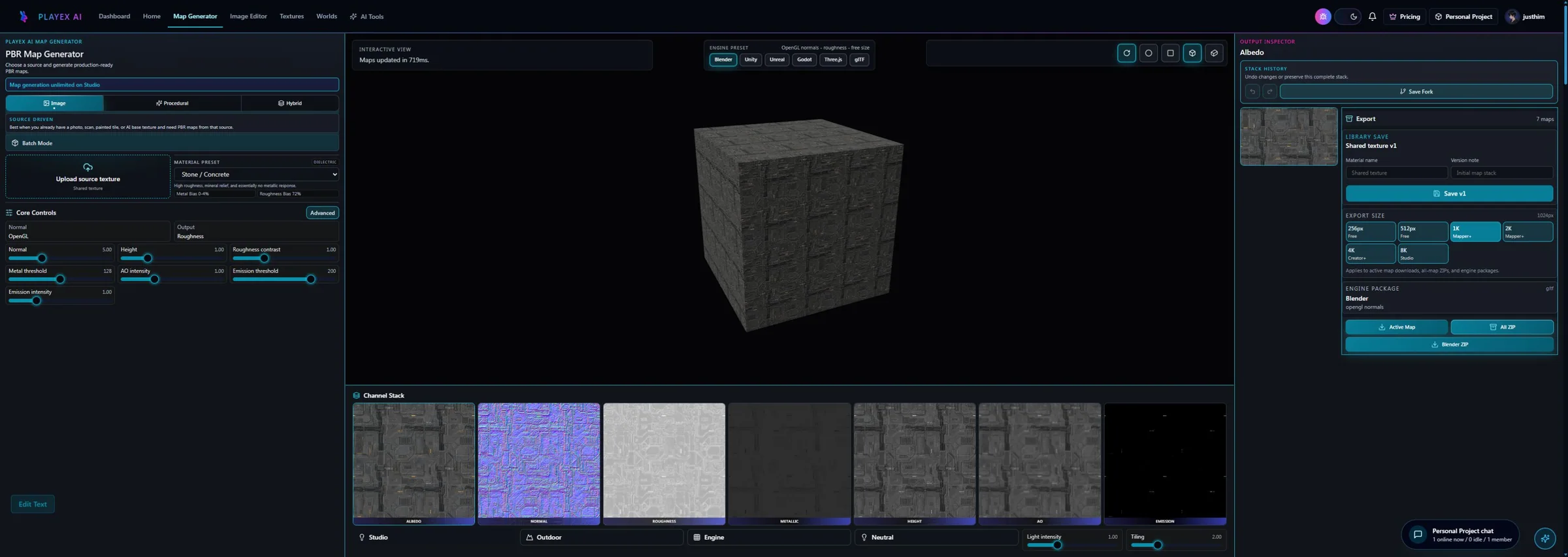
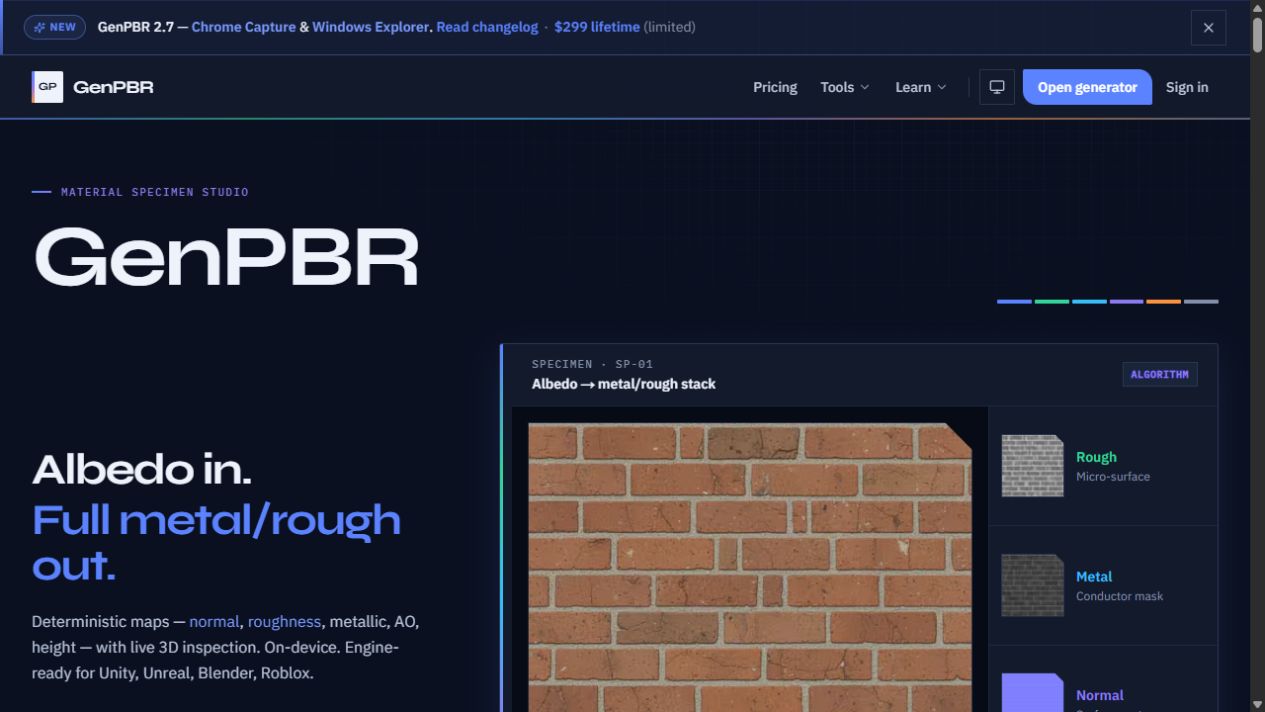
Workflow anatomy
PLAYTEX AI: source to reviewed material
- Start with the material. Upload a photo, scan, painted image, or existing texture—or generate a new source with AI.
- Generate aligned channels. Run deterministic image-processing math—not AI inference—to build normal, roughness, metallic, AO, height, and emission from the same source.
- Inspect, tune, and version. Review channels beside the live material preview, adjust the response, and save a named version.
- Package for the destination. Export individual maps, a full ZIP, or an engine-oriented package for the next production step.
GenPBR: Image-to-PBR workflow
- Upload the base image. Start from an albedo/source image in the browser or send it through the API.
- Generate the core maps. Create normal, roughness, metallic, and AO outputs, with height available when needed.
- Adjust the same source. Tune settings and regenerate the material without paying new-generation credits for that base image.
- Inspect the material. Use the browser tools to assess the channel response and material result.
- Export or automate. Download the standard map set or integrate the API into a larger asset pipeline.
How the connected PLAYTEX AI tools hand off the work
Image to Texture Generator
Correct perspective and lighting, isolate a surface, and prove the tile before PBR conversion.
PBR Map Generator
Build and review a seven-map stack from one source with deterministic, non-AI processing and per-channel advanced controls.
Texture Budget & VRAM Analyzer
Estimate decoded GPU memory, mip overhead, compression tradeoffs, and practical savings before delivery.
PBR Engine Converter
Repack maps and naming for Unity URP/HDRP, Unreal, Godot, Blender, Three.js, glTF, and Roblox workflows.
Choose from the production task
| Real task | Start with | Why |
|---|---|---|
| Tune a difficult source channel by channel | PLAYTEX AI | The advanced rail exposes more direct controls for albedo, normal, roughness, metallic, AO, height, emission, and stack-wide consistency. |
| Process a large existing-image corpus through an API | GenPBR | The API and explicit credit allocation are designed for programmatic generation. |
| Ship a seven-channel material that includes emission | PLAYTEX AI | Emission is part of the aligned PLAYTEX AI stack and has its own detailed deterministic control surface. |
| Make many setting changes on the same uploaded image | Depends | Both engines are deterministic; GenPBR explicitly advertises free same-base regeneration, while PLAYTEX AI exposes the deeper art-direction layer and saved material versions. |
| Choose for a small studio pipeline | Benchmark both | Use the same sources and compare output quality, API needs, license provenance, review overhead, export correctness, and total monthly volume. |
When the answer is both
Most teams will standardize on one image-to-PBR generator, but a hybrid can make sense when GenPBR owns automated batch conversion and PLAYTEX AI owns interactive material development and review.
- Separate batch and interactive jobs. Route high-volume known-source conversion to the API and art-directed material development to the browser workspace.
- Lock a shared channel contract. Standardize naming, normal convention, bit depth, resolution, packing, and license provenance.
- Use identical validation scenes. Compare both outputs under the same lighting, geometry scale, sampler, and engine import settings.
- Store one approved package. Keep the final maps, generator/source record, settings, and commercial-rights status together.
Limitations and evidence
PLAYTEX AI limitation
PLAYTEX AI’s broader workspace may be more product than a developer needs when the only requirement is a narrowly automated image-to-map endpoint.
GenPBR limitation
GenPBR plan limits, credit allocations, founder offers, API quotas, and free-versus-commercial output rights are unusually material to the decision and should be rechecked at purchase time.
Primary sources checked August 25, 2026
- PLAYTEX AI and GenPBR hands-on evidence package — Downloadable inputs, every raw result, exact defaults, version hashes, repeat previews, descriptive measurements, and explicit limitations; the test does not rank the products.
- PLAYTEX AI PBR technical overview — Deterministic non-AI map extraction, procedural controls, and calibration boundary.
- PLAYTEX AI PBR Map Generator guide — Seven-map stack, channel review, versions, and export workflow.
- GenPBR official product page — Current positioning, channels, and official screenshot.
- GenPBR current generator — Current five displayed output channels, documented parameter categories, preview, and export workflow.
- GenPBR Blender controls — Vendor-documented normal, metallic, roughness, AO intensity, and AO radius parameters.
- GenPBR pricing — Credits, maps per set, regeneration policy, plans, and API allocation.
- GenPBR API overview — Programmatic workflow and endpoint positioning.
- GenPBR licensing — Commercial rights by credit type and attribution rules.
- GenPBR tool comparison — Vendor-published comparison claims; treated as product positioning, not neutral evidence.
PLAYTEX AI vs GenPBR questions
Does PLAYTEX AI use AI to generate PBR maps?
No. PLAYTEX AI map generation is fully deterministic and uses image-processing math, not AI inference. AI is available only as a separate optional way to create a source image before the PBR workflow begins.
How do the PLAYTEX AI and GenPBR map stacks differ?
PLAYTEX AI keeps seven aligned outputs together: albedo, normal, roughness, metallic, AO, height, and emission. GenPBR documents a four-map core of normal, metallic, roughness, and AO, with height available as an optional fifth generated map; the uploaded base remains the source image.
Which product has deeper per-map controls?
PLAYTEX AI exposes the broader current control surface. It goes beyond strength and intensity with source-channel selection, response curves, clamps, format and inversion controls, edge and height interactions, parallax safety, a full emission editor, seam awareness, and stack-consistency controls.
Which product is the closest PLAYTEX AI alternative?
GenPBR is the closest among these comparisons because both products offer browser-based deterministic image-to-PBR generation. The larger difference is GenPBR’s focused API and credit model versus PLAYTEX AI’s larger map stack, deeper per-channel art direction, versions, and engine handoff.
Which is better for an API pipeline?
GenPBR has the clearer documented fit today because API credits and programmatic generation are central to its paid plans. A team should still benchmark throughput, rate limits, output quality, support, and license tracking.
Which is better for artists?
PLAYTEX AI is generally stronger when artists need to create or iterate the source, inspect channels visually, save material versions, and export destination-oriented packages. GenPBR can be attractive for a narrower source-in/maps-out flow.
How should I compare output quality?
Use the same base images, disable unrelated post-processing, match normal conventions and strength, render on identical geometry under identical HDR lighting, and score edge behavior, roughness plausibility, metallic masks, AO contamination, tiling, and engine import time.
Test the comparison with a real asset
Use the same source, destination, and acceptance criteria. Compare iteration time, output coverage, provenance, memory, and engine handoff—not a landing-page promise.
Search every comparison · Browse every PLAYTEX AI tool · Check live pricing