Core Material Workflow
PBR Map Generator: Create Normal, Roughness, AO, Height, Metallic, and Emission Maps
Turn one viable image or source-guided hybrid setup into a coherent map stack, review every channel as part of one material system, and export for the renderer you actually use.
Direct answer
What does a PBR map generator do?
Treat the channels as a system. Establish the material class first, change one family of controls at a time, then judge albedo, normal, roughness, metallic, AO, height, and emission separately before trusting the beauty preview.
How PLAYTEX AI helps: PLAYTEX AI derives the full map stack from one shared source and keeps every channel aligned. You still decide the material class, strength, channel meaning, normal convention, and engine-side packing.
What you will get
- Generate a consistent full PBR stack from one texture or source-guided hybrid setup.
- Understand what each settings rail section changes in the final material.
- Export with fewer surprises once the asset reaches engine.
Best use cases
- You already have a base texture and need a real material set.
- You want predictable PBR maps instead of hand-tuning every output separately.
- You need better control over procedural wear, color overlays, or material intent.
Acceptance test
Approve the asset only when these are true
- Albedo or base color is not carrying directional light, deep AO, or glossy highlights from the source photograph.
- Normal detail reinforces the surface structure at the intended texel scale and uses the convention expected by the destination engine.
- Roughness remains readable under both soft environment light and a harder grazing light.
- Metallic stays close to binary on pure materials; paint, dirt, rust, and exposed metal are separated intentionally.
- AO supports indirect-light contact without becoming a substitute for shadows in the base color.
- The exported maps are assigned to the destination shader once before the material is approved.
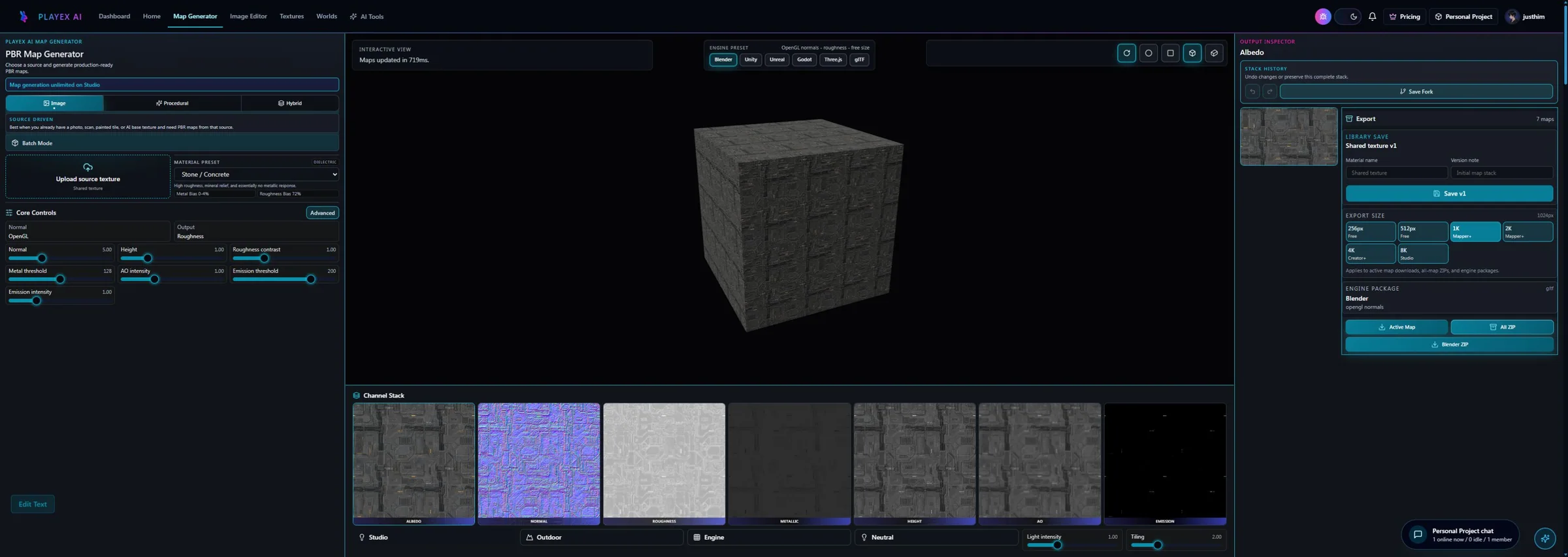
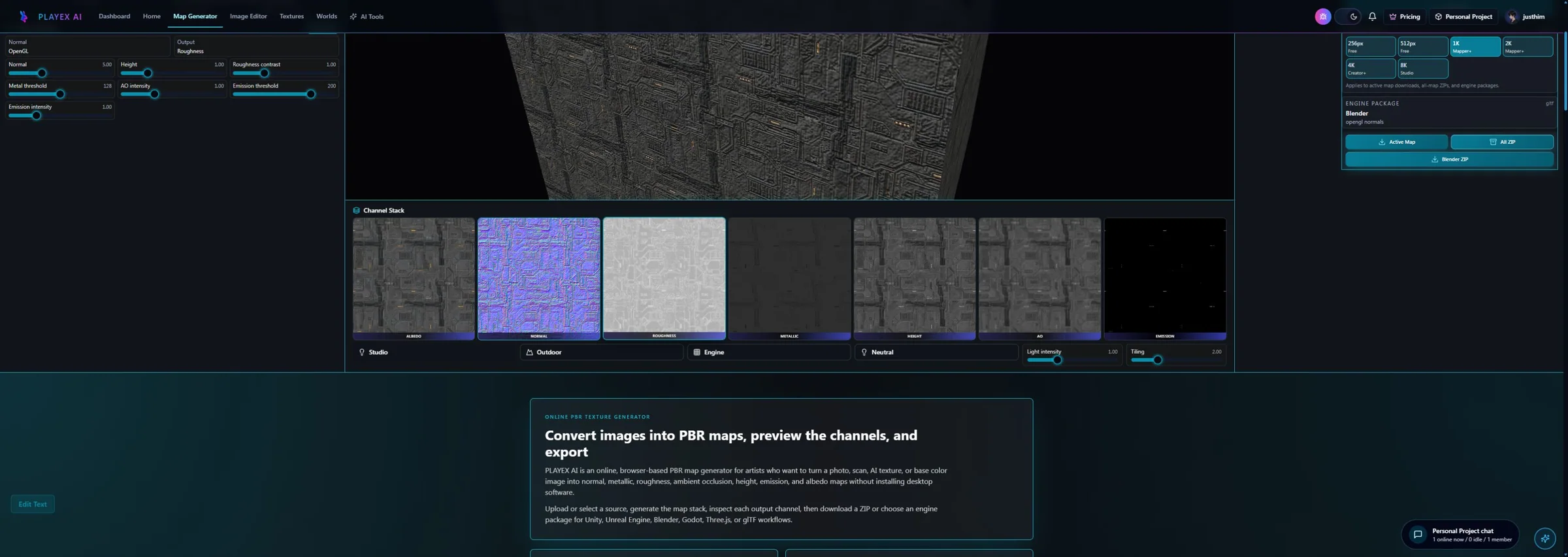
What a PBR map generator is actually for
A PBR map generator should not be treated like a filter that makes an image look more technical. Its real job is to convert a surface idea into a coordinated material set that can survive lighting, distance, and reuse inside a renderer. When artists do this manually across disconnected tools, the biggest problem is not usually speed. It is alignment. Roughness drifts away from the visual logic of the base color, metallic gets used as a contrast trick, normal detail becomes exaggerated to compensate for a weak source, and the final material becomes harder to trust the moment it enters a game engine.
The value of the PLAYTEX AI PBR Map Generator is that it keeps those channels in one workflow. The tool can generate albedo, normal, roughness, metallic, ambient occlusion, height, and emission from a shared material direction. That matters because believable materials depend on relationships between channels, not on any single map in isolation. A strong roughness map feels convincing partly because it matches the material story implied by the albedo and height. A stable normal map works partly because it reinforces structure instead of fighting it.
Readers landing on a page like this are usually trying to solve a practical problem: how to turn a texture into a usable material without hand-authoring every output from scratch. Helpful content needs to meet that need directly. That is why this guide focuses on source choices, map review, and export readiness instead of abstract rendering theory alone.
Choose source mode based on the asset, not habit
Image mode is best when the base texture already carries most of the material story. If the source image is strong, this is usually the quickest path because the material is already visually close to what you need. Hybrid mode keeps that real source while introducing more controlled procedural structure and wear. When the job is to design the material logic without starting from an image, Texture Composer is the browser-based material maker for that workflow.
A common mistake is to pick one workflow and force every asset through it. That works poorly because different surfaces fail in different ways. A photo-derived plaster wall might mostly need better tiling and then image-mode map generation. A scan with good color information but weak structure might be strongest in hybrid mode. A from-scratch stylized material belongs in Texture Composer. The point is to make those choices deliberate.
If you want a cleaner workflow, choose the mode that matches the problem still present in the asset. That principle shows up across the whole platform. You do not use PBR generation to rescue a broken source. You use it to convert a viable base texture into a coherent material stack. Once you apply that rule consistently, the generator becomes far more predictable.
How to review the channels like a technical artist
Map review is where a material either becomes production-ready or quietly begins accumulating downstream problems. The beauty preview is useful, but it is not enough. A material can look dramatic in one lighting setup and still be wrong in the channels that matter. Roughness might be too compressed. AO might be blackening the wrong regions. Metallic might be telling a false story about what the surface is made of. Normal strength might be so aggressive that the material breaks once it is applied at scale.
That is why the generator should be used map by map, not just output by output. Review albedo for leftover baked lighting and unwanted contrast. Review normal for stable structure instead of inflated noise. Review roughness for believable response rather than generic gray coverage. Review metallic with discipline and keep it reserved for truly metallic regions. Review height and AO as support channels, not as blunt-force ways to add drama. These are the habits that separate a material workflow from a screenshot workflow.
The good news is that a shared generator interface makes those checks easier to repeat. Once your team treats channel inspection as a required step instead of a best-effort step, the quality of exported assets improves fast. That is the part of the workflow that tends to pay back immediately.
Export readiness is part of the guide, not an afterthought
The moment a material leaves the generator and enters a game engine, the quality of the handoff starts to matter. PLAYTEX AI supports engine-aware packaging for Unity and Unreal workflows, along with validation context and supporting metadata. That is useful because export should not mean downloading a random pile of images and hoping the next person understands how they connect. The more deliberate the package is, the easier it is to review, import, and reuse.
Use Download All when you need the complete map stack. Use engine export when the target pipeline benefits from packaging decisions such as Unity or Unreal channel expectations. Use Save to Library when the material should remain available for projects, versions, or later review.
Even after export, validate inside the destination engine or renderer. PLAYTEX AI can generate and package the maps, but the final material response still depends on the shader, lighting setup, scale, compression, and import settings used downstream.
Settings Reference
Source and workflow settings
These choices define what kind of material you are actually generating.
- Material Source: The Source Mode Bar switches between Image Pipeline and Hybrid. Image Pipeline is a direct source-conversion workflow, while Hybrid combines an uploaded source with procedural shaping. Choose Image Pipeline when you already have a usable texture and Hybrid when the uploaded image has good structure but needs generated detail. Use Texture Composer when you need a new repeatable material without a source image.
- Material Class: Auto and Manual Lock: Auto infers the active material class from the source. Manual Lock preserves fixed dielectric or metallic behavior so later edits do not change the material provenance. Use Auto for normal texture conversion. Use Manual Lock when a material must stay dielectric, metal, or a known class while you tune maps and presets.
- Batch Mode: Opens the workflow for processing multiple sources or output passes instead of focusing on one material preview. Keep it off while diagnosing a single material. Turn it on when you are generating or reviewing a set of related textures.
- Settings Rail Tabs: Simple exposes the fast production sliders, Advanced exposes per-channel controls, and Presets gives you a quicker baseline when you do not want to start from neutral settings. Stay in Simple until the material direction is right, move to Advanced for a specific channel fix, and use Presets when the source needs a faster starting point.
- Material Intent: Biases the whole material toward a surface response instead of isolated channel tweaks. Use it early when the result feels globally too glossy, too flat, too metallic, or too soft.
Procedural structure, color, and wear
These panels are where the generator stops being generic and starts behaving like a material authoring tool.
- Procedural Structure: Controls seed, previous or next seed stepping, randomize, surface type, surface preset, Apply Preset, Reset to Auto Default, and the core noise controls: scale or frequency, detail or octaves, roughness or persistence, lacunarity, contrast, and balance or bias. Use it when you need repeatable materials such as concrete, rock, metal, fabric, wood, brick, tile, asphalt, gravel, mud, leather, grass, carpet, sci-fi panels, sand, snow, ice, or custom noise.
- Art Direction: Groups surface influence, pattern injection, relief, variation, finish, source preservation, replacement amount, large-shape versus micro-detail, and blend behavior. Use it when the material has the right source type but the wrong read: too flat, too noisy, too manufactured, too organic, or too far from the uploaded source in hybrid mode.
- Color Overlay: Applies palette direction without rebuilding the rest of the map logic. Use it to fit faction colors, mood shifts, biome variations, or art-direction passes.
- Wear Controls: Adds deterministic cracks, damage or chipping, stains and leaks, moss or growth, dust or grime, edge wear, wetness, and advanced crack/streak/cavity tuning. Increase it when the material needs age, exposure, or environmental storytelling. Lower it for clean manufactured assets, UI surfaces, mobile targets, or any output that becomes visually noisy.
Per-channel technical tuning
These settings control how the material behaves once light hits it.
- Simple Settings: Simple exposes Detail, Softness, Albedo Tone, Normal Strength, Roughness Contrast, Metallic Threshold, Height Strength, AO Strength, and Emission Threshold in one fast rail. Use this tab for most production passes: get the material believable before opening deeper channel tabs.
- Advanced Section Navigation: Advanced organizes channel controls into Albedo, Normal, Metallic, Emission, Roughness, Height, AO, and Global. Albedo/Basecolor includes brightness, contrast, saturation, hue shift, and gamma. Use it when one channel is wrong but the overall material is close, such as albedo needing gamma correction or roughness needing response cleanup.
- Normal Strength: Controls normal strength, blur, detail, edge emphasis, micro-detail scale, height-to-normal influence, OpenGL or DirectX format, axis inversion, and seamless tiling behavior. Increase strength and edge emphasis for stone, bark, and worn surfaces. Reduce strength, blur detail, or switch format/invert axes when shading looks inflated, crunchy, or flipped in the destination engine.
- Roughness Output: Defines luminance or inverted source, roughness versus smoothness output, black and white points, contrast, clamp range, inversion, and response curve. Use smoothness output for workflows that expect it. Tighten black and white points when response is washed out, and avoid crushing the range so every surface becomes equally glossy or matte.
- Metallic Output: Switches smart or manual metallic behavior and controls threshold, contrast, clamp range, and source channel. Keep it low for wood, stone, dirt, tile, cloth, snow, and organic surfaces. Use smart mode or source-channel control only when the source actually contains metal regions.
- Height and AO: Height controls strength, blur, midpoint bias, clamp range, and parallax-safe mode. AO controls radius, intensity, edge occlusion boost, and height-aware AO. Use height for believable relief and AO for cavity support. Turn on parallax-safe mode when height will feed a parallax workflow, and reduce AO when it blackens the material instead of supporting creases.
- Global Processing: Controls seam-aware processing, map consistency lock, and power-of-two lock across the output set. Use seam-aware processing for tiled materials, keep map consistency lock on when channels must stay aligned, and enable power-of-two lock when the target engine or compression path expects standard texture dimensions.
Preview, lighting, and tiling controls
The preview controls help you catch material problems before you save or export.
- Flat Maps and 3D Material View: Toggles between the individual map stack and the shaded material preview. Use 3D Material View to judge realism, then switch to Flat Maps when a channel looks suspicious.
- Preview Mesh: Switches the preview between Sphere, Plane, and Cube, with optional Rotate Auto. Use Sphere for broad lighting response, Plane for tile and surface read, and Cube when checking edge behavior or hard-surface use.
- Key Light Rig: Controls key intensity, light distance, azimuth, elevation, temperature, Rotate Light, and orbit speed. Move the light when normal or height detail only looks good from one angle, or when roughness response is hard to read.
- Environment and Tiling: Environment controls exposure, reflection strength, ambient, fill light, and rim light. Tiling controls linked X and Y repeat values. Use environment controls to stress-test reflections and shadows. Use linked tiling to check repeated material scale before export.
Workflow
Turn one viable image or source-guided hybrid setup into a coherent map stack, review every channel as part of one material system, and export for the renderer you actually use.
Step 1: Choose a source mode
Use the Source Mode Bar first. Image Pipeline uploads a base image and derives the full PBR set. Hybrid keeps the structure of an uploaded image while adding deterministic procedural detail. For a material built without a source image, start in Texture Composer.
Step 2: Set your material intent before micro-tuning
Material intent changes the overall direction of the map set. Dial that in first so you are not fighting detail sliders one by one.
Step 3: Review preview maps, not only the beauty view
Use the map strip and viewer to isolate albedo, normal, roughness, metallic, AO, height, and emission individually. Problems often hide in one channel while the main preview still looks fine.
Step 4: Validate the output and export for the target engine
Use quality review and engine export packaging before you ship the asset forward. This is where you catch incorrect balance, weak detail, or packaging mistakes.
Common Pitfalls
- Do not compensate for a weak source texture by cranking every map at once.
- Do not paint metallic into non-metal surfaces just to get contrast.
- Do not export before checking map-by-map output and preview lighting.
What maps does a PBR map generator create?
PLAYTEX AI can generate albedo, normal, roughness, metallic, ambient occlusion, height, and emission maps from one material source.
How does a roughness map work?
A roughness map controls how broad or tight specular reflections appear. In common metallic-roughness workflows, darker values are smoother and lighter values are rougher.
Should a metallic map be grayscale?
The file is grayscale, but most pixels on pure materials should stay near binary: metal or non-metal. Intermediate values are mainly useful at mixed boundaries, antialiasing, or genuinely layered material transitions.
Can I generate PBR maps from a photo?
Yes, if the photo is front-facing and cleaned of cast shadows, strong highlights, and perspective distortion. Those source artifacts otherwise leak into multiple channels.
Why does my normal map look inverted?
The target renderer may expect a different green-channel convention. Confirm whether the engine uses OpenGL-style Y+ or DirectX-style Y- normals, then flip only the Y channel if needed.
Do I need to export every generated map?
No. Export the maps used by the destination shader and asset. Keep unused channels out of the runtime package, and pack channels only according to the engine or pipeline specification.
Primary sources
Official specifications and renderer documentation
PLAYTEX AI guidance is paired with official specifications and platform documentation where the handoff depends on an outside convention.
Open the live workflow that this guide is documenting.
How to Rotate a Normal Map Correctly: PBR Texture-Set Rotator GuideRotate albedo, normal, roughness, metallic, AO, height, emissive, opacity, packed, and custom maps as one aligned PBR set while transforming tangent-space normal vectors and OpenGL or DirectX Y conventions correctly.
AI Texture Generator: Make Seamless Game Textures from a PromptGenerate repeatable surface candidates from a material brief, select for scale and tiling rather than spectacle, then move the strongest result into cleanup or PBR map generation.
Image to Texture: Convert a Photo into a Seamless TextureExtract a usable surface from a photo, scan, artwork crop, or generated reference; correct the source problems first; then tune seamless reconstruction while protecting the material character.