AI Generation
Image to Texture: Convert a Photo into a Seamless Texture
Extract a usable surface from a photo, scan, artwork crop, or generated reference; correct the source problems first; then tune seamless reconstruction while protecting the material character.
Direct answer
How do you turn an image into a seamless texture?
Perspective, baked lighting, and hard cast shadows are source problems. Fix or avoid them before judging the seamless engine, because a perfect edge blend cannot make incorrect surface information physically believable.
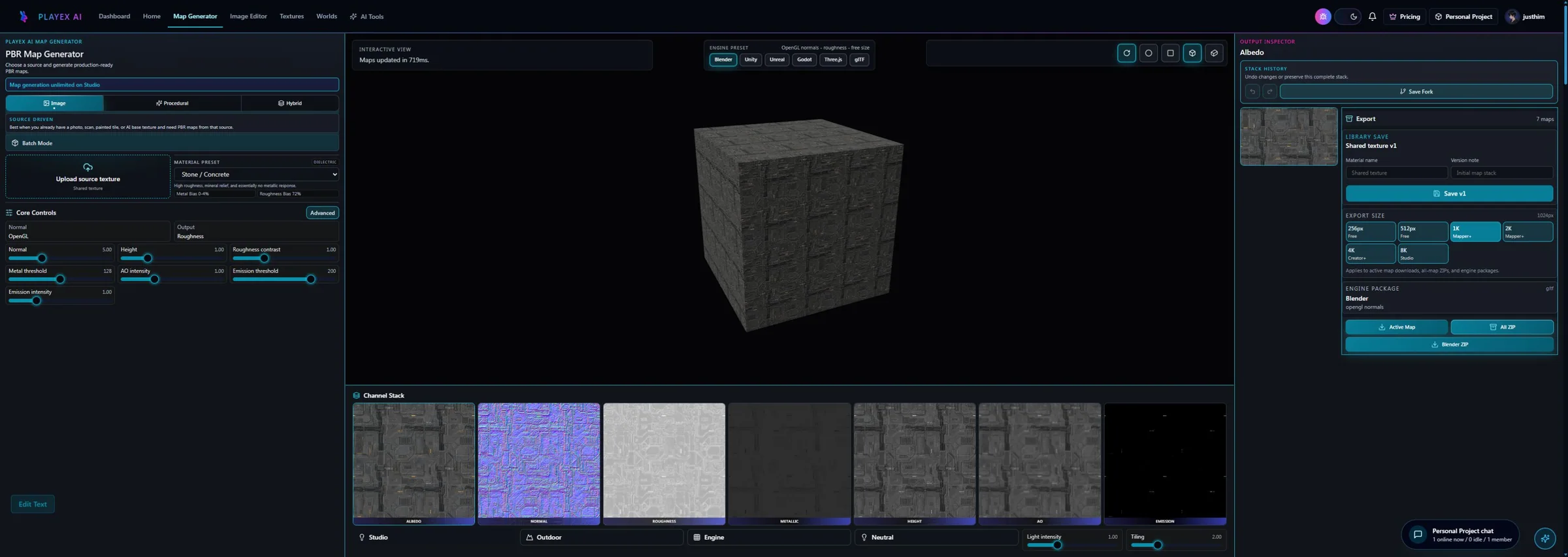
How PLAYTEX AI helps: Image to Texture handles crop, surface extraction, lighting cleanup, and tile creation. Seamless Creator exposes the repeated result and offset boundary as separate review modes. After approval, PBR Map Generator creates the aligned material channels; choosing Blender, Unity, or Unreal and clicking the labeled engine ZIP action once packages the reviewed set.
What you will get
- Turn messy photos into repeatable texture tiles.
- Know when to use region select versus surface extraction.
- Repair seams and preserve believable material wear in the same workflow.
Best use cases
- You photographed a wall, floor, stone, or fabric and need it to tile cleanly.
- You have AI art or concept imagery and want to isolate a surface from it.
- You need a strong base texture before creating a full PBR stack.
Acceptance test
Approve the asset only when these are true
- Perspective is front-facing or intentionally flattened before seamless processing.
- Hard highlights, cast shadows, and large illumination gradients are removed or reduced.
- A 3x3 or 5x5 tile view hides the original image boundary without obvious blur or mirrored structures.
- Wear, cracks, grain, and directional features remain plausible at the intended world scale.
- The exported tile is tested with repeat wrapping and mipmaps in the destination renderer.
A seamless texture guide should start with source reality
Most seamless-texture tutorials focus too early on the seam itself and not enough on the condition of the source image. In real production, the seam is only one symptom. If the photo has perspective distortion, harsh lighting direction, mixed materials, or weak surface coverage, the tile will struggle even if the edges technically repeat. That is why PLAYTEX AI separates the intake workflow into Region Select and Surface Extraction. Before you optimize the tile, you need to decide how the source should be interpreted.
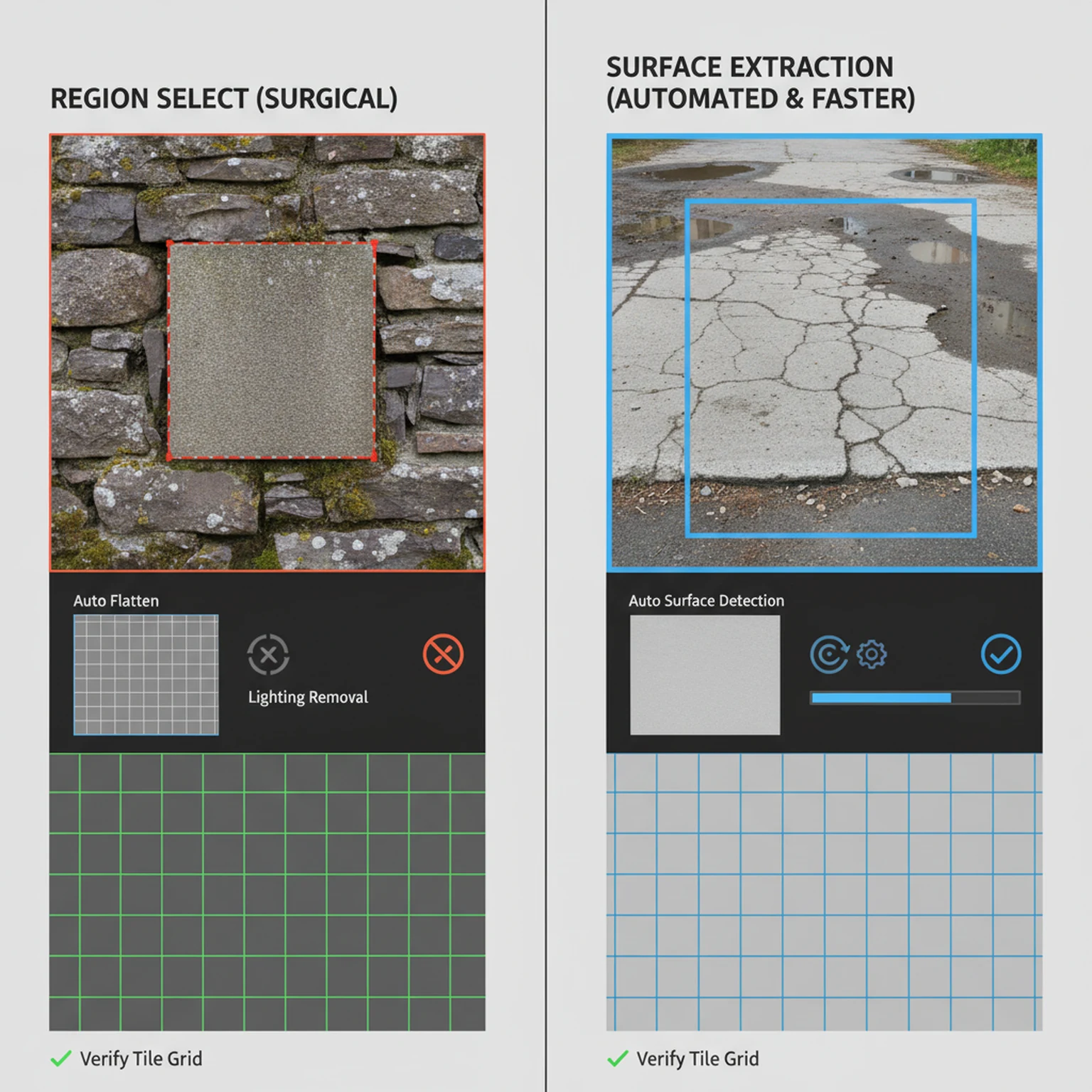
This is where the tool is most helpful to artists working from photos, scans, or concept references. Region Select is the right choice when you already know the exact patch you want and the source is mostly trustworthy. Surface Extraction is the better choice when the image is messy and you need the system to find, flatten, and rebuild a more usable surface area first. In both cases, the goal is the same: produce a clean base texture that can survive repetition without obvious artifacts.
Use Region Select for exact patch control and Surface Extraction for interpretation. Region Select exposes crop, legacy surface type, style, pattern scale, variation, and clean-to-worn. Surface Extraction exposes auto-detect or explicit surface categories, source-style preservation, lighting handling, pattern behavior, game type, variation, and a generated-surface review panel.
Use cleanup decisions to protect material character
A lot of source cleanup is really about deciding what should be preserved and what should be removed. Lighting removal is a good example. For many photographs it is the difference between a usable material source and a misleading one, because strong directional sun or camera flash makes the surface behave like a lit scene instead of material data. At the same time, if you flatten everything too aggressively, you can erase the wear, grain, and surface character that made the source valuable in the first place.
That is why the cleanup stage should be approached deliberately. Crop away conflicting regions. Use the appropriate surface type so the tool understands what kind of material logic to preserve. Keep wear detail when it supports the asset. Reduce it when the image is becoming noisy instead of informative. The best seamless tile usually does not come from maximum processing. It comes from the right amount of correction applied to the right source region.
Readers often want one magic setting that makes any image work. In practice the better skill is knowing what the source still needs. That is the kind of guidance worth putting on a long-form page, because it helps the user make decisions instead of just naming features.
How to think about seamless guidance, strength, and frequency
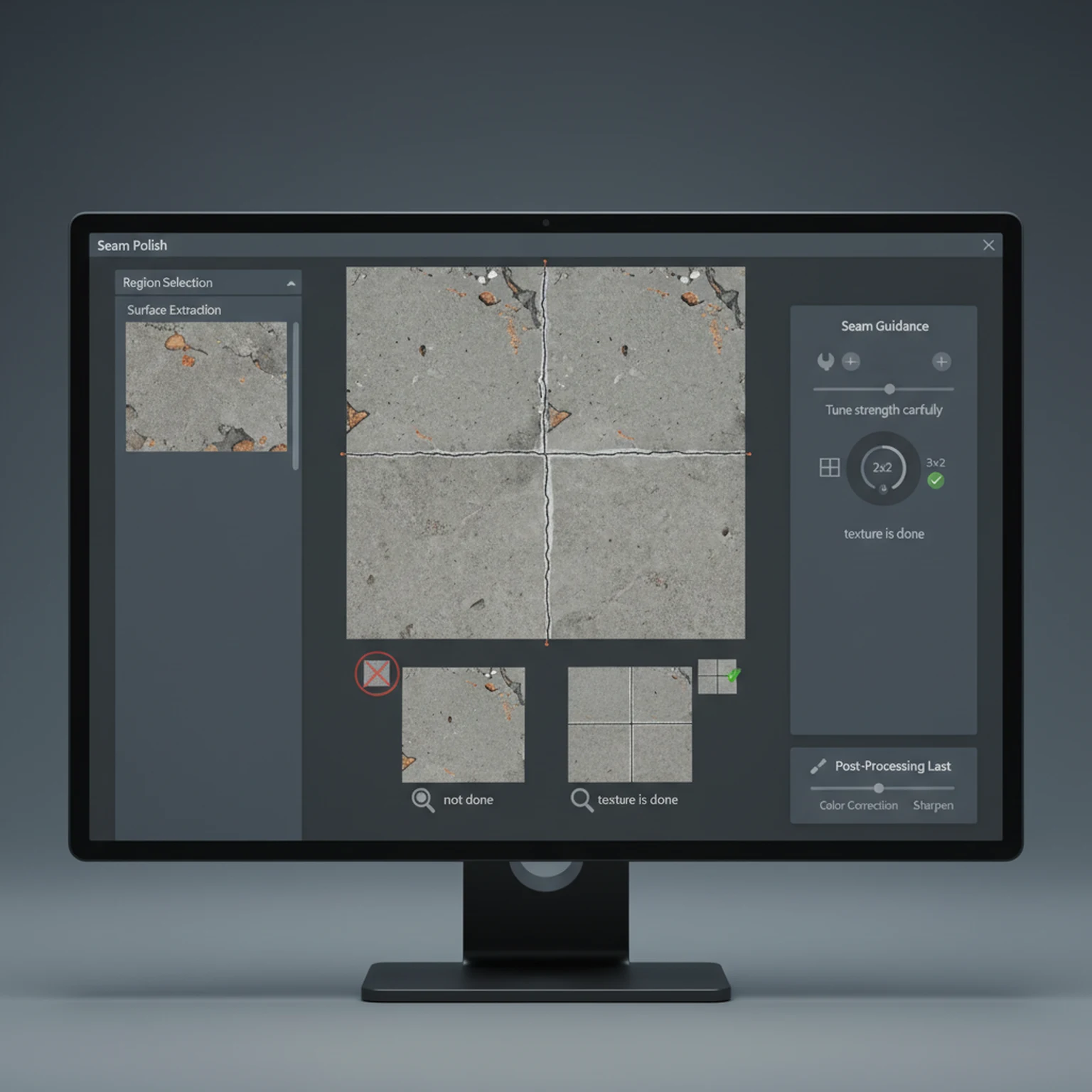
The seamless controls are powerful because they influence how aggressively the system enforces repeat-safe structure. That does not mean stronger is always better. If the strength is too low, edge discontinuities remain obvious when the image tiles. If the strength is too high, the texture can lose the irregularities that made it feel believable in the first place. The same goes for frequency: broad surfaces often need different seam behavior than tight micro-detail materials.
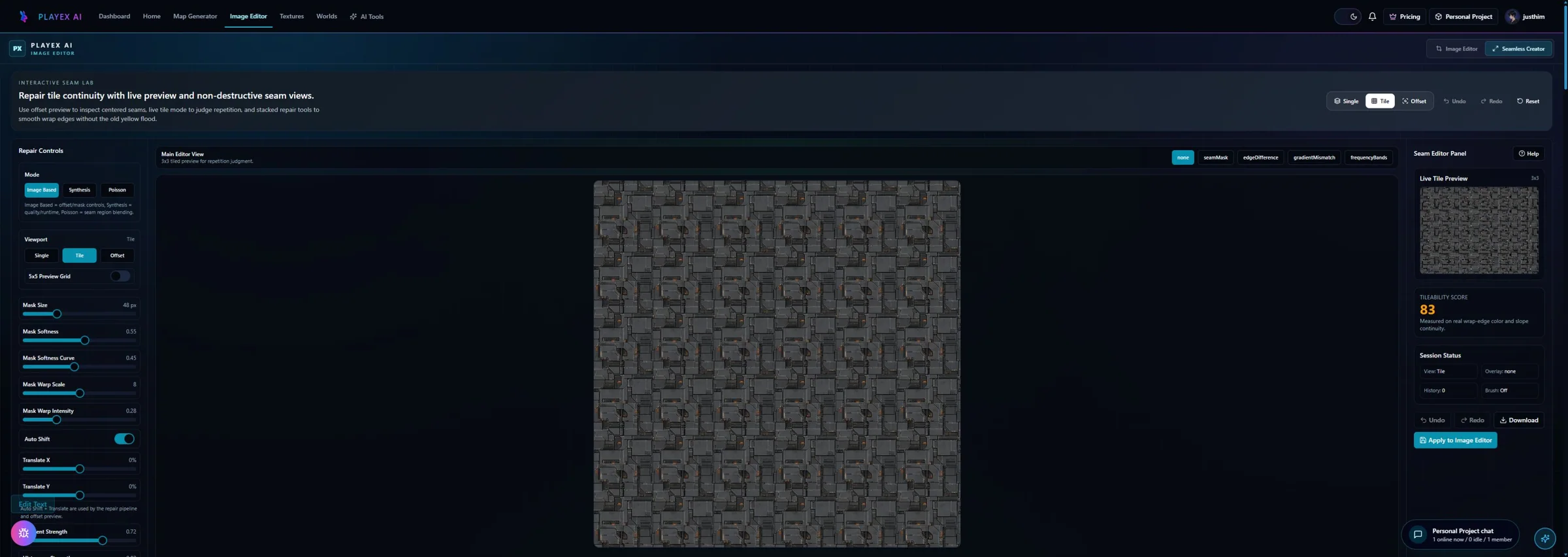
A good working habit is to preview the tile early and often. The single square can look excellent while the 2x2 or 3x3 repeat still reveals a grid. That is why this workflow should always be judged in repeated view, not only in isolated view. If the repeated pattern disappears and the material still retains believable structure, you are in the right range. If the grid is gone but the material now looks synthetic or mushy, you have probably gone too far.
Seed lock also matters more than many users realize. When you find a promising result, locking the seed gives you meaningful comparisons instead of chaotic retries. That is especially useful when you are trying to tune one variable at a time. It turns iteration from guesswork into something closer to controlled testing.
When the seamless tile is ready to become a real material
The final goal of this workflow is not just to produce a tileable square. The goal is to produce a base texture that is strong enough to move into PBR map generation. Once the tile is clean, believable, and stable across repetition, the next useful move is often to open PBR Map Generator and build the full material stack. That is where the seamless texture becomes a production asset rather than a cleaned-up reference.
This is also where PLAYTEX AI has a more coherent story than many isolated texture tools. The same platform that helps turn a photo or scan into a seamless base can also help convert that base into albedo, normal, roughness, metallic, AO, height, and emission outputs, then package the result for engine-facing workflows. That sequence is important because it matches the way artists actually work: source intake first, material conversion second, engine handoff later.
Use the output actions deliberately. Download when you only need the texture file, Save to Library when the result should be reusable, and Use in Map Generator when the tile is ready to become a full PBR material. The right next step depends on whether the asset is finished as a base texture or only ready for technical map generation.
Settings Reference
Region Select workflow controls
Use these when you want tight control over the patch being reimagined.
- Crop Area: Defines the exact part of the source image used as the material seed. Crop tighter when the source contains multiple conflicting materials or perspective noise.
- Surface Type: Tells the tool whether the selected patch behaves more like wall, floor, metal, fabric, or ground. Set it to match the dominant material so the result keeps the right surface logic.
- Pattern Scale and Variation: Pattern scale controls repetition size while variation controls how much the generator diverges from the source. Use low variation for faithful cleanup and higher variation when the original source is weak but directionally useful.
- Clean to Worn and Style: Lets you shift the finish from cleaner surfaces to more aged or stylized outputs. Use it when the source is technically useful but the mood is too fresh, dirty, or generic for the project.
Surface Extraction workflow controls
These controls are optimized for automatic surface finding and flattening.
- Surface Type: Targets auto-detect, floor, wall, ceiling, countertop/tabletop, exterior surface, ground/terrain, fabric/carpet, or generic surface behavior. Use auto-detect for mixed references and explicit types when you already know the material category.
- Output Resolution: Exports the extracted tile at 512, 1K, 2K, native source size, or the power-of-two 4096 × 4096 4K standard. Use 512 for previews, 1K or 2K for most game assets, and 4K only when close-up screen coverage justifies it. Sizes above 512 require a subscription.
- Lighting Removal: Removes baked directional light so the tile behaves more like raw material data. Keep it on for photographs with strong sun, shadows, or highlight streaks.
- Preserve Wear Detail: Keeps scratches, chips, grain, and surface character during flattening. Turn it up for weathered materials and reduce it if the output becomes busy or noisy.
- Pattern Mode and Game Type: Pattern mode controls whether the tile feels structured or organic, while game type shifts it toward platform-specific style expectations. Use structured for man-made surfaces and organic for soil, stone, bark, or naturally uneven materials.
- Match Source Style: Prioritizes the source image rendering style before secondary stylization is applied. Keep it on when the source already has the correct visual language, and turn it down when the source is only a rough material reference.
Seamless engine controls
These settings are the difference between a square image and a tile-safe production texture.
- Seamless Engine Enabled: Turns repeat-safe guidance on or off for the texture synthesis stage. Leave it on for almost all texture-generation use cases.
- Strength: Defines how strongly seam guidance shapes the result. Raise it when you still see boundary discontinuities; lower it when the texture starts losing natural structure.
- Frequency: Controls the scale of the seam guidance pattern. Use lower frequencies for broad materials and higher frequencies when micro-detail continuity matters.
- Seed and Seed Lock: Keeps the guidance pattern consistent across retries when locked. Lock the seed when you are refining around a good result and want comparable variations.
- Pro Seam Leveling: Pushes extra leveling into difficult seam cases. Use it when standard post-processing still leaves visible edge mismatch.
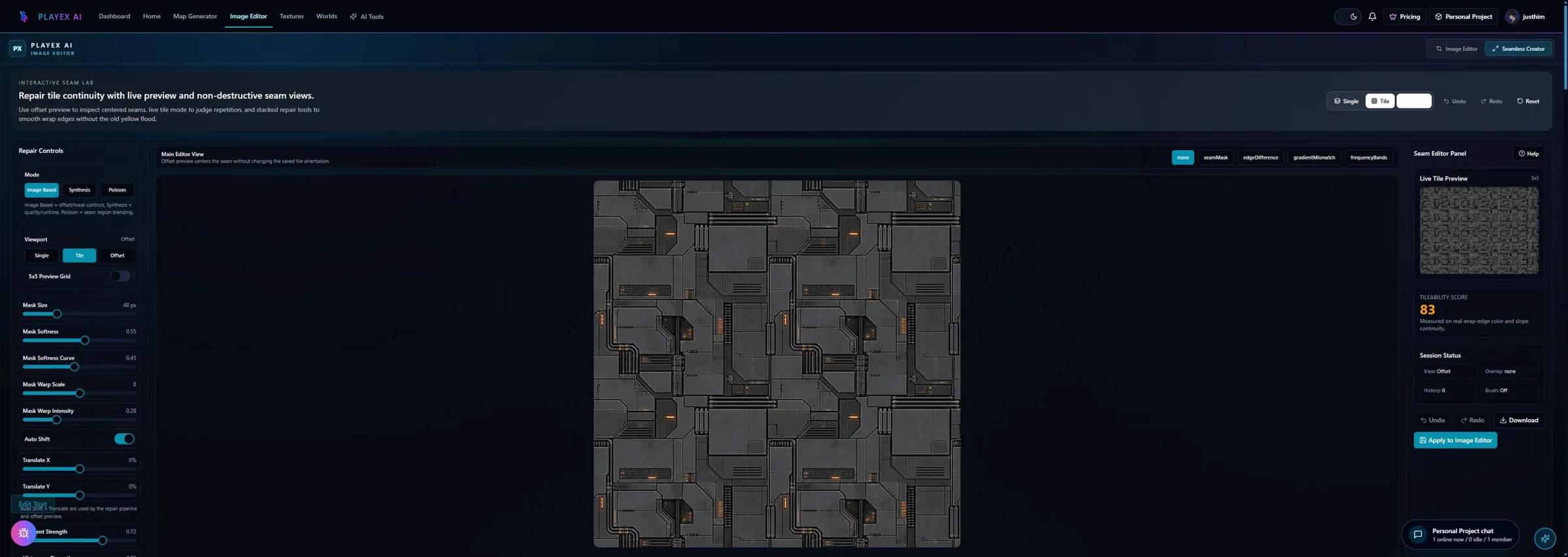
- Seamless Creator Workspace: Provides local seam repair tools including mask, gradient, histogram, blend, graphcut, FFT correction, overlay modes, brush repair, offset view, and 3x3 or 5x5 tile preview. Use it when an output is close but still reveals edge risk, gradient mismatch, or repeated-grid artifacts after generation.
Workflow
Extract a usable surface from a photo, scan, artwork crop, or generated reference; correct the source problems first; then tune seamless reconstruction while protecting the material character.
Step 1: Choose the right tab
Region Select is best when you already know the exact patch you want. Surface Extraction is better when the tool should detect and flatten the best usable surface automatically.
Step 2: Correct the source before stylizing it
Crop out perspective issues, isolate the cleanest region, and remove harsh lighting direction. If the source is physically wrong, extra styling only hides the problem temporarily.
Step 3: Use seamless guidance deliberately
The seamless engine, strength, frequency, and seed let you steer how aggressively the tool enforces repeat-safe structure. Stronger is not always better; use enough to hide seams without flattening the material character.
Step 4: Post-process, then preview the tile
Check the tile preview and seam metrics before exporting. A texture that looks good as a single square can still fail once repeated.
Common Pitfalls
- Do not feed in heavy perspective and expect the texture to become perfect without cropping or extraction.
- Do not max out seamless strength if the material starts looking artificial.
- Do not ignore lighting removal on real-world photos with harsh sunlight.
How do I convert an image to a seamless texture?
Use a front-facing, evenly lit crop; run the seamless conversion; inspect the offset boundary; then repeat the result at least 3 by 3 and tune until both the edge and the larger pattern disappear.
What images make the best texture sources?
Flat, evenly lit surfaces with consistent scale and no cast shadows, perspective convergence, text, or unique focal objects are the easiest to convert into believable repeating materials.
Why can I still see a grid after the edges match?
The seam may be fixed while an internal landmark still repeats. Remove or vary dominant cracks, bright patches, knots, or objects, then check the texture at a wider repeat count.
Does making a texture seamless reduce quality?
Aggressive blending can soften grain or duplicate structures. Use the lowest blend that hides the boundary, preserve directional features, and compare the processed tile with the original source at 100 percent.
Can I turn the seamless result into PBR maps?
Yes. Once the color source tiles cleanly and is free of unwanted lighting, send it to PBR Map Generator so every derived channel inherits the same aligned repeat.
How do I export the result for Blender, Unity, or Unreal Engine?
After the PBR channels pass review, choose the engine preset and click the labeled engine ZIP action once. The ZIP packages the current texture set and target conventions; it does not perform native engine import or shader wiring.
Can the converted texture also be used as a skybox?
A square repeatable surface is not a complete skybox. Use HDRI Sphere Generator to create a full 2:1 environment, verify the 360-degree seam and horizon, and export the panorama or engine cubemap package separately.
Primary sources
Official specifications and renderer documentation
PLAYTEX AI guidance is paired with official specifications and platform documentation where the handoff depends on an outside convention.
Open the live workflow that this guide is documenting.
PBR Map Generator: Create Normal, Roughness, AO, Height, Metallic, and Emission MapsTurn one viable image or source-guided hybrid setup into a coherent map stack, review every channel as part of one material system, and export for the renderer you actually use.
Image Editor for Textures: Clean, Mask, Make Seamless, and ExportCorrect framing, masks, tone, and local defects in a deliberate order so the next PLAYTEX AI tool receives clean source information instead of having to compensate for preventable problems.
How to Make Game Textures with PLAYTEX AI: Complete WorkflowStart with the asset you actually have, move through only the tools that solve its current problem, and finish with a repeatable material or lighting handoff.