3D texture painting comparison
PLAYTEX AI vs ArmorPaint: Browser momentum or local control?
PLAYTEX AI is a guided browser workspace for source generation, PBR maps, review, versions, and handoff. ArmorPaint is an open-source desktop mesh painter with layers, nodes, GPU baking, path tracing, and increasingly capable local neural nodes.
Short answer: Choose PLAYTEX AI for low-setup material production. Choose ArmorPaint for low-cost, local, open-source painting on meshes—and validate the current release-candidate build against your production hardware and files.
Fact-checked against primary sources. Reviewed by PLAYTEX AI Editorial Team.
Choose PLAYTEX AI when
You want a fast hosted workflow, minimal setup, reusable material versions, and engine packages without learning a mesh-painting application.
Choose ArmorPaint when
You want direct local painting, nodes, bakes, path-traced preview, source access, and the ability to run neural tools on your own GPU.
What the current first-party sources change
Local neural nodes narrow the feature gap
ArmorPaint’s current manual lists local Text to Image, Edit Image, Image to PBR, upscaling, Image to 3D, and console models. Once downloaded, processing can run without an internet connection.
The local workflow has real hardware implications
ArmorPaint recommends at least 6 GB of VRAM for neural nodes; individual models can require from 1 GB to 16 GB. Painting and ray-traced baking also depend heavily on the GPU.
The current download is 1.0 RC1—and still carries a warning
The official download is labeled ArmorPaint 1.0 RC1 at $19 with free updates and source on GitHub. The site still warns users to expect rough edges, so a production team should validate its exact hardware and project path.
PLAYTEX AI vs ArmorPaint decision matrix
“Best fit” means the more direct workflow for this criterion, not a universal quality ranking.
| Decision | PLAYTEX AI | ArmorPaint | Best fit |
|---|---|---|---|
| Fast image → PBR workflow | Guided browser path with review, versions, and packages. | Available through nodes, but model/project and local model setup add technical steps. | Leans PLAYTEX AI |
| Direct mesh painting | Not a full direct-on-model painter. | Core function with brushes, layers, masks, nodes, materials, and instant viewport feedback. | Leans ArmorPaint |
| Local/private processing | Hosted browser workflow; privacy depends on the selected PLAYTEX AI plan and feature. | Desktop app and local neural models can run offline after model download. | Leans ArmorPaint |
| Setup and accessibility | Open the browser, choose a source, and work through guided material controls. | Portable desktop build, GPU dependencies, model downloads, and a more technical release-candidate workflow. | Leans PLAYTEX AI |
| Baking and path tracing | Live material preview and generated channels, not a full mesh-bake tool. | GPU/ray-traced bakes plus a path-traced viewport on supported APIs and hardware. | Leans ArmorPaint |
| Open-source extensibility | Commercial hosted product with defined workflows. | Open-source project with source builds, plugins, node systems, and scriptable extension points. | Leans ArmorPaint |
| Team versions and handoff | Projects, named versions, review, and engine packages stay connected. | Local project and texture files; teams bring their own source control and review system. | Leans PLAYTEX AI |
Interface and output evidence
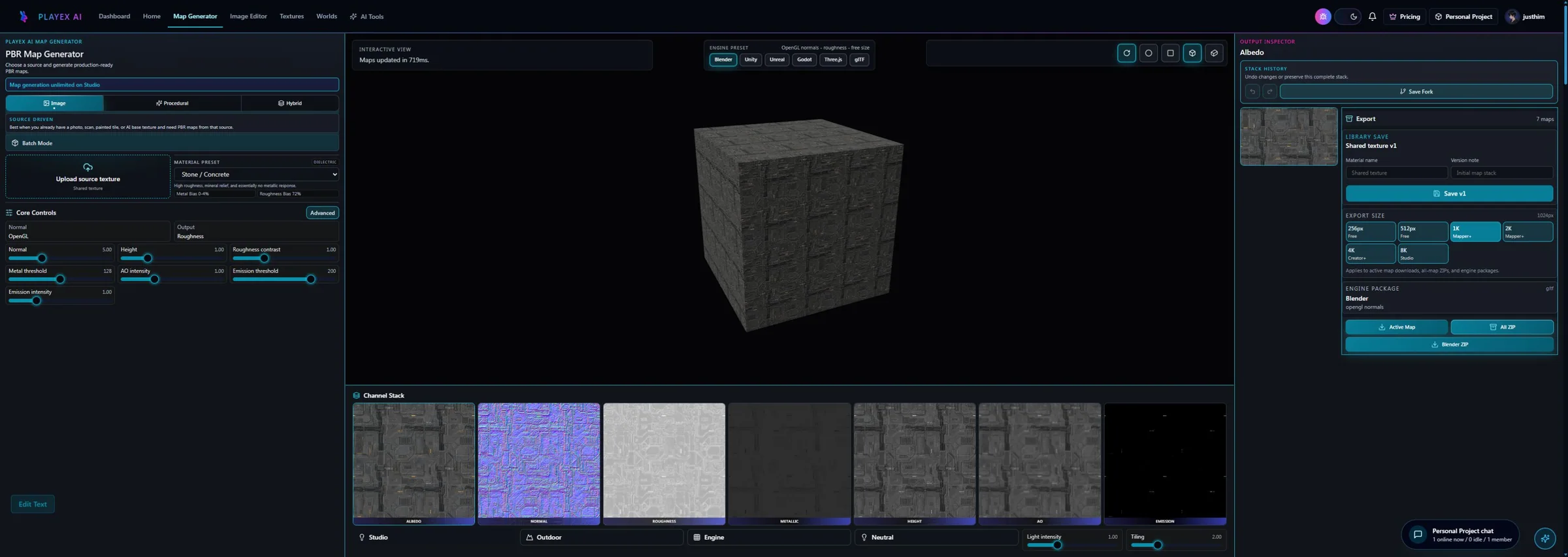
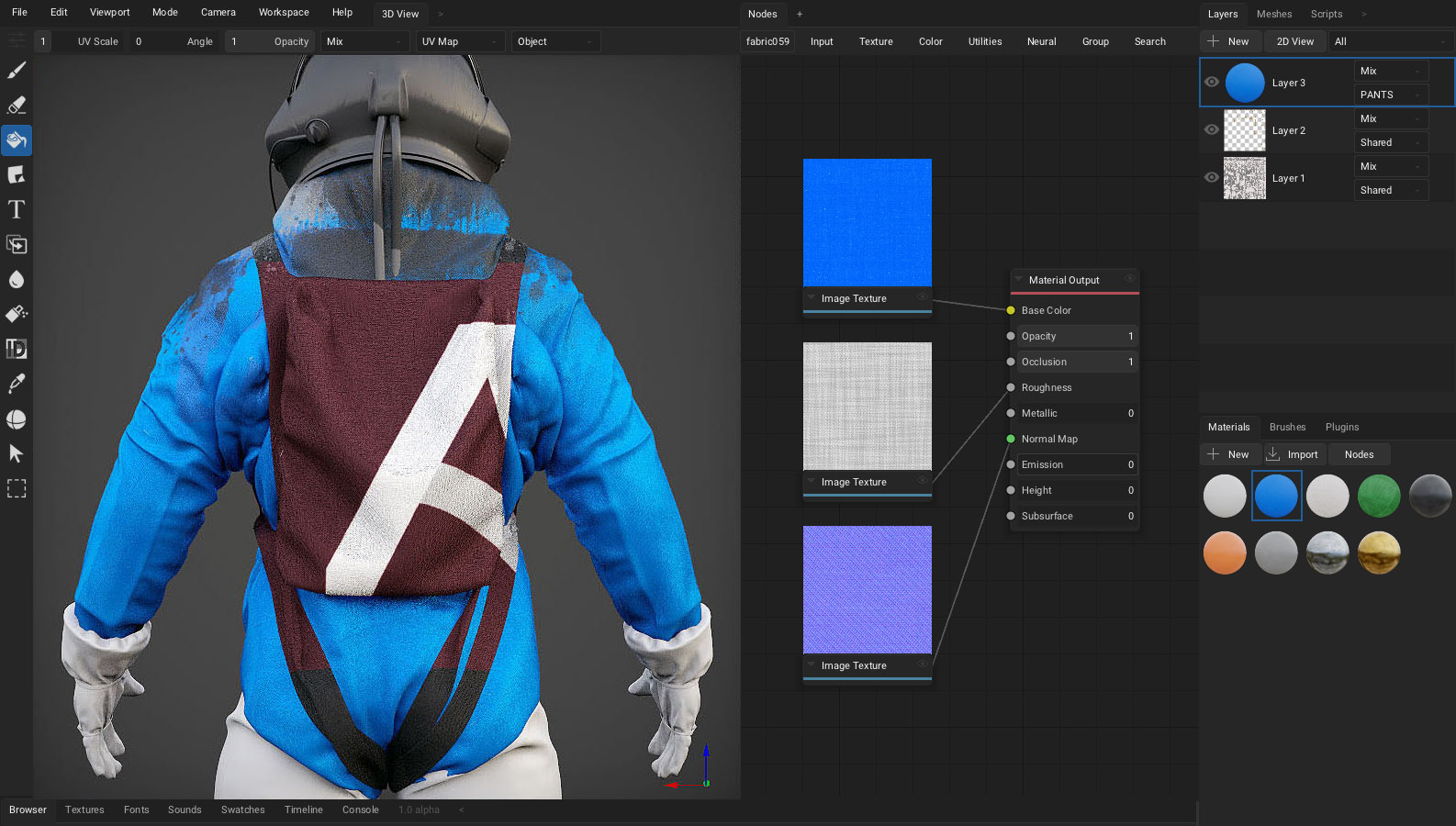
Workflow anatomy
PLAYTEX AI: source to reviewed material
- Start with the material. Upload a photo, scan, painted image, or existing texture—or generate a new source with AI.
- Generate aligned channels. Run deterministic image-processing math—not AI inference—to build normal, roughness, metallic, AO, height, and emission from the same source.
- Inspect, tune, and version. Review channels beside the live material preview, adjust the response, and save a named version.
- Package for the destination. Export individual maps, a full ZIP, or an engine-oriented package for the next production step.
ArmorPaint: 3D texture painting workflow
- Download or build ArmorPaint. Choose the official build or compile the open-source project; confirm GPU/API support.
- Import and validate the mesh. Check UVs, normals, texture size, material setup, and the intended paint workflow.
- Build materials and bakes. Use material nodes, fill layers, local neural nodes, or ray-traced bake nodes as needed.
- Paint and mask in 3D. Apply multi-channel strokes, procedural brushes, masks, and layer effects directly to the model.
- Export and version locally. Write the texture set to disk and manage project history with the surrounding file/source-control system.
How the connected PLAYTEX AI tools hand off the work
Image to Texture Generator
Correct perspective and lighting, isolate a surface, and prove the tile before PBR conversion.
PBR Map Generator
Build and review a seven-map stack from one source with deterministic, non-AI processing and per-channel advanced controls.
Texture Budget & VRAM Analyzer
Estimate decoded GPU memory, mip overhead, compression tradeoffs, and practical savings before delivery.
PBR Engine Converter
Repack maps and naming for Unity URP/HDRP, Unreal, Godot, Blender, Three.js, glTF, and Roblox workflows.
Choose from the production task
| Real task | Start with | Why |
|---|---|---|
| Convert source photos into many PBR material packages | PLAYTEX AI | The repeated work benefits from a focused source-to-stack workflow and saved versions. |
| Paint local-only details on an unreleased character | ArmorPaint | Direct mesh painting and local processing keep the asset on the workstation. |
| Learn a guided material workflow on low-end hardware | PLAYTEX AI | It avoids local neural-model and high-resolution paint GPU requirements. |
| Experiment with open-source nodes and custom extensions | ArmorPaint | Source access and plugin/node systems are central to the value proposition. |
| Create a reusable base and finish a single prop locally | Use both | Build the reusable map stack in PLAYTEX AI, then paint localized details in ArmorPaint. |
When the answer is both
The efficient hybrid is similar to a Painter pipeline, but it keeps the finishing step local and open source.
- Build the shared base in PLAYTEX AI. Generate or convert the source, tune the PBR response, and approve the reusable material version.
- Export the channel set. Choose the target resolution and normal convention before moving files to the desktop project.
- Paint localized detail in ArmorPaint. Apply the material to the mesh and add masks, wear, decals, and bake-aware effects.
- Validate and archive. Export the finished texture set, test it in-engine, and commit the project/output files to local version control.
Limitations and evidence
PLAYTEX AI limitation
PLAYTEX AI is not designed for direct UV-aware painting or local-only neural execution on a workstation GPU.
ArmorPaint limitation
ArmorPaint labels the current download 1.0 RC1 and still warns users to expect rough edges. Teams should test stability, import/export fidelity, GPU support, project compatibility, and the exact neural-model requirements on production hardware.
Primary sources checked August 25, 2026
- ArmorPaint product page — Painting, nodes, baking, path tracing, neural tools, and official imagery.
- ArmorPaint manual — Requirements, neural models, baking, painting, and workflow details.
- ArmorPaint download page — Current 1.0 RC1 build label, price, platforms, warning, and open-source statement.
- ArmorPaint release notes — Version history and current build changes.
- ArmorPaint source repository — Source code and project activity.
PLAYTEX AI vs ArmorPaint questions
Is ArmorPaint a full replacement for PLAYTEX AI?
No. ArmorPaint is a local mesh-painting and node application; PLAYTEX AI is a connected material-generation and handoff workflow. Their overlap is image-to-PBR and material creation, not the entire product model.
Does ArmorPaint run AI locally?
Yes. The current manual lists several downloadable neural models that process on-device and can run without internet after setup. VRAM requirements vary significantly by model.
Which is easier for a beginner?
PLAYTEX AI is generally easier for a beginner whose goal is to turn an image or idea into material maps. ArmorPaint introduces meshes, UVs, layers, nodes, bakes, local models, and release-candidate rough edges.
Can I start in PLAYTEX AI and finish in ArmorPaint?
Yes. Export the approved map stack from PLAYTEX AI, import it as a material in ArmorPaint, then add mesh-specific paint, masks, and bake-driven detail.
Test the comparison with a real asset
Use the same source, destination, and acceptance criteria. Compare iteration time, output coverage, provenance, memory, and engine handoff—not a landing-page promise.
Search every comparison · Browse every PLAYTEX AI tool · Check live pricing