AI 3D creation comparison
PLAYTEX AI vs Meshy AI: Material first or model first?
These products solve different starting problems. PLAYTEX AI creates and packages 2D material systems. Meshy generates, remeshes, textures, rigs, animates, and exports 3D models. The right choice is usually determined before the first prompt: do you need a surface or an object?
Short answer: Choose PLAYTEX AI when the deliverable is a reusable material. Choose Meshy when the deliverable is a generated 3D asset. Use both when a generated model needs a more deliberate, reusable material pipeline.
Fact-checked against primary sources. Reviewed by PLAYTEX AI Editorial Team.
Choose PLAYTEX AI when
You already have geometry—or do not need it—and want textures, PBR channels, material versions, and engine-oriented packages.
Choose Meshy when
You need text-to-3D or image-to-3D generation, remeshing, AI texturing on a model, rigging, animation, or downloadable geometry.
What the current first-party sources change
Meshy is a broad 3D creation suite
Its current feature set includes text-to-3D, image-to-3D, AI texturing, image creation, animation, 3D-to-image, video generation, APIs, remeshing, and DCC bridge plugins.
Texturing is one stage of the model pipeline
In Text to 3D, a user selects a draft, optionally remeshes it, then runs a separate texture step with its own credit cost before downloading.
Upload constraints matter in production
Meshy documents FBX, OBJ, STL, glTF, and GLB uploads up to 100 MB and recommends a single mesh; keeping original textures/UVs requires one material and one non-overlapping UV map after merge.
PLAYTEX AI vs Meshy decision matrix
“Best fit” means the more direct workflow for this criterion, not a universal quality ranking.
| Decision | PLAYTEX AI | Meshy | Best fit |
|---|---|---|---|
| Primary deliverable | Reusable 2D texture sources and PBR material map stacks. | Generated or uploaded 3D models, optionally textured, remeshed, rigged, and animated. | Depends on the task |
| Text/image → 3D geometry | Outside the core comparison workflow. | Core product capability with draft selection and refinement stages. | Leans Meshy |
| Existing image → PBR maps | Direct, deterministic material workflow with channel inspection and engine packaging. | Texture features are model-centered rather than a dedicated flat material handoff system. | Leans PLAYTEX AI |
| Texture a specific uploaded mesh | Creates materials for downstream application; no direct UV-aware model painting. | AI Texturing works on uploaded/generated geometry subject to model and UV requirements. | Leans Meshy |
| Material reuse across many meshes | The surface and map stack remain first-class reusable assets. | The workflow typically treats texture as a stage attached to a model asset. | Leans PLAYTEX AI |
| Rigging and animation | Not a character/animation platform. | Built-in animation and rigging workflow for supported generated assets. | Leans Meshy |
| Pipeline automation | Connected projects and exports; API scope should be evaluated against the specific plan/workflow. | Robust APIs and DCC bridge plugins for Blender, Godot, and Unity are part of the broader platform. | Leans Meshy |
Interface and output evidence
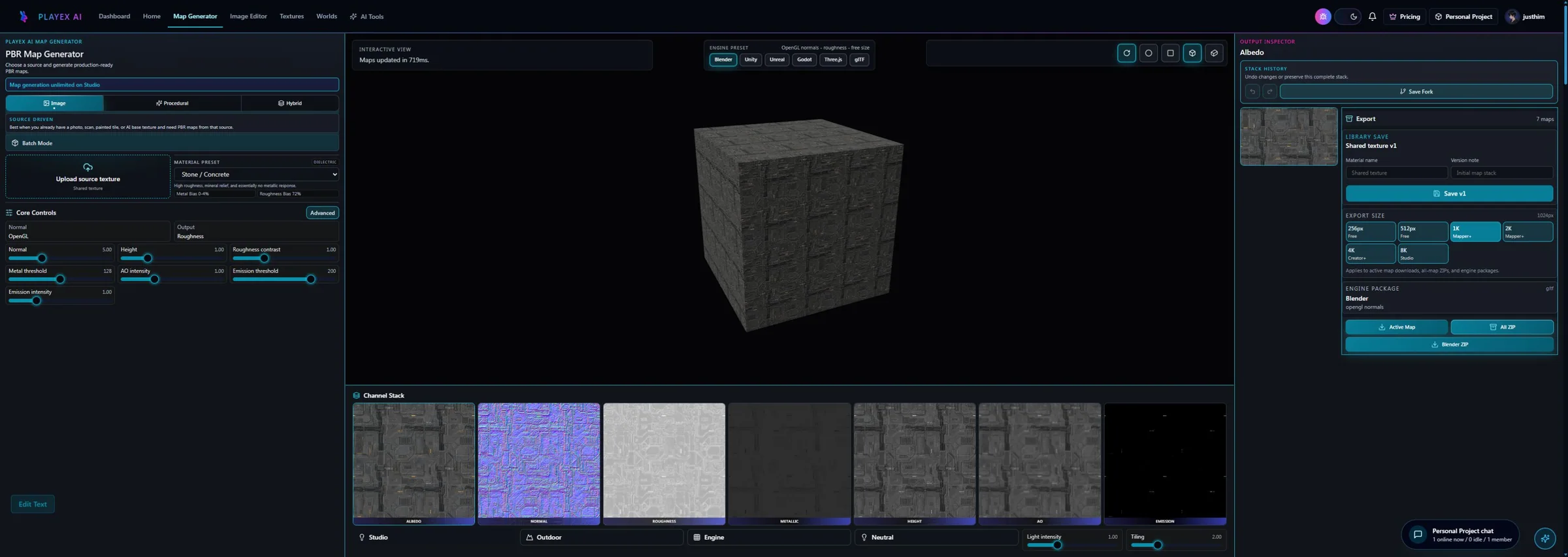
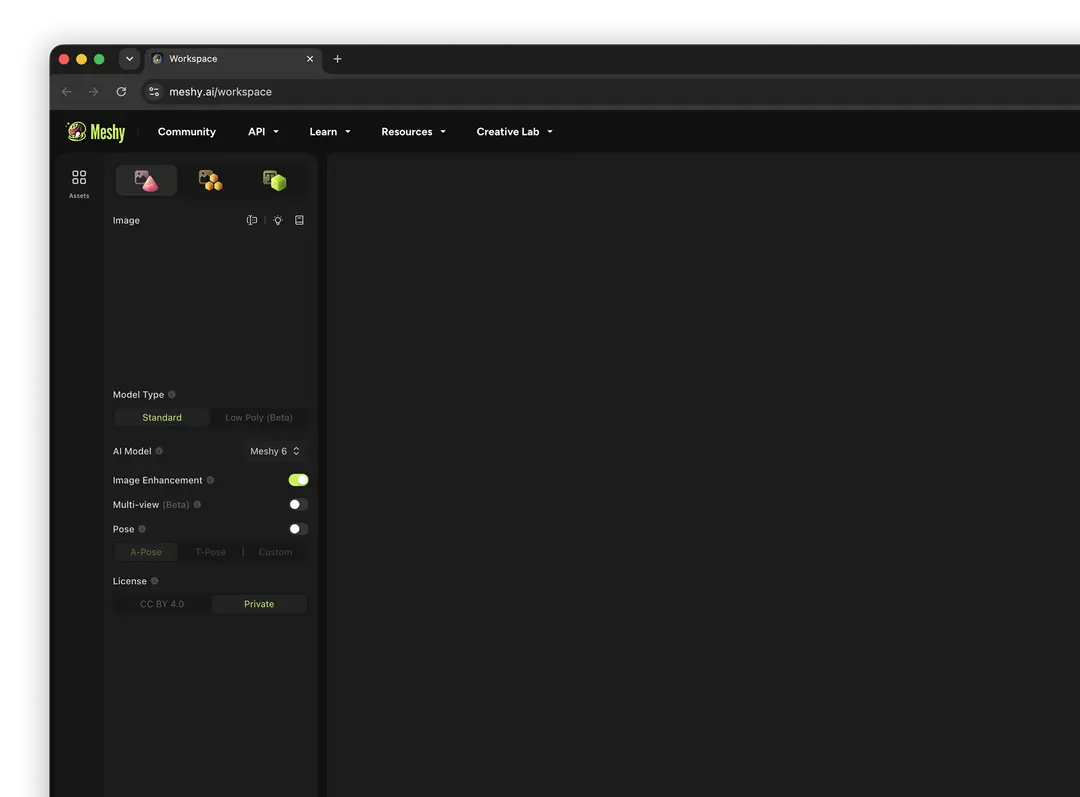
Workflow anatomy
PLAYTEX AI: source to reviewed material
- Start with the material. Upload a photo, scan, painted image, or existing texture—or generate a new source with AI.
- Generate aligned channels. Run deterministic image-processing math—not AI inference—to build normal, roughness, metallic, AO, height, and emission from the same source.
- Inspect, tune, and version. Review channels beside the live material preview, adjust the response, and save a named version.
- Package for the destination. Export individual maps, a full ZIP, or an engine-oriented package for the next production step.
Meshy: AI 3D creation workflow
- Choose text or image input. Describe one object or upload a strong reference image; image input is better for tighter visual control.
- Generate and select a draft. Review the candidate meshes in the viewer and choose the geometry worth refining.
- Remesh or adjust topology. Tune polygon settings and mesh quality for the target use before committing to texture.
- Generate the model texture. Run a separate texturing pass, optionally preserving compatible original texture and UV data.
- Rig, animate, or export. Download a supported format or continue through rigging, animation, or a DCC bridge.
How the connected PLAYTEX AI tools hand off the work
Image to Texture Generator
Correct perspective and lighting, isolate a surface, and prove the tile before PBR conversion.
PBR Map Generator
Build and review a seven-map stack from one source with deterministic, non-AI processing and per-channel advanced controls.
Texture Budget & VRAM Analyzer
Estimate decoded GPU memory, mip overhead, compression tradeoffs, and practical savings before delivery.
PBR Engine Converter
Repack maps and naming for Unity URP/HDRP, Unreal, Godot, Blender, Three.js, glTF, and Roblox workflows.
Choose from the production task
| Real task | Start with | Why |
|---|---|---|
| Generate a game prop mesh from one concept image | Meshy | The missing deliverable is geometry, which is Meshy’s core job. |
| Create tileable stone used across 30 environment meshes | PLAYTEX AI | The reusable material—not a unique generated model—is the production asset. |
| Texture an uploaded one-material hero prop automatically | Meshy | Meshy can apply AI texturing directly to compatible uploaded geometry. |
| Generate calibrated maps from an approved studio albedo | PLAYTEX AI | The source image remains authoritative and the output needs channel-level review and packaging. |
| Prototype a model, then standardize its materials | Use both | Generate geometry in Meshy, then develop or replace reusable surfaces through PLAYTEX AI before engine validation. |
When the answer is both
Use Meshy for geometry acceleration and PLAYTEX AI for material-system discipline. Keeping those responsibilities distinct makes revisions easier.
- Generate the model in Meshy. Select a draft whose silhouette and topology are good enough to continue.
- Prepare the asset. Remesh, fix UVs/material slots in a DCC if needed, and decide which surfaces should be reusable.
- Develop materials in PLAYTEX AI. Create or convert the approved surface references, review the PBR channels, and save versions.
- Assemble in the engine or DCC. Apply the exported packages to the model and validate scale, normals, roughness, and compression.
Limitations and evidence
PLAYTEX AI limitation
PLAYTEX AI does not generate, remesh, rig, or animate complete 3D models in this material comparison workflow.
Meshy limitation
AI-generated geometry and texture still need topology, UV, material-slot, licensing, credit-cost, and engine-readiness checks. A visually convincing preview is not automatically a production-ready asset.
Primary sources checked August 25, 2026
- Meshy feature overview — Current product scope and integrations.
- Meshy Text to 3D workflow — Draft, texture, retry, and download stages.
- Meshy supported file formats — Upload limits, UV requirements, and exports.
- Meshy pricing — Current plan credits, privacy, retries, and download rights.
- Meshy official product page — Official interface rendering and current positioning.
PLAYTEX AI vs Meshy questions
Are PLAYTEX AI and Meshy direct competitors?
Only partly. Both use AI around 3D production, but PLAYTEX AI is material-first and Meshy is model-first. The overlap is texture creation; the primary deliverable is different.
Which should I use if I already have a model?
Use Meshy if you want an AI texture applied directly to compatible geometry. Use PLAYTEX AI if you want reusable surface materials, explicit channel review, versions, and engine-oriented PBR packages that can serve several assets.
Which should I use if I only have a texture photo?
PLAYTEX AI is the more direct choice because no geometry needs to be invented. The workflow can treat the photo as the material source and generate the supporting PBR channels.
Can a Meshy model use PLAYTEX AI materials?
Yes, after the model has usable UVs and material assignments. Export the model, prepare it in a DCC if necessary, then apply PLAYTEX AI map sets in the DCC or target engine.
Test the comparison with a real asset
Use the same source, destination, and acceptance criteria. Compare iteration time, output coverage, provenance, memory, and engine handoff—not a landing-page promise.
Search every comparison · Browse every PLAYTEX AI tool · Check live pricing