Image-to-material maps comparison
PLAYTEX AI vs Materialize: Connected workflow or focused utility?
Both tools can turn a source image into material maps. PLAYTEX AI is a browser production system with source generation, preview, versions, and engine packages. Materialize is a free, open-source Windows utility with direct map-to-map controls, seamless tiling, and lightweight local automation.
Short answer: Choose PLAYTEX AI for an end-to-end material workflow. Choose Materialize for a no-cost Windows utility when you want local manual control and are comfortable managing every file and handoff yourself.
Fact-checked against primary sources. Reviewed by PLAYTEX AI Editorial Team.
Choose PLAYTEX AI when
You want browser access, new source generation, live 3D review, named versions, projects, collaboration, and destination packages.
Choose Materialize when
You want a free local Windows utility for converting and tuning individual maps, making textures seamless, or driving repeated file operations with its XML clipboard commands.
What the current first-party sources change
Materialize is unusually direct
The official feature list documents Diffuse→Height/Metallic/Smoothness, Height→Normal, Normal→Edge/Occlusion/Height, combined conversions, tiling, and project save/load.
It has a small but useful automation hook
Clipboard commands in XML can automate repeated open/save and map-conversion processes—valuable for a local utility, though not equivalent to a hosted API.
Platform and maintenance risk are part of the decision
The official FAQ says there is no macOS or Linux version. Materialize is GPLv3 and its Unity project source is public, but teams own compatibility and maintenance risk.
PLAYTEX AI vs Materialize decision matrix
“Best fit” means the more direct workflow for this criterion, not a universal quality ranking.
| Decision | PLAYTEX AI | Materialize | Best fit |
|---|---|---|---|
| Existing image → maps | Guided full-stack generation with preview, versions, and package export. | Focused conversion controls for height, normal, metallic, smoothness, edge, and occlusion. | Depends on the task |
| New AI texture source | Integrated prompt/image generation before deterministic map creation. | Starts from existing images or maps; no prompt-led source generation. | Leans PLAYTEX AI |
| Individual map control | Material-oriented controls keep related channels aligned and reviewed together. | Direct map-to-map tools expose a compact manual utility workflow. | Leans Materialize |
| Browser/cross-platform access | Modern browser workflow across supported systems. | Official FAQ lists Windows only; no official macOS or Linux version. | Leans PLAYTEX AI |
| Offline and open source | Hosted product with plan-based access and a connected workspace. | Free GPLv3 desktop utility with public Unity project source. | Leans Materialize |
| Versions, teams, and projects | Named versions, projects, review context, and handoff remain attached to the material. | Save/load and local files; teams bring their own organization and source control. | Leans PLAYTEX AI |
| Automation | Connected workflow and broader platform integration. | XML clipboard commands automate local operations, but there is no comparable hosted API/service layer. | Depends on the task |
Interface and output evidence
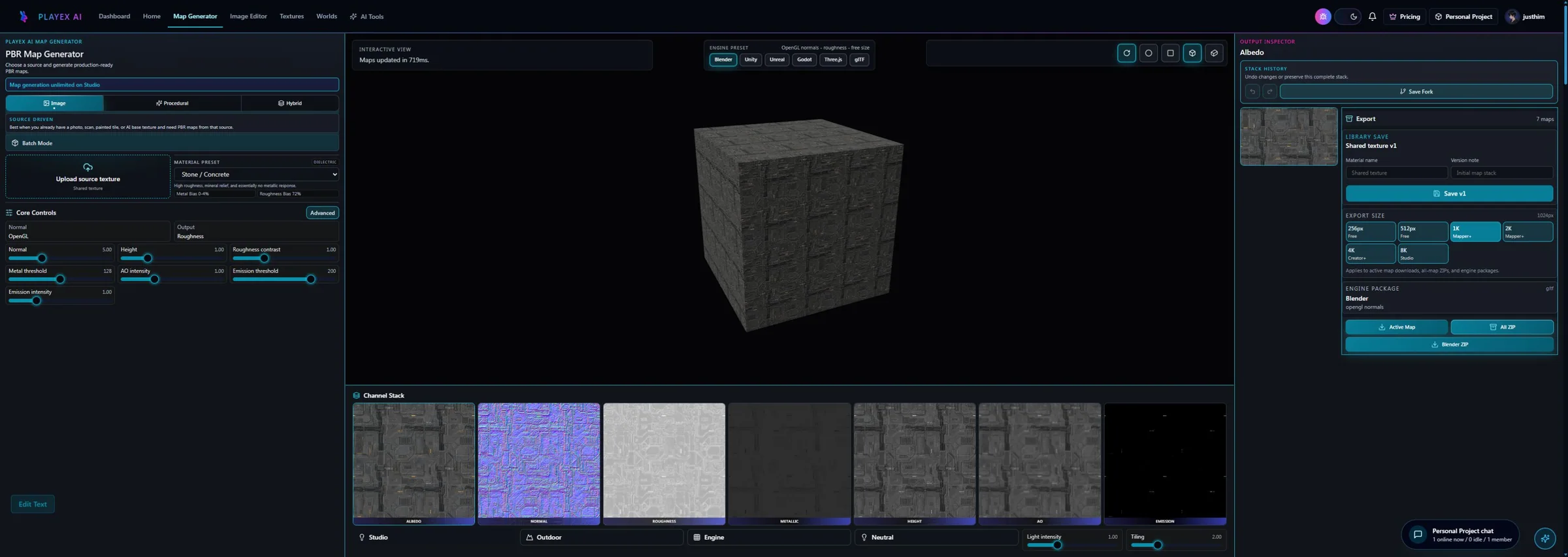
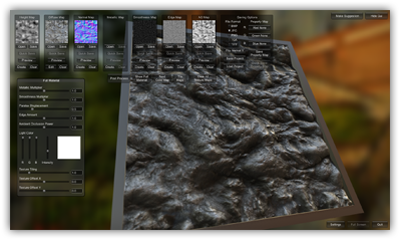
Workflow anatomy
PLAYTEX AI: source to reviewed material
- Start with the material. Upload a photo, scan, painted image, or existing texture—or generate a new source with AI.
- Generate aligned channels. Run deterministic image-processing math—not AI inference—to build normal, roughness, metallic, AO, height, and emission from the same source.
- Inspect, tune, and version. Review channels beside the live material preview, adjust the response, and save a named version.
- Package for the destination. Export individual maps, a full ZIP, or an engine-oriented package for the next production step.
Materialize: Image-to-material maps workflow
- Launch the Windows utility. Extract the application outside protected folders and confirm the required Windows runtime works.
- Load the source or existing maps. Start from one image or bring in channels that need conversion or correction.
- Generate channels in sequence. Derive height, normal, metallic, smoothness, edge, and occlusion using the relevant conversion panels.
- Make the texture seamless. Use the built-in tiling tools and preview to reduce visible repetition boundaries.
- Save maps and assemble downstream. Write the local files, then build and validate the material in the destination DCC or engine.
How the connected PLAYTEX AI tools hand off the work
Image to Texture Generator
Correct perspective and lighting, isolate a surface, and prove the tile before PBR conversion.
PBR Map Generator
Build and review a seven-map stack from one source with deterministic, non-AI processing and per-channel advanced controls.
Texture Budget & VRAM Analyzer
Estimate decoded GPU memory, mip overhead, compression tradeoffs, and practical savings before delivery.
PBR Engine Converter
Repack maps and naming for Unity URP/HDRP, Unreal, Godot, Blender, Three.js, glTF, and Roblox workflows.
Choose from the production task
| Real task | Start with | Why |
|---|---|---|
| Create and manage many browser-based material versions | PLAYTEX AI | Version history, preview, and handoff context are first-class parts of the workflow. |
| Generate a normal map locally on a Windows workstation for free | Materialize | The focused utility solves that job without a subscription or connected service. |
| Generate a new texture concept and all supporting maps | PLAYTEX AI | Source ideation and PBR conversion happen in the same product. |
| Automate a fixed local folder conversion with XML clipboard commands | Materialize | Its lightweight automation can be enough for a stable Windows-only batch process. |
| Choose for a cross-platform team | PLAYTEX AI | Materialize’s official Windows-only position creates immediate access and support friction. |
When the answer is both
A hybrid is useful when a Windows artist wants Materialize’s direct per-map correction while PLAYTEX AI remains the source, review, and version system.
- Create the baseline in PLAYTEX AI. Generate or convert the source and save an approved map-stack version.
- Correct a specific channel locally. Use Materialize for a focused height/normal/occlusion conversion or seam operation.
- Revalidate the full set. Return every edited channel to the same material preview and look for cross-channel mismatch.
- Archive the final package. Record which channel changed, retain the local source file, and export the validated engine package.
Limitations and evidence
PLAYTEX AI limitation
PLAYTEX AI’s connected workflow may be unnecessary for a user who only needs one free local map conversion and is comfortable managing files manually.
Materialize limitation
Materialize is Windows-only according to its FAQ, has sparse official documentation, and leaves collaboration, versioning, engine assembly, and ongoing compatibility to the user.
Primary sources checked August 25, 2026
- Materialize official overview — Conversions, seamless tiling, automation, open source, and production history.
- Materialize FAQ — Windows-only status, GPLv3 license, runtime notes, and source location.
- Materialize downloads — Official binaries and download reference.
- Materialize source repository — Unity project source and project activity.
PLAYTEX AI vs Materialize questions
Is Materialize still useful in 2026?
Yes for a narrow local Windows workflow. It remains a capable free utility for deriving and adjusting maps from images. Its value is highest when the user accepts limited platform support and manages files, versions, and engine assembly independently.
Which is easier for a single normal map?
Materialize can be the simpler no-cost local tool if it is already installed on Windows. PLAYTEX AI becomes more valuable when the task expands to a complete map stack, live review, versions, and delivery.
Does Materialize run on macOS or Linux?
Its official FAQ says there is no Mac or Linux version at this time. Because the project is open source, community ports are possible, but they are not the same as an officially supported release.
Can Materialize and PLAYTEX AI be used together?
Yes. Use PLAYTEX AI for the baseline material and Materialize for a focused local channel correction, then bring the edited channel back into the complete material review before export.
Test the comparison with a real asset
Use the same source, destination, and acceptance criteria. Compare iteration time, output coverage, provenance, memory, and engine handoff—not a landing-page promise.
Search every comparison · Browse every PLAYTEX AI tool · Check live pricing