Formats and Delivery
PNG vs JPEG vs WebP for Game Textures: Format, Alpha, Artifacts, and Memory
Use PNG for lossless texture data, hard-edged masks, and dependable alpha. Use JPEG only for opaque color textures when block and chroma artifacts pass review. Use WebP for compact delivery when the destination supports its selected lossy or lossless mode. The source extension alone does not state runtime VRAM.
Release notes
What changed?
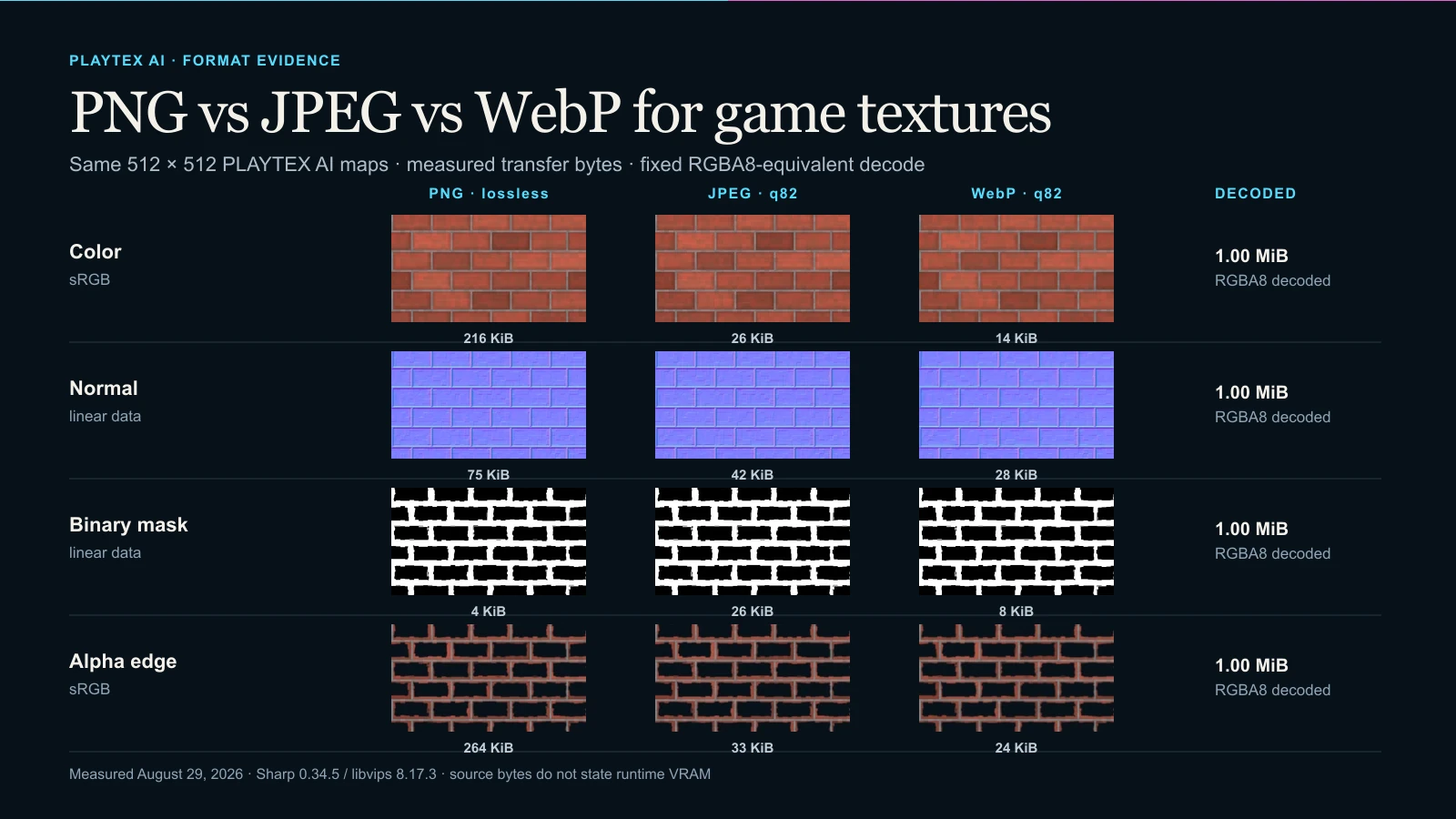
- : Initial measured format study Published reproducible PNG, JPEG q82, lossy WebP q82, and lossless WebP encodes for color, normal, binary-mask, and alpha-edge samples from one PLAYTEX AI material.
Direct answer
Which image format should you use for a game texture?
Choose by map semantics first: preserve values for normals and masks, preserve coverage for alpha, and accept lossy compression only for opaque color after a visual test. Then measure source bytes separately from the decoded RGBA8-equivalent baseline and the engine's target GPU format.
Guide intent versus tool intent: This guide owns format semantics and pipeline decisions. Texture Budget & VRAM Analyzer owns file inspection: it reads representative PNG, JPEG, WebP, and other texture files locally, reports source metadata and RGBA8-equivalent memory, and compares target compression without claiming that source file size equals resident VRAM.
What you will get
- Choose a source or delivery format by color, normal, mask, and alpha semantics instead of one universal winner.
- Separate transfer bytes, decoded RGBA8-equivalent memory, GPU compression, mip overhead, and residency.
- Verify the source format and color-space choice in Unity 6.5 or Unreal Engine 5.8 before shipping.
Best use cases
- Opaque photographic or painterly base color where transfer size matters and mild loss is acceptable.
- Normal, roughness, metallic, AO, height, or packed-channel data where pixel values drive shading.
- Sprites, decals, foliage, UI, and cutouts that require straight alpha or preserved edge RGB.
- Browser-delivered 3D previews that can decode WebP before upload or conversion to an engine-native source format.
Acceptance test
Approve the asset only when these are true
- Color textures use sRGB sampling; normal, roughness, metallic, AO, height, and packed masks use data/linear sampling.
- Lossy JPEG or WebP artifacts were checked at 100% and in a magnified high-frequency region.
- Any required alpha survives the file, the engine importer, the chosen compression target, and the material blend mode.
- Source bytes and decoded RGBA8-equivalent bytes are recorded as different quantities.
- The target build's GPU format, mip policy, streaming, and residency were profiled in the destination—not inferred from the extension.
Why file size does not equal runtime texture memory
PNG, JPEG, and WebP are source or delivery containers. Their compressed byte length matters for storage, downloads, patching, and decode time, but the renderer usually samples a decoded or GPU-compressed texture selected by the build pipeline. Resolution, channel count, GPU block format, mip chain, streaming, and resident mip range determine the runtime cost.
The PLAYTEX AI inspector deliberately reports an RGBA8-equivalent baseline for a consistent comparison. In this 512 × 512 study, every sample is 1,048,576 bytes at the top mip and 1,398,100 bytes for a complete RGBA8 mip chain. A real build may use fewer channels, BC/ASTC/ETC2, virtual texturing, or partial residency, so profile the cooked target.
Why color maps tolerate loss better than normal maps
Opaque albedo often contains correlated color and natural variation, so a carefully chosen lossy encode can be acceptable. Judge it in the shaded material and at representative distance, not only as a flat image. Avoid baking lighting into base color and keep the color texture tagged sRGB at import.
A normal map stores vector components, not display color. In this test, JPEG q82 produced a 5.418° mean angular error and a 24.765° p95 error; lossy WebP q82 produced 5.468° mean and 24.433° p95. Those numbers are source-specific, but they demonstrate why a visually similar purple preview can still change lighting.
Why masks expose ringing and threshold contamination
Metallic, opacity, material-ID, and packed masks can depend on exact endpoints or thresholds. A small halo of intermediate values may create partially metallic pixels, soft cutout edges, or leaking material regions after filtering and mip generation.
For the binary PLAYTEX AI-derived mask, PNG and lossless WebP introduced no new midtones. JPEG q82 introduced intermediate values in 1.926% of tested pixels and reached a maximum channel delta of 115/255. Lossy WebP q82 reduced that to 0.018% in this sample, but lossless remains the safer authoring choice.
Alpha support is more than a yes-or-no column
PNG stores unassociated alpha and can preserve RGB behind transparent pixels. Ordinary JPEG has no alpha channel, so the test flattened the sample over #07111a before encoding. That is permanent: changing the background later cannot recover the original coverage or edge RGB.
WebP supports alpha with lossy or lossless RGB. At alpha-quality 100, this test preserved alpha exactly in both WebP modes. The lossless encoder still normalized RGB under fully transparent pixels, matching Google's documented caveat; that invisible RGB can matter to dilation or future editing even when the current composite looks identical.
What Unity 6.5 and Unreal Engine 5.8 currently document
Unity 6.5 lists JPG and PNG among its readable texture source formats, then applies Texture Import Settings and platform overrides to choose the imported texture. Unreal Engine 5.8 likewise lists JPEG/JPG and PNG, and its Texture Asset Editor exposes sRGB, compression, maximum size, mip, and streaming controls.
Neither current source-format list names WebP. That is a documentation-scoped compatibility result, not a universal claim that no plugin or custom importer can read WebP. Keep WebP for browser or network delivery when useful, but convert or test the exact engine pipeline before committing it as the studio master.
Settings Reference
Encoding controls that change the result
Record these values beside every comparison; a bare extension is not a reproducible setting.
- Lossy quality: Changes quantization and therefore file size and reconstruction error. Test at the viewing distance and on the most artifact-sensitive map, not only the albedo.
- JPEG chroma subsampling: Reduces color resolution, commonly using 4:2:0 for smaller photographic files. Avoid for vector data and colored masks; compare 4:4:4 when color-edge precision matters.
- WebP mode: Selects lossy RGB or lossless coding; alpha can exist in either mode. Use lossless for data or exact masks only when the destination supports WebP and the byte result is actually useful.
- WebP alpha quality: Controls alpha coding separately from lossy RGB in supporting encoders. Keep it high for sprites, decals, foliage, and cutouts, then composite over multiple backgrounds.
- PNG bit depth and color type: Changes channel precision and whether alpha is stored at all. Preserve 16-bit source data only when the next tool and engine path can use it; remove truly unused alpha.
Engine import controls that determine runtime behavior
These choices sit after the source file and can change memory, quality, and sampling independently.
- Texture type / compression preset: Selects normal-aware, mask, color, or other build behavior and target formats. Assign the semantic role before judging memory or artifacts.
- sRGB: Applies the display transfer function for color data. Enable for base/emissive color; disable for normal and scalar/packed data maps.
- Maximum size: Caps imported dimensions per platform and changes every downstream memory figure. Set from texel density and screen coverage, not from the source's maximum available resolution.
- Mipmaps and streaming: Add lower-resolution levels and control which levels may be resident. Use for 3D textures unless a deliberate UI/sprite case says otherwise; profile active residency.
- Alpha handling: Can keep, split, discard, or choose a different compressed target. Remove unused alpha; preserve real coverage and verify the material blend mode.
A format decision that survives engine import
Use PNG for lossless texture data, hard-edged masks, and dependable alpha. Use JPEG only for opaque color textures when block and chroma artifacts pass review. Use WebP for compact delivery when the destination supports its selected lossy or lossless mode. The source extension alone does not state runtime VRAM.
Step 1: Classify the map before choosing a container
Treat base color and emissive color as display color, tangent-space normals and scalar masks as data, and alpha as coverage. A filename cannot replace this semantic classification.
Step 2: Build one coherent source set
Use PBR Map Generator to create aligned color, normal, roughness, metallic, AO, height, and emission maps before comparing delivery formats. A codec test is only meaningful when every variant starts from the same pixels.
Step 3: Encode representative copies and inspect artifacts
Keep the master lossless. Test JPEG or lossy WebP at a named quality and chroma setting, then compare high-frequency edges, normal-vector response, mask thresholds, and alpha composites. Do not generalize one material's byte savings to another.
Step 4: Measure file metadata and decoded cost separately
Open Texture Budget & VRAM Analyzer with representative files or a ZIP. Record source bytes, dimensions, channels, alpha evidence, RGBA8-equivalent memory, mip overhead, and the target compression comparison as separate fields.
Step 5: Convert names, channels, and normal conventions for the engine
Use PBR Engine Converter after the semantic decision. It prepares target naming, channel packing, and normal-map convention; it does not make a lossy source lossless again.
Step 6: Set import type, color space, compression, and mips
In Unity 6.5 or Unreal Engine 5.8, mark color textures as sRGB and normal/mask data appropriately, choose platform compression, and review the imported texture. Their current source-format documentation lists PNG and JPEG but does not list WebP, so treat WebP as a delivery format unless your exact destination path proves support.
Step 7: Run the complete set through preflight
Use Material Preflight to verify map roles, alpha, color-space expectations, normal convention, and engine packaging together. Finish by profiling the representative scene on target hardware.
PNG, JPEG, and WebP are not interchangeable texture sources
| Format / mode | Compression | Alpha | Best fit | Do not assume |
|---|---|---|---|---|
| PNG | Lossless DEFLATE; 1–16-bit samples depending on PNG color type | Optional straight (unassociated) alpha | Master color, normal/data maps, sharp masks, sprites, decals, import sources | A small PNG means a small runtime texture |
| JPEG / JFIF | Usually lossy DCT; this study uses quality 82 with 4:2:0 chroma subsampling | No ordinary alpha channel | Opaque color when artifacts pass at target viewing distance | Photographic suitability makes it safe for normals or masks |
| WebP lossy | VP8-style lossy RGB with optional alpha | Supported; alpha quality is a separate encoder decision | Compact web delivery and opaque/transparent previews when the destination decodes it | Smaller transfer bytes mean lower engine VRAM or universal engine import |
| WebP lossless | Lossless WebP coding; hidden RGB under fully transparent pixels can still be normalized by encoders | Supported | Lossless web delivery when compatibility is proven | It always beats PNG or preserves forensic hidden RGB |
Failure symptoms that point back to the format decision
- Blocky or swimming highlights on a normal-mapped surface: compare the lossless normal and confirm normal-map import plus linear sampling.
- Dirty metallic or opacity boundaries: inspect the mask histogram for intermediate values added by lossy compression.
- Dark, white, or colored fringes on cutouts: verify straight versus premultiplied alpha, edge RGB, the chosen matte, and mip dilation.
- A tiny source file still consumes unexpected memory: inspect dimensions, decoded channels, GPU format, complete mip chain, streaming, and resident levels.
- WebP works in a browser but not in an engine import dialog: convert at the pipeline boundary or provide a tested importer instead of renaming the extension.
- A re-encoded texture degrades every revision: return to the lossless master rather than chaining lossy exports.
Is PNG always best for game textures?
No. PNG is a strong lossless authoring default, especially for normal/data maps, masks, and alpha, but it can transfer more bytes than a reviewed lossy color texture. Engine builds normally convert the source to a target GPU format anyway.
Can JPEG be used for normal maps?
It can be decoded, but it is usually a poor master because DCT quantization and chroma subsampling change vector components. In this PLAYTEX AI sample, JPEG q82 produced 5.418° mean and 24.765° p95 angular error.
Does WebP support transparency?
Yes. WebP supports alpha with lossy or lossless RGB. Record alpha quality separately, test composites, and remember that some lossless encoders can normalize RGB where alpha is exactly zero.
Does a smaller WebP use less VRAM than a larger PNG?
Not necessarily. Smaller encoded bytes reduce transfer or storage. Runtime memory depends on decoded dimensions, channels, GPU compression, mipmaps, streaming, and residency selected by the engine pipeline.
Should color textures use sRGB?
Base-color and ordinary emissive-color textures normally use sRGB sampling. Normal, roughness, metallic, AO, height, opacity data, and packed masks normally use linear/data sampling.
Can Unity 6.5 import WebP textures?
Unity 6.5's current documented readable texture source formats list JPG and PNG but not WebP. A plugin or custom pipeline may add support, so test that exact path; do not infer built-in support from browser compatibility.
Can Unreal Engine 5.8 import WebP textures?
Unreal Engine 5.8's current documented texture source formats list JPEG/JPG and PNG but not WebP. Convert the source or validate a specific importer before choosing WebP as an engine-facing asset.
What is the safest studio workflow?
Keep a lossless master, create named delivery variants, measure representative files, convert maps for the target engine, verify import settings and the cooked GPU format, then profile the scene on representative hardware.
Primary sources
Official specifications and renderer documentation
PLAYTEX AI guidance is paired with official specifications and platform documentation where the handoff depends on an outside convention.
- W3C PNG Specification, Third Edition
- JPEG Committee: JPEG 1 overview and specifications
- Google WebP: An image format for the Web
- Google WebP compression techniques
- Google WebP FAQ: transparent RGB behavior
- Unity 6.5 Manual: Import a texture and supported source formats
- Unity 6.5 Manual: Texture Import Settings
- Unreal Engine 5.8: Textures and supported source formats
- Unreal Engine 5.8: Texture Asset Editor settings
Open the live workflow that this guide is documenting.
PBR Map Generator: Create Normal, Roughness, AO, Height, Metallic, and Emission MapsTurn one viable image or source-guided hybrid setup into a coherent map stack, review every channel as part of one material system, and export for the renderer you actually use.
How to Convert PBR Textures for Unity, Unreal, Godot, Blender, Three.js, and glTFAs of August 2026, PLAYTEX AI can identify a complete PBR texture set, convert roughness and smoothness, repack channels, switch tangent-space normal conventions, apply target-specific naming and color-space guidance, and package optional editor helpers for Unity URP, Unity HDRP, Unreal Engine, Godot 4, Blender, Three.js, and glTF 2.0.
How to Extract Textures from a GLB File: Embedded Images and Material ManifestDrop a binary glTF file into the GLB Texture Extractor, inspect its material bindings, and download the original embedded images with a JSON manifest that records where every texture belongs.
How to Fix Alpha Bleed on Transparent PNG TexturesAs of August 2026, Alpha Bleed Fixer fills hidden RGB around visible texture edges, preserves every alpha byte, previews filtering on light or dark backgrounds, and exports a corrected PNG in the browser.