Texture Cleanup
How to Fix Alpha Bleed on Transparent PNG Textures
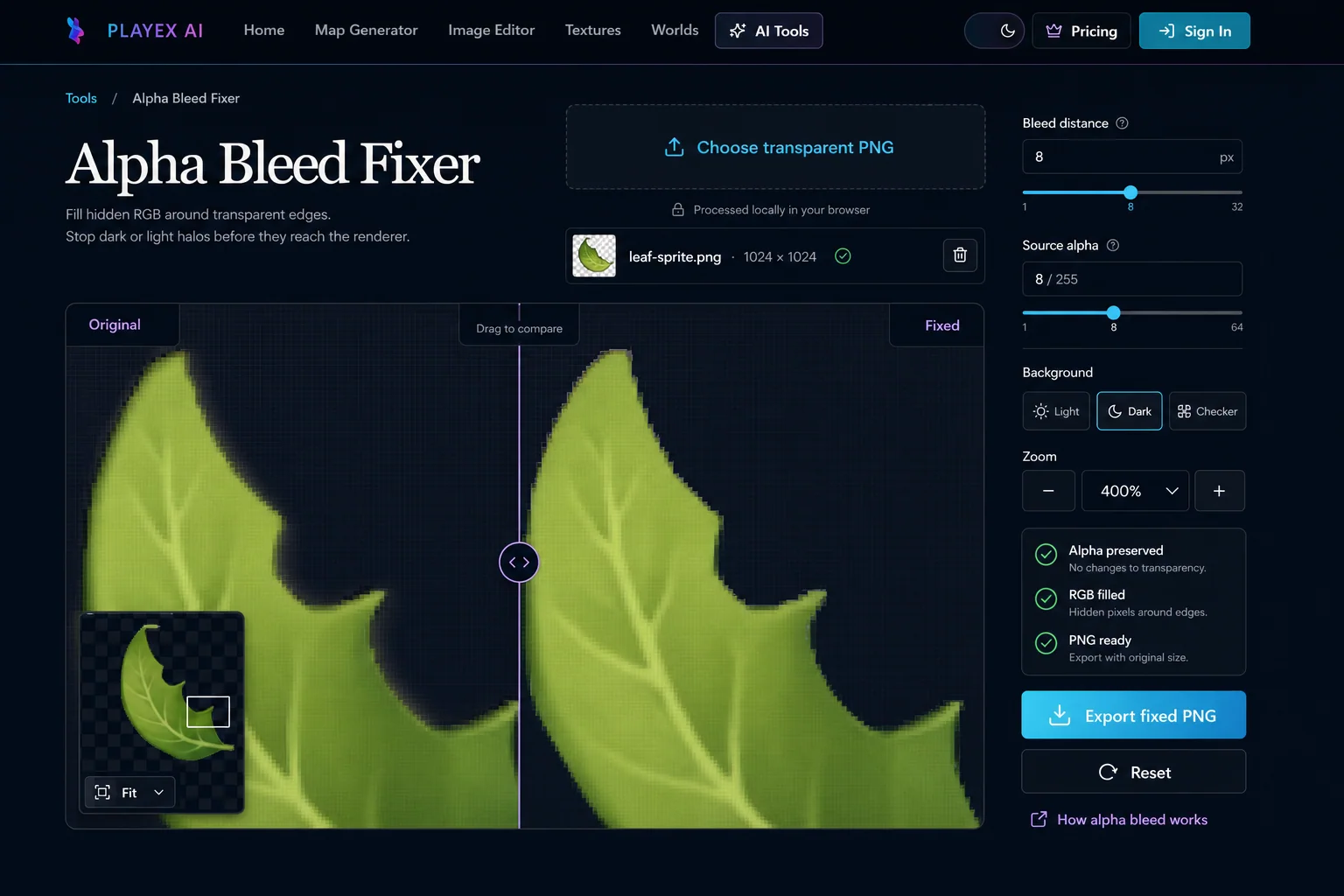
As of August 2026, Alpha Bleed Fixer fills hidden RGB around visible texture edges, preserves every alpha byte, previews filtering on light or dark backgrounds, and exports a corrected PNG in the browser.
Direct answer
How do you fix dark or white halos around a transparent texture?
Use alpha bleed when a transparent color texture shows a dark, pale, or unrelated fringe under linear filtering or mipmaps. Do not use RGB dilation to repair a wrong alpha mask, insufficient atlas spacing, or color contamination inside visible pixels.
How PLAYTEX AI helps: Alpha Bleed Fixer extends nearby visible RGB into transparent texels while preserving every alpha byte. Its comparison backgrounds and zoomed divider show whether filtering still pulls an unrelated matte color into the silhouette.
What you will get
- Remove dark or pale filtering halos without changing transparency.
- Choose a bleed distance and source-alpha threshold from the texture and mip use case.
- Export a PNG whose fully transparent texels retain useful edge RGB.
When does a transparent texture need alpha bleed?
- Sprites and game UI textures that use smooth alpha edges.
- Foliage cards, decals, particles, and VFX sheets viewed against changing backgrounds.
- Texture atlas islands that need matching color padding inside their allocated space.
- WebGL, Three.js, Unity, Unreal, Godot, Roblox, and other filtered real-time textures.
Acceptance test
Approve the asset only when these are true
- The source uses alpha for transparency and contains at least one transparent or semitransparent texel.
- The visible and antialiased edge remains unchanged at the selected source-alpha threshold.
- The filled RGB follows nearby visible color instead of black, white, or an adjacent atlas island.
- The edge stays clean on light, dark, and checkerboard backgrounds at 100% and enlarged zoom.
- The smallest mip level used by the project does not blend neighboring atlas islands.
- The exported PNG is imported once with the intended alpha, filter, wrap, compression, and mip settings.
What is alpha bleed in a transparent PNG?
Alpha bleed is useful RGB stored outside the visible silhouette of a transparent texture. The alpha channel still marks those texels as invisible, but their RGB matches the nearest visible edge instead of defaulting to black, white, or an unrelated matte.
A PNG can store red, green, and blue values even when alpha is zero. Those hidden values do not appear when the texel is viewed alone, but they can contribute when a renderer filters several neighboring texels into one sample.
Why do transparent textures get dark or white halos?
Linear texture filtering computes a weighted value from adjacent texels. The Khronos glTF 2.0 specification describes linear magnification and minification as weighted sums of neighboring texels, so a transparent neighbor with black RGB can pull a visible edge toward black before blending.
A white fringe follows the same mechanism with a white matte. Alpha bleed replaces the hidden matte color with local edge color, which makes the weighted RGB sample agree with the visible silhouette. Unity exposes the same operation through Alpha Is Transparency, which dilates visible color into fully transparent areas to prevent filtering artifacts.
How much padding do mipmaps and texture atlases need?
Mipmaps repeatedly reduce a texture, so a narrow full-resolution gap becomes smaller at each level. A four-pixel gap becomes about two pixels after one half-resolution step and about one pixel after the next. The correct padding therefore depends on the smallest mip that can be sampled, not only the full-size preview.
Texture atlases need two separate protections: empty distance between islands and matching RGB inside that distance. Unity documents a four-pixel default Sprite Atlas gap and exposes larger power-of-two padding values to prevent sprites from bleeding into each other in lower mip levels.
Alpha Bleed Fixer cannot create space that an atlas does not have. If the selected distance reaches a neighboring island, repack the atlas with more padding or bleed each source texture before packing.
When should the source-alpha threshold stay low?
The source-alpha threshold should stay low when semitransparent texels carry intentional color. Hair, smoke, glow, glass, soft particles, and antialiased illustration edges often use low alpha as part of the artwork, so replacing too much RGB can change the filtered color even though alpha remains identical.
A threshold of 8 / 255 protects texels above roughly 3.1 percent alpha. Raise the threshold only when the comparison proves that a matte remains inside lower-alpha texels, then inspect the thinnest and softest parts of the texture on both backgrounds.
Does alpha bleed fix alpha clip and alpha blend materials?
Alpha bleed can help both clipped and blended color textures, but the visible benefit differs. Alpha-blended materials show smooth edge texels directly, while alpha-clipped materials can reveal filtering changes as the sampled alpha crosses the clip threshold at distance or in mipmaps.
Alpha mode remains a shader decision. Edge RGB padding does not select the clip cutoff, change sorting, solve premultiplied-versus-straight blend setup, or repair an incorrect alpha mask.
How do you verify an alpha-bleed export?
A valid alpha-bleed export keeps width, height, and every alpha byte unchanged while modifying RGB only in the selected low-alpha region. Alpha Bleed Fixer encodes RGBA scanlines directly because a premultiplied browser canvas can discard RGB where alpha is zero.
Import the exported PNG into the destination renderer and test the actual filter, wrap, compression, mip, and alpha settings. Rotate or scale the textured object, view it against light and dark scene colors, and inspect the smallest expected screen size before approving the asset.
Alpha bleed settings and what they change
Bleed distance
Bleed distance controls how many eight-connected texel rings receive RGB from the visible edge. Alpha Bleed Fixer supports 1 to 32 pixels in the interface.
- 1 to 3 px: Adds a narrow color guard immediately outside the visible edge. Use it for full-resolution UI or sprites with no mipmaps and generous separation from unrelated pixels.
- 4 to 8 px: Provides enough color padding for common filtered textures and the first few mip levels. Start here for standalone sprites, foliage cards, decals, and moderate-size atlas islands.
- 9 to 32 px: Extends edge RGB farther into transparent space for aggressive minification. Use it only when the texture owns enough empty padding. Stop before the bleed reaches another atlas island or unrelated color region.
Source alpha threshold
Source alpha decides which texels are protected color sources. Alpha Bleed Fixer changes RGB only where alpha is at or below the selected threshold.
- 1 to 8 / 255: Protects almost every visible antialiased texel while replacing fully transparent and nearly transparent RGB. Use this range first. The default 8 / 255 keeps the visible silhouette stable on most exported art.
- 9 to 32 / 255: Allows more low-alpha edge color to be replaced by neighboring visible RGB. Raise the threshold when a faint matte remains inside nearly transparent texels, then inspect fine hair, foliage, and soft VFX edges closely.
- 33 to 64 / 255: Rebuilds a wider portion of the soft edge while leaving alpha unchanged. Use it only for a proven low-alpha color problem. A high value can remove intentional color variation from translucent artwork.
Comparison background and zoom
The comparison preview simulates straight-RGBA interpolation before compositing so hidden RGB affects the visible antialiased edge.
- Light background: Makes black, dark gray, and saturated hidden RGB contamination easier to see. Check it when the texture will appear over sky, paper, snow, light UI, or bright particles.
- Dark background: Makes white matte, pale edge padding, and bright contamination easier to see. Check it when the texture will appear over night scenes, dark UI, shadows, or black compositing plates.
- Checkerboard and 400% zoom: Shows transparency context and enlarges the filtered transition between visible and hidden texels. Use both before export, then drag the divider across a curved or diagonal part of the silhouette.
How to fix alpha bleed without changing transparency
As of August 2026, Alpha Bleed Fixer fills hidden RGB around visible texture edges, preserves every alpha byte, previews filtering on light or dark backgrounds, and exports a corrected PNG in the browser.
Step 1: Upload a transparent texture
Choose a PNG or WebP with an alpha channel. The browser decodes and processes the file on your device.
Step 2: Set the bleed distance
Choose how many transparent texel rings should inherit color from the nearest visible edge. Eight pixels is a practical starting point for many game textures.
Step 3: Protect the antialiased edge
Set the source alpha threshold low enough that visible and antialiased texels remain source colors while only nearly transparent texels are replaced.
Step 4: Compare on light and dark backgrounds
Drag the comparison divider and switch backgrounds. Check both extremes because a fringe can disappear on one background and remain obvious on the other.
Step 5: Export the corrected PNG
Download the original dimensions and alpha values with corrected hidden RGB stored around the edge.
Compare the methods
| Method | Filtered edge result | Best use |
|---|---|---|
| Black or empty transparent RGB | Can create a dark fringe on light backgrounds | Avoid for filtered color textures |
| White transparent RGB | Can create a pale fringe on dark backgrounds | Avoid unless the visible edge is already white |
| Nearest-edge RGB bleed | Keeps filtered edge color close to the visible silhouette | Sprites, decals, UI textures, foliage, and texture atlases |
Common alpha bleed mistakes
- Filling transparency with one flat color instead of extending the local color beside each edge segment.
- Changing alpha during RGB dilation, which changes the silhouette instead of only repairing hidden color.
- Using a high source-alpha threshold on hair, smoke, glow, glass, or soft particles without checking the translucent color transition.
- Bleeding one atlas island into another because the packed islands do not have enough empty texel padding.
- Checking only a checkerboard. A fringe can hide there and remain obvious on a solid light or dark background.
- Assuming edge bleed replaces engine import checks for alpha mode, sRGB, wrap mode, compression, or mip generation.
- Exporting through a premultiplied canvas path that zeros RGB in fully transparent texels.
What is alpha bleed in a transparent texture?
Alpha bleed is RGB color stored in transparent texels around a visible texture edge. Good edge bleed extends the visible edge color outward so bilinear filtering and mipmaps do not pull black, white, or unrelated RGB into the silhouette.
Does Alpha Bleed Fixer change transparency?
No. Alpha Bleed Fixer preserves every alpha byte and changes only RGB values in texels at or below the selected source-alpha threshold.
Why do transparent PNG textures get dark or white halos?
Texture filtering samples neighboring RGBA texels. If transparent neighbors contain black or white RGB, the filtered edge can inherit that color before blending, which creates a halo on a contrasting background.
How much alpha bleed should a texture use?
Start with 4 to 8 pixels for a standalone texture and inspect the smallest mip level used by the project. Atlases and textures with large mip chains may need more padding, but the safe distance depends on texture resolution, UV spacing, filtering, and mip settings.
Are uploaded textures sent to a server?
No. Alpha Bleed Fixer reads, processes, previews, and encodes the texture in the browser. The selected file does not leave the device.
Primary sources
Official specifications and renderer documentation
PLAYTEX AI guidance is paired with official specifications and platform documentation where the handoff depends on an outside convention.
Open the live workflow that this guide is documenting.
Image Editor for Textures: Clean, Mask, Make Seamless, and ExportCorrect framing, masks, tone, and local defects in a deliberate order so the next PLAYTEX AI tool receives clean source information instead of having to compensate for preventable problems.
PBR Map Generator: Create Normal, Roughness, AO, Height, Metallic, and Emission MapsTurn one viable image or source-guided hybrid setup into a coherent map stack, review every channel as part of one material system, and export for the renderer you actually use.
How to Extract Textures from a GLB File: Embedded Images and Material ManifestDrop a binary glTF file into the GLB Texture Extractor, inspect its material bindings, and download the original embedded images with a JSON manifest that records where every texture belongs.
How to Make Game Textures with PLAYTEX AI: Complete WorkflowStart with the asset you actually have, move through only the tools that solve its current problem, and finish with a repeatable material or lighting handoff.