Editing and Cleanup
How to Remove Lighting from a Texture and Create a Cleaner Albedo Map
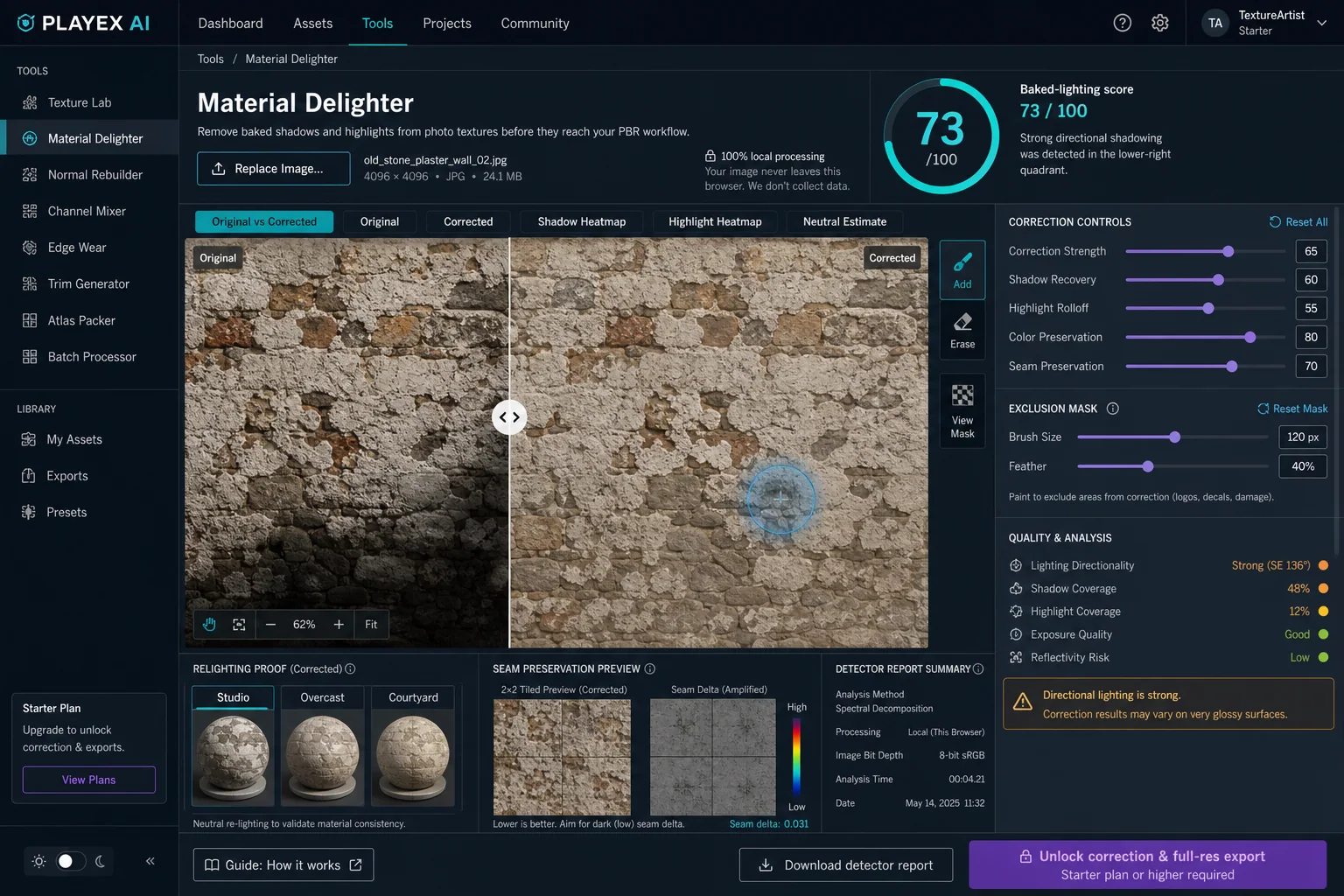
As of August 2026, Material Delighter analyzes one photo or scan for broad shadows, highlights, exposure loss, and directional light, then estimates a more neutral base color for material authoring. The detector is free; editable correction and full-resolution export require Starter or higher.
Direct answer
What does texture delighting remove?
Use texture delighting when a source contains broad lighting that should move with the scene rather than remain painted into base color. Recapture instead when reflections are clipped, black regions contain no detail, or measured albedo accuracy matters more than recovering the existing photo.
How PLAYTEX AI helps: Material Delighter analyzes broad shadows, highlights, exposure loss, and lighting direction locally in the browser, then gives you a corrected base-color estimate, masks, heatmaps, relighting proof, and seam checks. It cannot recover detail that was clipped out of the source.
What you will get
- Tell broad baked illumination from surface variation before correction.
- Use score, heatmaps, relighting, masks, and seam delta as separate review evidence.
- Know when a single-image estimate is useful and when the source should be recaptured.
When texture delighting is worth using
- A phone photo has a broad shadow across wood, stone, brick, fabric, soil, or plaster.
- A photogrammetry texture keeps its original sunlight or sky gradient after baking.
- A scanned diffuse texture produces double shadows or fixed highlights under new scene lighting.
- A tileable source needs illumination cleanup without introducing a new border mismatch.
Acceptance test
Approve the asset only when these are true
- The broad source light no longer dominates the corrected comparison.
- Real paint, grain, stains, decals, cavities, and damage remain recognizable.
- No bright region is being presented as recovered detail when the source was clipped.
- The material reads consistently under Studio, Overcast, and Courtyard neutral light.
- The corrected 2 x 2 repeat has no new bright or dark border band.
- The exported image is treated as base color and reviewed with the rest of the PBR maps.
What is texture delighting?
Texture delighting estimates which image variation came from illumination and which variation belongs to the surface. The desired base-color result keeps diffuse surface color while reducing shadows, directional gradients, and highlights that should be created later by the renderer.
A single RGB image does not uniquely determine reflectance and lighting. Material Delighter therefore reports an estimated neutral base color and shows its evidence. It does not label the result as measured physical albedo.
Why do baked shadows break a PBR material?
Base color is multiplied by the renderer's lighting response. A dark photographed shadow stored in base color stays dark even when a new key light reaches that surface. The scene can then show a fixed source shadow and a new dynamic shadow at the same time.
Baked highlights cause the opposite error. A bright photographed reflection remains visible when the environment rotates, so the highlight no longer follows the view direction, roughness, normal map, or HDRI.
When should you recapture instead of correct?
Recapture a surface when large regions are clipped white, crushed black, wet, metallic, translucent, or mirror-like. Those pixels do not preserve enough diffuse evidence for a dependable single-image repair.
For higher physical accuracy, use diffuse light, RAW exposure, multiple light directions, or cross-polarization. Cross-polarized capture separates much of the specular response before the texture reaches the delighting stage.
How does the browser detector estimate baked lighting?
Material Delighter converts the analysis image to linear color, estimates a multi-scale low-frequency field in log luminance, preserves strong boundaries with a guided filter, and fits the remaining field for direction. Shadow and highlight confidence combine broad-field deviation with local luminance and chroma evidence.
The correction applies the inverse illumination estimate with separate dark and bright limits. Periodic boundary compensation reduces a correction-field mismatch across opposite borders. The detector report includes the measured score, coverage values, source warnings, neutral color estimate, and seam delta.
Material Delighter control reference
Illumination correction controls
These controls change how strongly the estimated lighting field is removed.
- Correction strength: Scales the complete inverse illumination field from the original toward the neutral estimate. Start near 60 to 70. Stop when broad light is reduced but surface regions still retain believable contrast.
- Shadow recovery: Controls how far likely shadow regions are lifted in linear color. Raise it for broad shade with preserved detail. Lower it when dark paint, pores, or cavities begin to look washed out.
- Highlight rolloff: Reduces likely broad highlights and bright lighting peaks. Raise it for matte glare or a broad hotspot. Stop if pale paint or naturally light grains become gray.
- Color preservation: Protects source chroma while luminance is corrected. Keep it high for painted or naturally colorful surfaces. Lower it only when the light has a clear color cast.
Exclusion mask controls
The mask tells the correction where surface appearance should win over the detector.
- Add and Erase: Paints or removes a local 0 to 100 percent protection value. Protect logos, stains, paint changes, emissive marks, deep cavities, or damage that belongs in base color.
- Brush size and feather: Controls the radius and softness of the protected region. Use a large soft brush for broad material zones and a smaller brush for hard-edged decals or repairs.
Validation controls
These views test a different failure mode; one clean view does not replace the others.
- Neutral HDRI relighting proof: Places the corrected preview under three neutral light arrangements. Compare the material under all three and look for a shadow or hotspot that stays fixed to the image.
- Seam preservation: Compensates the correction field across opposite image borders and reports the remaining seam delta. Raise it for a source that already tiles. Keep a 2 x 2 repeat visible while tuning strength.
How to remove baked lighting without flattening the material
As of August 2026, Material Delighter analyzes one photo or scan for broad shadows, highlights, exposure loss, and directional light, then estimates a more neutral base color for material authoring. The detector is free; editable correction and full-resolution export require Starter or higher.
Step 1: Start with the least damaged source
Choose the highest-bit-depth, least-compressed photo available. Prefer even exposure, soft light, and a camera angle close to the surface normal. If the source is clipped or mirror-like, delighting can only estimate the missing diffuse color.
Step 2: Run the free baked-lighting detector
Open Material Delighter and choose the image. Read the 0 to 100 score together with directionality, shadow coverage, highlight coverage, exposure quality, and reflectivity risk. No single metric is enough by itself.
Step 3: Verify the shadow and highlight heatmaps
The shadow heatmap should follow broad lighting, not every dark pore or painted stripe. The highlight heatmap should identify lighting peaks without treating white paint as glare. Use the original and neutral estimate beside the heatmaps before changing strength.
Step 4: Balance recovery and preserve source color
Increase correction strength until the broad light direction stops dominating. Use shadow recovery for dark field variation and highlight rolloff for bright field variation. Keep color preservation high unless the capture has a clear illumination color cast.
Step 5: Paint exclusions over real surface features
Mask logos, stains, paint changes, emissive marks, deep cavities, or deliberate weathering that the detector may confuse with illumination. A soft brush edge avoids a visible correction boundary.
Step 6: Approve relighting and seam behavior separately
A flat comparison can hide a lighting error. Review the corrected texture under Studio, Overcast, and Courtyard neutral light, then inspect the 2 x 2 repeat. A lower seam delta means opposite edges are closer after correction. If a tile boundary remains visible, upload the corrected base color to Seamless Texture Fixer before deriving the other maps.
Step 7: Export base color, then build the PBR set
Export the corrected PNG at the source dimensions on Starter or higher. Treat it as the base-color input, not as a finished material. Continue to PBR Map Generator for normal, roughness, height, metallic, AO, and engine-specific packaging.
Common texture delighting mistakes
- Do not maximize correction strength only to make the image flat.
- Do not treat every dark pixel as shadow; dark pigment and cavities can belong in base color.
- Do not claim a clipped glossy photo has become measured albedo.
- Do not approve the flat preview without neutral relighting.
- Do not ignore the 2 x 2 repeat when the texture will tile.
- Do not derive every PBR channel from the uncorrected source after cleaning base color.
What is the difference between a diffuse texture and an albedo map?
In many production pipelines, diffuse texture is used loosely for visible surface color. Albedo or base color more specifically aims to exclude view-dependent highlights and scene lighting. Material Delighter targets that cleaner base-color role.
Can I remove sunlight from a photogrammetry texture?
Broad sunlight and shade can often be reduced when the pixels retain color detail. Hard clipped highlights, deep black occlusion, and cast shadows with missing information remain limited by the source capture.
Why does the corrected image look flatter?
A base-color texture should lose some lighting-shaped contrast because normal, roughness, geometry, HDRI, and lights recreate that contrast in the scene. If real pigment or structural variation also disappears, reduce strength or add an exclusion mask.
Should ambient occlusion remain in base color?
Keep strong ambient occlusion out of base color when the renderer has a separate AO path. A slight material-darkening cue may remain for art direction, but fixed cavity shadow should not replace the AO map.
What baked-lighting score is too high?
Treat 0 to 35 as low, 36 to 61 as moderate, 62 to 81 as strong, and 82 to 100 as severe. The heatmaps and warnings decide the action; a high score does not prove every dark or bright region is lighting.
Is Material Delighter an AI intrinsic-image model?
No. The browser detector is deterministic and local. It uses multi-scale, edge-aware illumination estimation and explicit correction limits. Research models can predict richer intrinsic layers, but they also introduce learned priors and uncertainty that this detector does not hide.
Primary sources
Official specifications and renderer documentation
PLAYTEX AI guidance is paired with official specifications and platform documentation where the handoff depends on an outside convention.
Open the live workflow that this guide is documenting.
Image to Texture: Convert a Photo into a Seamless TextureExtract a usable surface from a photo, scan, artwork crop, or generated reference; correct the source problems first; then tune seamless reconstruction while protecting the material character.
Image Editor for Textures: Clean, Mask, Make Seamless, and ExportCorrect framing, masks, tone, and local defects in a deliberate order so the next PLAYTEX AI tool receives clean source information instead of having to compensate for preventable problems.
PBR Map Generator: Create Normal, Roughness, AO, Height, Metallic, and Emission MapsTurn one viable image or source-guided hybrid setup into a coherent map stack, review every channel as part of one material system, and export for the renderer you actually use.