HDRI and Environments
Equirectangular vs Cubemap Environments
Equirectangular and cubemap files can describe the same 360-degree environment. Use a 2:1 panorama for single-image authoring, inspection, and renderers that accept latitude-longitude input; use six cubemap faces when the destination asks for directional cube data.
Create an HDRI environment · Convert an existing panorama
Download the projection evidence pack
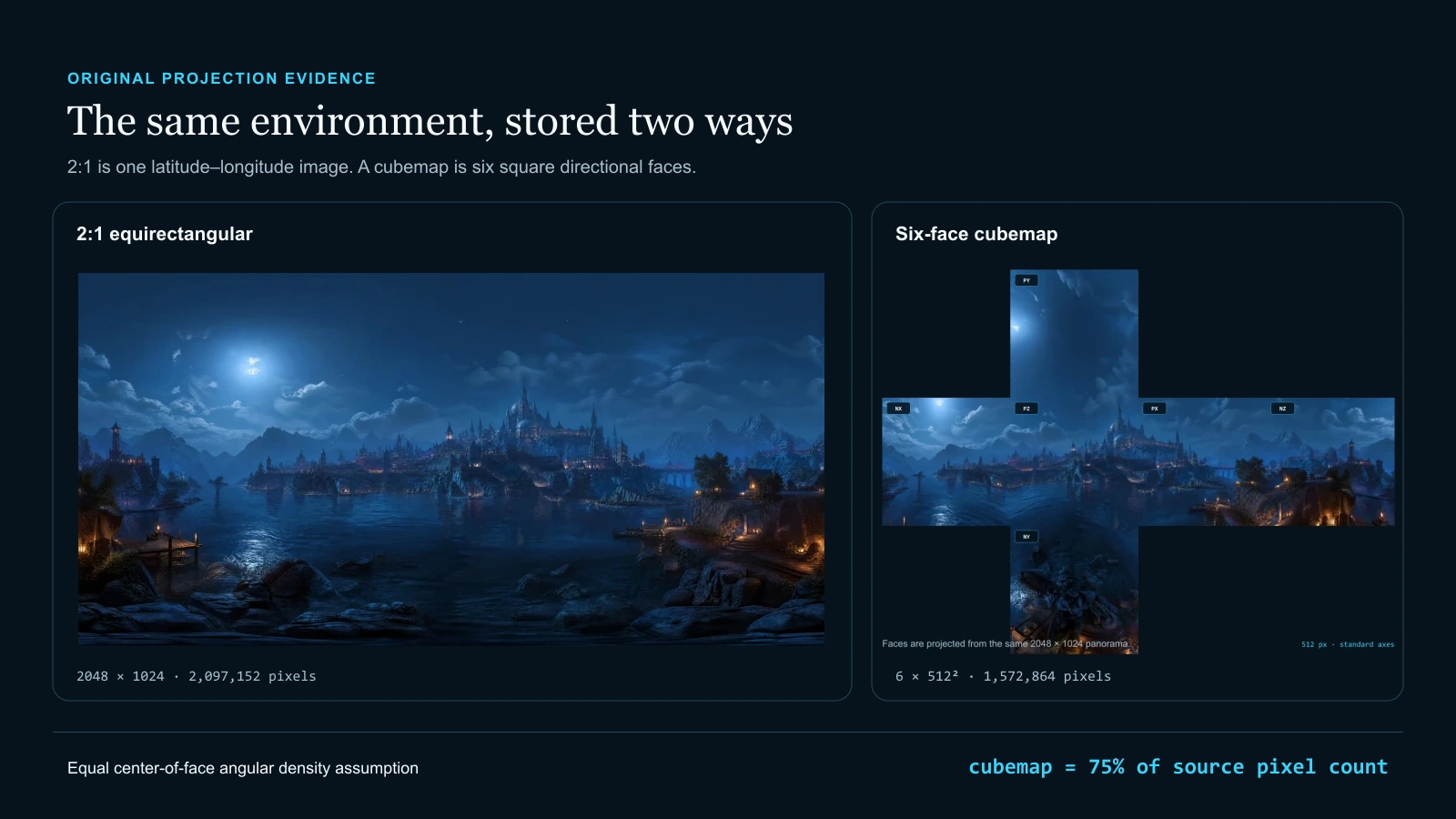
The exact 2048 × 1024 PNG source, six 512 px Three.js-named PNG faces, orientation SVG, README, and manifest used for this comparison.
Direct answer
Should you use equirectangular or cubemap?
Keep the 2:1 equirectangular panorama while you create, edit, archive, or inspect the whole sphere in one image. Export a cubemap when the target API, engine importer, or asset contract requires six square faces. Neither projection makes an image HDR: dynamic range comes from the stored values and file path, while projection only changes where directions land in the pixels.
Owner boundary: This guide owns the projection decision. HDRI Sphere Generator owns creating or uploading a source and running 360 QA. Panorama to Cubemap Converter owns local conversion and target-named ZIP export. Cubemap Face Order and Orientation owns the detailed naming and rotation reference.
What you will get
- Choose a projection from the destination contract instead of treating cubemap as a synonym for HDR.
- Estimate a comparable face size from a 2:1 source and state the density assumption behind the number.
- Inspect the failure areas that move from panorama poles to cubemap edges, corners, order, and orientation.
- Hand off one verified source plus a target-specific pack without creating a competing generator or converter owner.
Where each projection earns its place
- A single 2:1 master panorama for painting, archival review, 360 inspection, or a latitude-longitude environment loader.
- A six-face cube texture for APIs and engine importers that explicitly request positive and negative X, Y, and Z images.
- A target engine package whose filename order, handedness, and pole rotations must be recorded in a manifest.
- A controlled conversion test where the same scene is compared before and after projection without changing source values.
- A runtime workflow that creates prefiltered or mipmapped cube data from an equirectangular master during import.
Acceptance test
Approve the asset only when these are true
- The source is a full 2:1 panorama when the workflow claims complete 360 × 180-degree coverage.
- The left-right wrap, horizon, zenith, nadir, and dominant-light direction are approved in a 360 viewer before conversion.
- The destination contract states equirectangular input, combined cubemap, or six separate faces for the exact engine/version.
- Face size has a stated reason; width ÷ 4 is used only as the matched-center-density starting assumption.
- All six axis directions, loader order, up vectors, handedness, and filenames agree with the target documentation and manifest.
- Face edges and corners remain continuous at the base level and across the target mip/prefilter chain.
- LDR/HDR provenance, value limitations, color space, and tone-mapping expectations remain attached to the asset.
- The converted pack is tested in the destination using a horizon, orientation marker, glossy material, and rough material.
- The best known source is retained so later targets do not require a lossy round trip from cubemap back to panorama.
A flat rectangle cannot distribute spherical area evenly
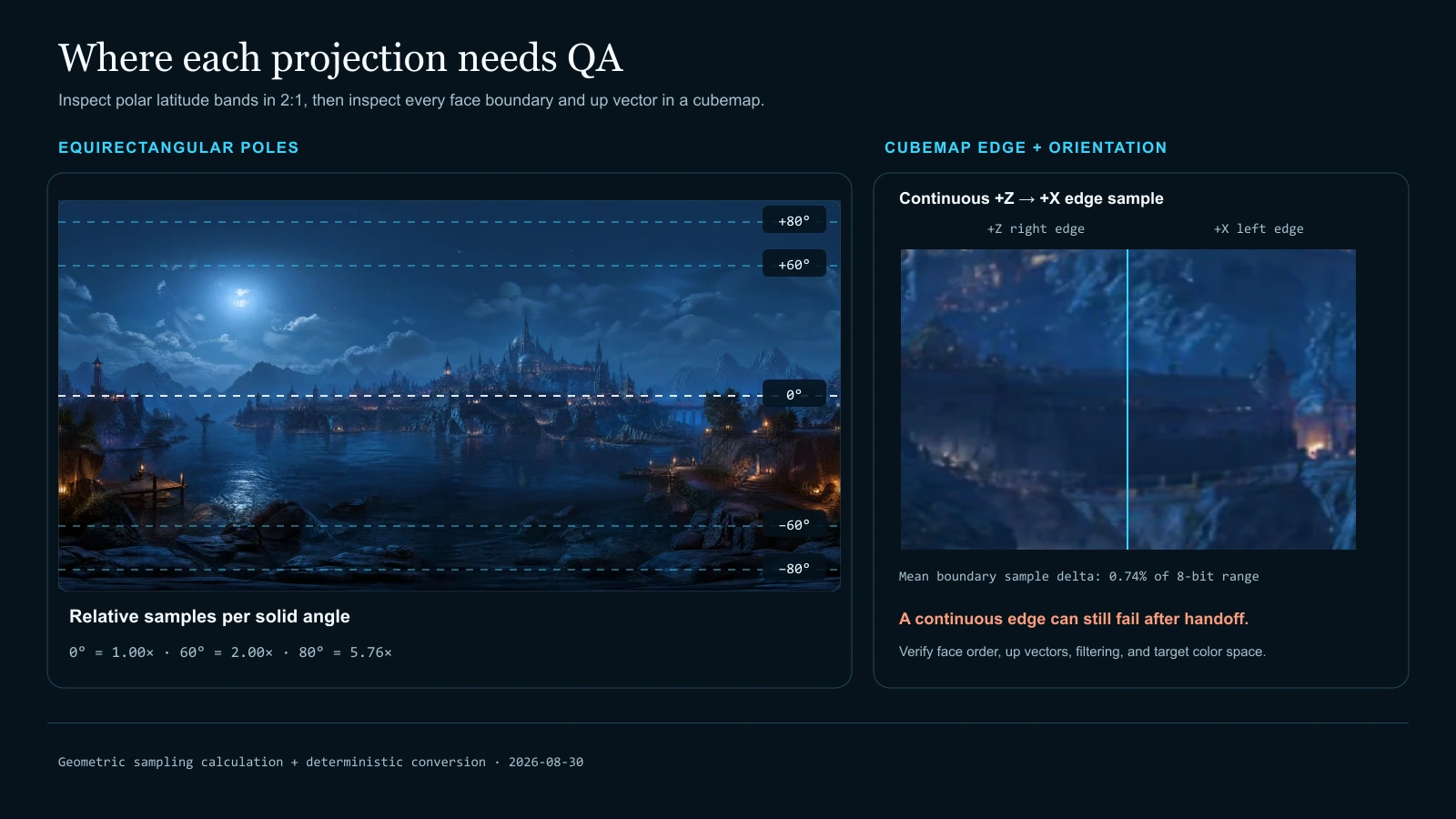
In an equirectangular image, equal vertical pixel steps represent equal latitude steps, but rings of constant latitude shrink toward the poles. Relative samples per unit solid angle therefore scale as 1/cos(latitude): 1.00× at the equator, 2.00× at 60 degrees, and about 5.76× at 80 degrees. The values describe sampling geometry, not extra captured detail.
A cubemap avoids a single polar singularity by projecting onto six planes, but it is not equal-area either. Directional density changes from each face center toward its edges and corners. The practical trade is between a familiar one-image wrap and a multi-face delivery contract with different distortion placement.
Resolution comparisons need an explicit assumption
For a panorama width of 4N, one cube face of N pixels matches horizontal angular samples per degree at the panorama equator and at the center of a 90-degree cube face. The 2:1 panorama is then 4N × 2N, or 8N² pixels, while the cubemap is six N × N images, or 6N² pixels. That is where the 75% evidence figure comes from.
It is a sizing starting point, not a claim of identical reconstruction error everywhere. Pole detail, face-corner density, source sharpness, filtering, roughness convolution, display use, and camera field of view can justify a different size. Record the reason instead of passing along an unexplained “4K” label.
Conversion should happen at a deliberate boundary
Every projection conversion resamples the image. Keep the best known master, convert once for the target, and preserve the target manifest. If the destination can consume equirectangular HDR directly and builds its own filtered cube representation, the engine import may be the correct conversion boundary.
If the destination expects six files, use the existing Panorama to Cubemap Converter and verify the result in-engine. The guide remains the learn/evaluate owner; the converter remains the do-intent owner, and the Cubemap Face Order and Orientation page remains the detailed reference for filenames and rotations.
Projection and dynamic range answer different questions
Equirectangular versus cubemap answers “where are directions stored?” PNG versus Radiance HDR or OpenEXR, plus the actual pixel values, answers “what range and precision can be stored?” An 8-bit cubemap is still LDR; an HDR panorama can remain HDR until a target importer converts it to a cube texture.
PLAYTEX AI can export an estimated Radiance compatibility file from LDR-derived imagery, but that does not turn the source into a calibrated multi-exposure light probe. Carry the limitation through conversion and engine handoff.
The projection decisions worth recording
Source geometry
Establish the directional map before evaluating file format or lighting range.
- 2:1 aspect ratio: Maps 360 degrees of longitude across width and 180 degrees of latitude across height. Reject or crop only when the source contract says it is a full equirectangular sphere; a cropped panoramic photograph may not cover both poles.
- Horizontal seam: Joins the left and right image edges at the ±180-degree meridian. Repair exposure, color, or content discontinuity before conversion. A cubemap export can move the symptom, but cannot repair missing continuity.
- Pole inspection: Reveals the latitude-longitude oversampling and stretching concentrated near ±90 degrees. Review zenith and nadir in 360, especially after generative fill, cloning, denoising, or aggressive downsampling.
Cubemap contract
The six images are useful only when the destination interprets their directions the same way.
- Face size: Sets the square dimensions of each of the six cube images and therefore the base pixel budget before mipmaps. Start from source width ÷ 4 for matched center density, then change it from destination detail, memory, and platform evidence.
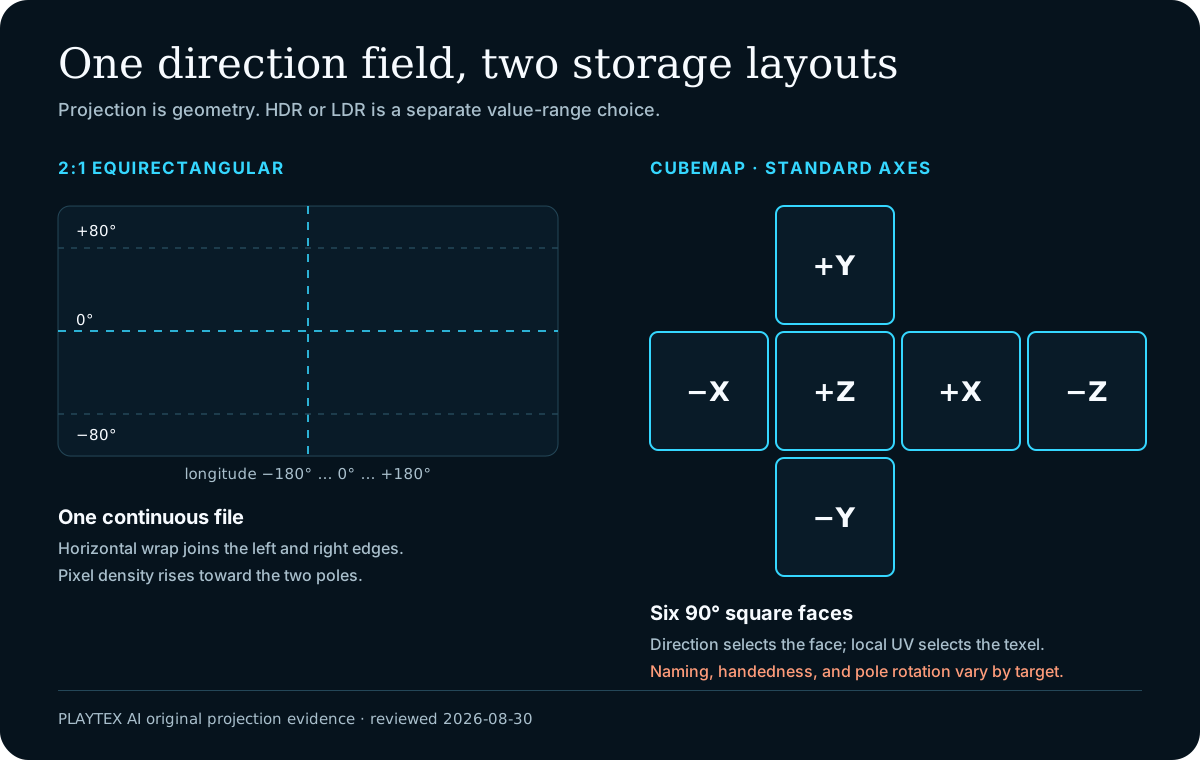
- Face order and filenames: Connects each file to positive or negative X, Y, and Z in the importer or loader. Use the destination convention. Three.js CubeTextureLoader documents px, nx, py, ny, pz, nz order; another engine may expose named slots or import a combined layout.
- Rotation and handedness: Determines which edge is up and whether the world appears mirrored when the six faces surround the camera. Check a labeled orientation grid and the current engine documentation. Do not infer rotation from filenames alone.
Values and filtering
Projection changes lookup geometry; the renderer still needs an honest value and sampling contract.
- LDR or HDR data: Controls the stored light range and precision independently of whether the layout is equirectangular or cubemap. Preserve scene-linear HDR through a supported HDR path. Converting PNG faces into an HDR-capable container cannot reconstruct clipped capture values.
- Mipmaps and prefiltering: Adds filtered representations for distance, roughness, or image-based-lighting lookup. Generate them in the destination pipeline and inspect cross-face filtering. Base-level continuity does not guarantee seamless lower mip levels.
- Color space: Controls how stored values are decoded before background display or lighting calculations. Treat display-color PNGs according to the target color-texture path and HDR environments according to the target linear-light path; verify the exact importer.
Keep one master, then convert once for the destination
Equirectangular and cubemap files can describe the same 360-degree environment. Use a 2:1 panorama for single-image authoring, inspection, and renderers that accept latitude-longitude input; use six cubemap faces when the destination asks for directional cube data.
Step 1: Create or upload the 2:1 source
Start with an equirectangular image whose width is twice its height. Use HDRI Sphere Generator for a new environment or an uploaded panorama, and keep the source provenance and value-range limitation with the asset.
Step 2: Inspect the complete 360-degree field
Orbit through the left-right wrap, level the horizon, inspect both poles, and check dominant-light direction before conversion. The flat 2:1 view is useful for broad edits, but a 360 viewer reveals spherical stretching that the rectangle hides.
Step 3: Read the destination contract
Confirm whether the target accepts an equirectangular texture, creates a cube texture during import, or wants six separate images. Record loader order, axis labels, handedness, up direction, color space, mip generation, and edge filtering for the exact engine version.
Step 4: Choose face size from a stated density target
A practical starting point is face size = panorama width ÷ 4. A 2048 × 1024 source therefore maps to 512 px faces. That matches horizontal samples per degree at the panorama equator and each cube-face center; it does not make either projection uniformly sampled.
Step 5: Convert locally and keep the manifest
Use Panorama to Cubemap Converter for an existing PNG, HDR, or EXR. Export the selected target naming, keep the generated manifest beside the six images, and avoid repeated panorama-to-cube-to-panorama round trips because each resampling can soften detail.
Step 6: Test seams, corners, poles, and orientation in-engine
Use a high-contrast horizon, text or direction marker, one glossy object, and one rough object. Check every face boundary at more than one mip level, then rotate the camera through zenith and nadir. Approval belongs to the destination render, not only the exported thumbnails.
Compare the transport contract, not the scene content
| Decision | Equirectangular (2:1) | Cubemap (six faces) |
|---|---|---|
| Storage | One rectangular latitude-longitude image. | Six equally sized square images or one cube-texture asset. |
| Authoring view | Easy to archive and edit as one file; the flat view stretches the poles. | Harder to paint across boundaries without a cube-aware workflow. |
| Direction lookup | Longitude and latitude map to 2D UV coordinates. | The major direction axis selects a face, then local coordinates select a texel. |
| Distortion concentration | Sampling density rises toward the poles; the rectangle visibly stretches polar regions. | Sampling varies within each face and changes around edges/corners; cube faces are not perfectly equal-area. |
| Continuity risk | One left-right wrap plus two pole neighborhoods. | Twelve face edges, eight corners, and target-specific face orientation. |
| Comparable resolution | For a 4N × 2N source, the base image contains 8N² pixels. | Six N × N faces contain 6N² pixels, or 75% of that source count under the matched-center-density assumption. |
| Runtime contract | Use when the renderer accepts lat-long input or converts it during import. | Use when the renderer/API asks for a cube texture or six named faces. |
| HDR capability | Possible with an HDR-capable file and value path. | Also possible with an HDR-capable cube path; projection alone proves nothing about range. |
| Primary QA | 360 wrap, horizon, poles, orientation, and source value range. | Every face edge/corner, order, rotation, handedness, filtering, and source value range. |
Failure symptoms and the assumption behind them
- The zenith looks pinched or smeared: the flat 2:1 edit hid pole distortion, source detail was insufficient, or downsampling was too aggressive.
- A thin line appears only after cube import: face order, orientation, edge filtering, compression, or mip generation does not match the target.
- Text or a landmark is mirrored: handedness or a positive/negative axis assignment changed during export or import.
- The horizon jumps at one boundary: two adjacent faces are swapped, rotated, or were processed independently after conversion.
- The base cubemap is clean but rough reflections show seams: inspect cross-face mipmap or environment-prefilter generation in the destination.
- The six faces look correct as thumbnails but the sky is upside down: the Y-face up direction or engine coordinate convention was assumed instead of tested.
- Lighting looks flat after converting PNG: projection changed, but missing HDR highlight values were not restored.
- A 4K panorama becomes six 4K faces by default: the face size label was copied without comparing angular density or runtime memory.
Is cubemap better than equirectangular?
Not universally. Equirectangular is convenient as one editable 2:1 master and is accepted directly by many environment loaders. Cubemap matches cube-texture APIs and moves the polar singularity into face edges and corners, but adds order and orientation risk. Choose from the destination contract and QA evidence.
What cubemap face size matches a 4K equirectangular panorama?
A useful starting point is panorama width divided by four, so a 4096 × 2048 panorama maps to 1024 px faces. This matches angular samples per degree at the panorama equator and cube-face centers. It is not an equal-quality guarantee at poles, edges, or corners.
Does converting an equirectangular PNG to cubemap make it HDR?
No. Projection conversion changes direction-to-pixel layout. HDR requires source values and a file/import path that preserve a high dynamic range. Six PNG faces made from an 8-bit PNG remain display-referred LDR evidence.
Why do equirectangular images look stretched at the top and bottom?
Equal-width rows are used for every latitude even though spherical latitude rings shrink toward the poles. Relative samples per solid angle scale as 1/cos(latitude), so the flat image increasingly stretches the polar neighborhoods.
Why do cubemap seams appear if every face came from one panorama?
The base projection can be continuous while the destination introduces a seam through swapped or rotated faces, independent compression, clamp/wrap behavior, non-seamless mip generation, or environment prefiltering. Test multiple mip levels and roughnesses in the target.
What order does Three.js CubeTextureLoader expect?
Current Three.js documentation lists positive X, negative X, positive Y, negative Y, positive Z, negative Z. The evidence ZIP uses px.png, nx.png, py.png, ny.png, pz.png, nz.png in that order and includes a manifest; still verify the installed Three.js version and handedness note.
Can I convert the panorama in this guide?
The guide is the learn/evaluate owner, not an upload tool. Use Panorama to Cubemap Converter for local PNG, HDR, or EXR conversion and target-named ZIP export. Use Cubemap Face Order and Orientation when you need the detailed engine naming matrix.
Primary sources
Official specifications and renderer documentation
PLAYTEX AI guidance is paired with official specifications and platform documentation where the handoff depends on an outside convention.
- Unity 6 cubemap texture import settings: six-frame and latitude-longitude mappings
- Unreal Engine HDRI Backdrop: importing latitude-longitude HDR images into a cubemap asset
- Godot PanoramaSkyMaterial: equirectangular sky maps and HDR formats
- Godot Cubemap: six layers, expected face order, and custom sky shader note
- Three.js CubeTextureLoader: six-file order and handedness convention
- Three.js backgrounds and skyboxes: cube texture and equirectangular examples
- Khronos OpenGL Wiki: cubemap face targets, orientation, and direction-vector lookup
- OpenEXR scene-linear representation: HDR values are a separate storage concern
The exact 2048 × 1024 PNG source, six 512 px Three.js-named PNG faces, orientation SVG, README, and manifest used for this comparison.
Create an HDRI environmentOpen the live workflow that this guide is documenting.
HDRI Generator: Create a 360 Skybox and Environment MapCreate a 2:1 lighting environment, control its horizon, sun, clouds, mood, seams, and yaw, then validate how it lights both rough and reflective materials before export.
HDRI vs Skybox: What Changes Lighting, Reflections, and the Background?A skybox describes how an image is used around a scene. HDRI describes the dynamic range and scene-light data the image can store. One file can serve both roles, but the terms are not interchangeable.
How to Use an HDRI Environment in Three.jsLoad a 2:1 Radiance HDR file with HDRLoader, mark it as equirectangular, give a PMREM-filtered texture to scene.environment, and assign the original panorama to scene.background only when it should be visible. Then set tone mapping and exposure, test rough and reflective materials, and dispose both source and PMREM resources when the environment changes.