image to PBRPBR benchmarktexture map generatorseam measurement
Key Takeaways
This three-crop, 512px default-settings run does not establish that either product is better.
GenPBR permitted anonymous generation and download during the test; this is an access-policy observation, not a texture-quality result.
The border-pixel, metallic, and timing values are descriptive. They do not support seam-quality, map-accuracy, or faster-product conclusions.
PLAYTEX AI produced seven channels and GenPBR produced five derived channels in the tested flows; channel count does not establish map quality.
Every input, result map, setting, checksum, repeat preview, and measurement is downloadable.
Products that were not run under the same input and output contract are not ranked.
Who Informed This
justhim ran three controlled 512×512 crops through the checked-in PLAYTEX AI reference core and the public GenPBR 2.7 anonymous generator, then inspected and measured the unedited outputs.
How It Was Evaluated
Same first-party source photo, fixed 512×512 crops, default controls, disclosed execution surfaces, five measured PLAYTEX AI core runs per crop, two GenPBR determinism reruns, SHA-256 checksums, opposing-edge delta, metallic-map statistics, normal-vector length error, and source-to-height luminance correlation.
Proof And Evidence
Downloadable input-photo set, full raw-result archive, per-case pages, exact settings JSON, measurements JSON/CSV, 3×3 repeat previews, methodology, and SHA-256 manifest at /benchmarks/image-to-pbr/2026-09-03/.
Limits And Caveats
One phone photo and three crops cannot establish a universal ranking. No calibrated height, roughness, AO, or spectral ground truth was available. Defaults were not hand-tuned. PLAYTEX AI and GenPBR timing surfaces and sample counts differ, so they cannot support a faster-product conclusion.
What Changed
September 3, 2026: replaced the feature-only Top 5 list and unsupported PLAYTEX AI “best overall” claim with a hands-on, downloadable two-product evidence package. Removed category-winner language because the recorded diagnostics do not establish texture quality or comparable performance. Untested products remain explicitly not tested.
Answer: this controlled 512×512 run does not establish that either product is better. It publishes raw outputs from three crops at default settings. The border-pixel and encoded-map measurements are descriptive, not texture-quality verdicts, and the timing sets are not comparable. Anonymous access and channel counts describe product scope. Every input, result, setting, checksum, and measurement is available for inspection.
Three controlled crops from one first-party phone photo. The edition is frozen at September 3, 2026; open the benchmark page for the full-resolution files.
Results at a glance
Measured and observed results for the September 3, 2026 edition
Question
PLAYTEX AI
GenPBR 2.7
Supported interpretation
Anonymous 512px generation and download
The Free plan can generate and preview, but the checked-in entitlement contract disables procedural download.
The public 512px generator ran without an account. GenPBR says free outputs are non-commercial and require attribution.
Access-policy difference only; not texture quality
Mean opposing-border pixel delta, five shared maps
17.172%
14.560%
Descriptive statistic; no seam-quality or product verdict
Mean encoded metallic value on photographed wood
19.712%
35.342%
Descriptive statistic; no calibrated accuracy verdict
Observed processing timer
504.127 ms median across 15 core-only samples
466 ms median across three browser result updates
Not comparable; no faster-product conclusion
Output channels at tested defaults
7: albedo, normal, metallic, emission, roughness, height, AO
5 derived maps: normal, metallic, roughness, height, AO
Output-scope difference; channel count is not map quality
Commercial entry listed on the test date
$9/month Starter; 2048px PBR maps and engine-package export in the repository entitlement contract
$9.99/month Starter with commercial rights on the official pricing page
Not like-for-like; price, rights, and bundles differ
The border-pixel statistic reports how different the opposing one-pixel borders are. It does not establish that a texture is tileable, detailed, physically correct, or better. A flat output can record a small delta while discarding useful texture structure.
What exactly was tested?
Tester:justhim. Test date: . Machine: Windows 11 Home build 26200, AMD Ryzen 5 5600X, 31.9 GB RAM, NVIDIA GeForce RTX 5070.
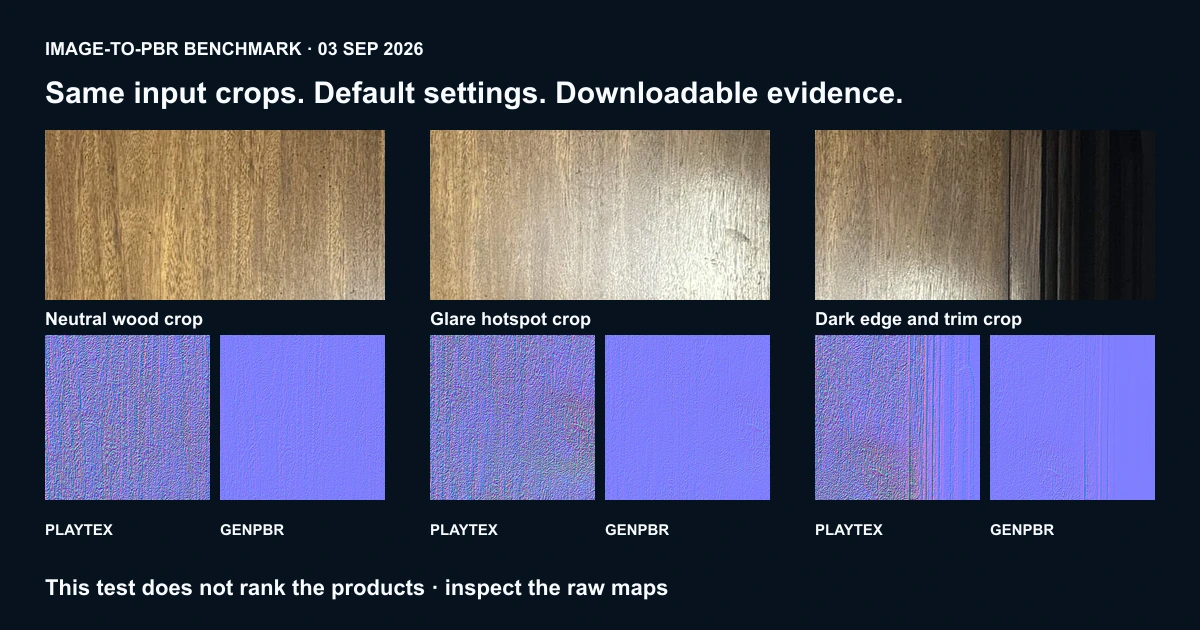
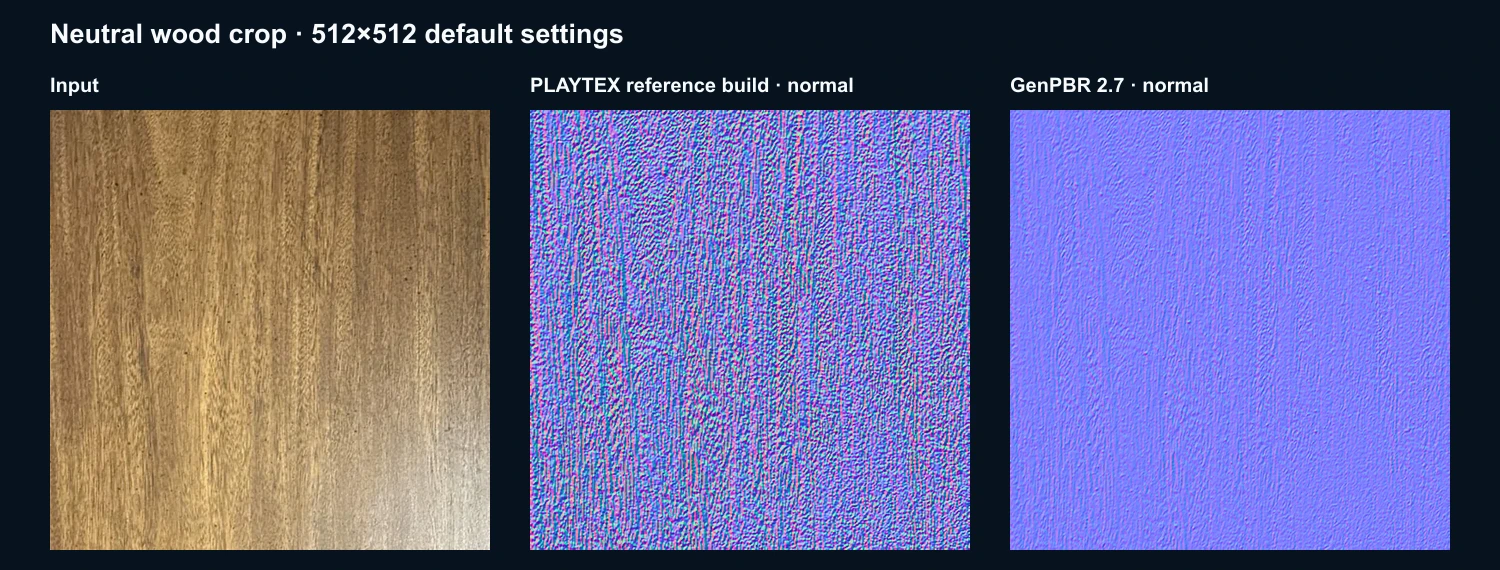
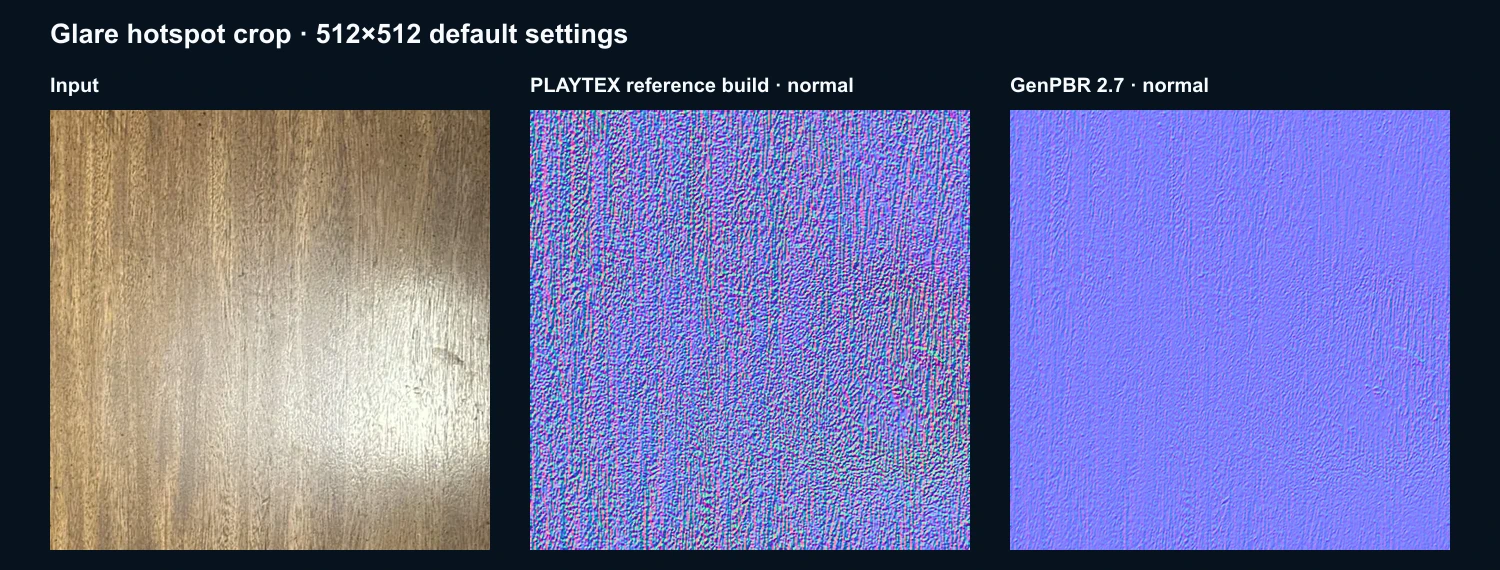
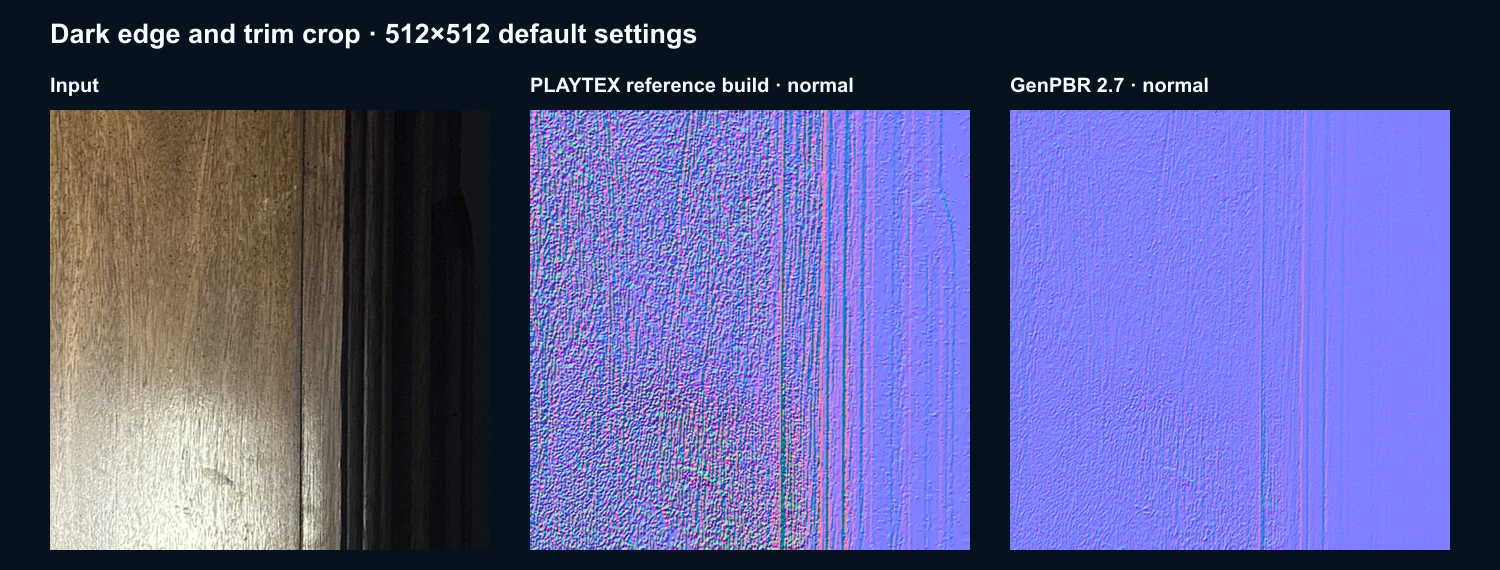
The input set contains three 512×512 PNG crops from one first-party 1080×1440 phone photo: a lower-glare wood crop, a glare-hotspot crop, and a crop containing the dark trim boundary. There was no retouching after crop.
PLAYTEX AI settings
Version: reference build 2ae3dbaf971b21895a84697b5775fa0509cfedf5, committed September 3, 2026. The benchmark called the checked-in synchronous PBR core directly at 512px with material class dielectric, preset wood, map-consistency lock on, seam-aware processing off, power-of-two lock off, and all seven map types requested. The complete nested settings object and SHA-256 hashes of every implementation file are in settings.json.
GenPBR settings
Version: GenPBR 2.7, as displayed on the public generator on the test date. Mode: Canvas CPU • Universal. Resolution: 512×512. Visible defaults: normal strength 5.0, metallic intensity 0.8, roughness intensity 2.0, AO intensity 2.0, AO radius 12, height contrast 1.00, height brightness 0.00, and invert height off. The neutral and glare normal maps were regenerated; their SHA-256 hashes matched the first captures.
How the measurements were made
Each source crop was submitted at its native 512×512 dimensions. The downloaded PNGs were measured without resizing, color correction, seam painting, denoising, or recompression. For PLAYTEX AI, the script requested every available channel in one synchronous core call. For GenPBR, the tester uploaded the same PNG in the public generator, selected “Generate All Maps,” and saved the five displayed derived maps. Filenames, dimensions, byte sizes, and SHA-256 digests are recorded so a reviewer can detect a substituted or altered file.
Opposing-border delta compares the top row with the bottom row and the left column with the right column, averages the absolute channel differences, and reports the result as a percentage of the full 8-bit range. It is calculated separately for normal, metallic, roughness, height, and AO, then averaged across the three crops for the shared-map summary. The number is descriptive only. A flat but physically wrong map can record a small delta, so the statistic cannot decide seam quality or texture quality.
The metallic check treats photographed wood as a known dielectric: encoded metallic values should therefore stay close to black. We report the mean value and the share of pixels above 0.10 rather than inventing a universal pass threshold. Height/source luminance correlation is also descriptive; a high value flags that photographed lighting may be reproduced as geometry, but it does not prove every correlated feature is an error. No subjective beauty score, hidden weighting, or composite leaderboard is used.
Timing was recorded at the narrowest repeatable boundary available for each product. PLAYTEX AI samples cover the checked-in map-generation core. GenPBR samples cover the browser interval from the generation action until the result images changed. These are deliberately labeled as different surfaces. Raw sample values are published, the median is reported to reduce sensitivity to a single slow run, and no claim is made about network, upload, download, or complete workflow speed.
Per-case edge measurements
Each value below is the mean opposing-edge RGB delta. Lower values indicate closer boundary pixels for that map.
1. Neutral wood crop
Shared map
PLAYTEX AI
GenPBR
Normal
23.737%
5.124%
Metallic
6.042%
13.487%
Roughness
4.946%
21.278%
Height
18.378%
14.298%
AO
18.315%
7.227%
Failure note: neither metallic map is near an ideal black dielectric result. PLAYTEX AI mean metallic is 17.181%; GenPBR is 34.400%. PLAYTEX AI height/source luminance correlation is 0.9999 and GenPBR is 0.8611, so both outputs retain substantial source-luminance structure.
Failure note: neither product removes the photographed hotspot at default settings. PLAYTEX AI height/source correlation is 0.9999; GenPBR is 0.9190. PLAYTEX AI mean metallic is 22.367%; GenPBR is 44.503%.
Failure note: the dark trim is not a tileable material boundary, and both products carry it into derived maps. The high height-edge values—44.127% for PLAYTEX AI and 35.709% for GenPBR—show why source cleanup or a seamless-generation stage is still required.
Repository reference build; no retail transaction. Public Free can preview but cannot download.
$0 anonymous public generator
Download/commercial entry on test date
$3/month Mapper for personal-use downloads; $9/month Starter for standard commercial use and engine packages
Free output is non-commercial with attribution; $9.99/month Starter lists commercial rights
Processing-time samples
15 measured core calls; median 504.127 ms; excludes file loading, UI, preview, and PNG encoding
Three browser result updates: 478, 437, and 466 ms; median 466 ms; excludes file selection
Maps observed
Albedo, normal, metallic, emission, roughness, height, AO
Normal, metallic, roughness, height, AO
Formats
PNG maps, ZIP material sets, engine-package export on Starter+
PNG and “Download All” observed; the official page documents ZIP and MaterialX
Timing caution: these numbers answer “how long did each recorded processing boundary take on this machine?” They do not answer “which complete user workflow is faster?” The boundaries and sample counts differ, so this run supports no timer comparison.
Why the other products are no longer ranked
Meshy, Polycam, Scenario, AITextured, Adobe Substance 3D Sampler, and Hyper3D were named in the old list, but this run did not test them under the same square-image-to-five-map contract. Some solve broader or different tasks. They have therefore been removed from the ranking. Not tested does not mean worse. A later edition may add a product only after its inputs, outputs, version, settings, and raw results can be published on the same terms.
Limitations you should keep in view
This is one phone photo split into three stress crops, not a broad material corpus.
There is no calibrated physical height, roughness, AO, or spectral ground truth.
Defaults favor repeatability, not the best hand-tuned output either product can achieve.
The source is not seamless. Opposing-edge delta diagnoses boundary disagreement; it is not a perceptual quality score.
The glare and trim are intentional source failures. Neither product repairs them at this map-derivation stage.
PLAYTEX AI published and reviewed a benchmark containing its own product. The artifacts are public so readers can audit that conflict.
Pricing and licensing can change. The values above are snapshots from September 3, 2026; check the linked first-party pages before buying or shipping.
Frequently asked questions
Which image-to-PBR generator is best overall?
No. This three-crop run does not support a product ranking. It records raw maps, product-scope differences, and descriptive diagnostics. The border-pixel, metallic, and timer values do not establish which generator produces better textures.
Can I cite or reproduce these results?
Yes. Cite the dated September 3, 2026 edition, preserve the product versions and limitations, and link to the benchmark page. Download the input set, exact settings, results, and SHA-256 manifest to repeat the calculations.
Are the benchmark inputs seamless?
No. That is intentional. The 3×3 previews expose how the original boundaries and generated maps repeat. The metric measures opposing-edge disagreement; it does not claim the inputs were authored as tiles.
Why is GenPBR attribution shown?
The GenPBR licensing page says free outputs require attribution for public sharing. The benchmark therefore uses the requested credit: Textures generated with GenPBR — genpbr.com.