Unreal Engine base-texture workflow
AI Texture Generator for Unreal Engine
Create the visual source in Texture Lab, then use Unreal’s texture asset and material graph for production sampling.
Direct answer: Use PLAYTEX AI Texture Lab when an Unreal material needs an original surface rather than a preserved photo. Describe the material, compare tileable variants on multiple preview meshes, choose an export size, and click Download PNG once. Import the PNG as a Texture asset, keep sRGB enabled when it feeds Material Base Color, and use a TextureCoordinate expression to control U and V tiling. This output is the base texture—not a DirectX normal, ORM map, native Material, or environment cubemap.
Reviewed:
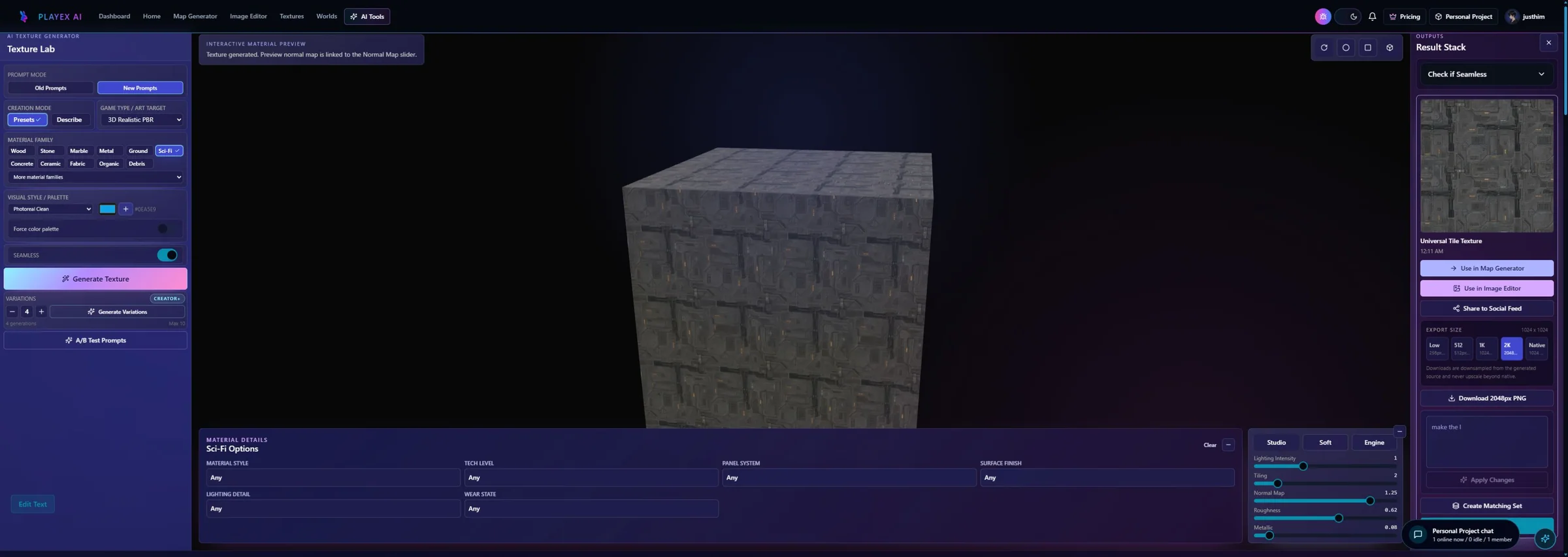
What this AI Texture Generator page covers
This workflow invents the color source only. Use the Unreal PBR page for DirectX normals and ORM, and the Unreal HDRI page for Sky Light or HDRI Backdrop environments.
How to use AI Texture Generator with Unreal Engine
Prompt for surface information
Describe material category, pattern scale, wear, edge character, and color range. Exclude objects, labels, camera perspective, and baked key lighting.
The result can be sampled repeatedly by an Unreal material.
Judge the tile beyond one hero view
Use a plane for repetition, a cube for edge changes, and a sphere for distortion. Check whether a distinctive feature will repeat across a landscape or modular kit.
The selected source can withstand the intended Unreal coverage.
Download a right-sized master once
Choose the export resolution according to screen size and source value, then click Download PNG. Unreal can create mips and platform formats after import.
The project receives a useful master rather than an arbitrarily oversized asset.
Use the Texture asset in a Material
Import the PNG, sample it in the Material graph, connect RGB to Base Color, and multiply TextureCoordinate U/V tiling when the surface needs more repeats. Validate under moving light.
The generated source becomes an editable Unreal material input.

Where the generated PNG belongs in Unreal Engine
Treat the AI result as display color until a separate PBR workflow creates technical data textures.
| PLAYTEX AI output | Unreal Engine destination | Verify in engine |
|---|---|---|
| Generated color PNG | Texture Sample RGB → Material Base Color | sRGB on, no baked key light, color range fits art direction. |
| UV repetition | TextureCoordinate → Texture Sample UVs | UTiling and VTiling preserve believable feature scale. |
| Project texture asset | Texture Asset Editor | Max size, mips, compression, and streaming fit the target platform. |
One click downloads the generated color source
Select the Texture Lab export resolution, then click Download PNG once.
What remains after the click
The download does not generate a .uasset, Material Instance, DirectX normal, ORM texture, virtual texture, or project import script.
Included in this handoff
- AI-generated base texture
- Selected PNG resolution
- Source for Unreal Base Color or later PBR mapping
Landscape concepts
Explore ground, rock, snow, sand, and vegetation-bed sources before committing to a final library.
Modular environment kits
Create consistent wall, floor, roof, trim-surface, and painted-material directions.
Fast prototyping
Keep the Material hookup production-shaped even when the art source is temporary.
Pre-handoff QA
- The generation contains surface detail rather than scene perspective.
- Repeat rhythm is checked over large Unreal coverage.
- The color texture imports with sRGB enabled.
- Max size, mips, compression, and streaming are evaluated in the project.
AI Texture Generator and Unreal Engine FAQ
Does Download PNG create an Unreal Material?
No. It downloads the generated color source. Import the image as a Texture asset and connect it inside the Material or Material Instance workflow used by the project.
How do I tile an AI texture in Unreal Engine?
Connect a TextureCoordinate expression to the Texture Sample UV input and set or parameterize U and V tiling. Validate the resulting physical scale on the real mesh.
Should the generated color texture use sRGB?
Yes when it is used as display color such as Base Color. Technical mask and normal textures use different settings in the separate PBR workflow.
Can a square AI texture be used in HDRI Backdrop?
No. HDRI Backdrop expects an environment image with full spherical coverage. Use the Unreal HDRI Sphere workflow for the panorama or cubemap asset.
Base Color is a distinct physical material input
Epic documents Base Color separately from Metallic, Roughness, Normal, and other material inputs.
TextureCoordinate controls U and V tiling
Epic documents UTiling, VTiling, and UV channel selection on the TextureCoordinate material expression.
Texture Asset Editor controls import behavior
sRGB, compression, maximum texture size, mips, power-of-two options, and virtual texture streaming remain project-side settings.