Updated
Roblox Game Pass Maker: Plan, Price, Create and Script a Pass
A Roblox game pass maker should prepare the pass before you publish it. PLAYTEX AI plans permanent benefits, reverse-calculates Robux prices, checks the circular icon crop, writes listing copy, and exports Luau; Roblox Creator Dashboard remains the place where you create the real pass, turn on sales, and copy its Asset ID.
PLAYTEX AI does not ask for Roblox credentials, create free Robux, or publish to your account. Plans and uploaded artwork stay in your browser until you export them.
Open the free Game Pass Builder · See the five-step workflow
What does a Roblox game pass maker or generator do?
A useful game pass maker prepares the product around the official Roblox pass. It helps define a permanent benefit, calculate the listing price, compose a circular-safe icon, write purchase copy, and connect the final Asset ID to server-authoritative game code. It cannot generate free Robux, and it should never request a Roblox password or session cookie.
Responsibility split: PLAYTEX AI creates the plan and export pack. Roblox Creator Dashboard creates the official pass. Your Roblox server verifies ownership and grants the promised benefit.
How PLAYTEX AI and Roblox Creator Dashboard work together
1. Plan in PLAYTEX AI
Choose permanent benefits, write the listing copy, check the icon, and build a price ladder.
2. Create in Roblox
Open Creator Dashboard, upload the prepared icon and copy, then create and price the pass.
3. Copy the Asset ID
Use the pass card menu in Creator Dashboard to copy the Asset ID into your plan and scripts.
4. Add server-safe scripts
Use the exported Luau as a starting point, with ownership checks and benefit grants on the server.
5. Test the published build
Verify a new buyer, an existing owner, rejoining, live price text, and every granted benefit.
| Workspace | What it is for | What it handles | Boundary |
|---|---|---|---|
| PLAYTEX AI Game Pass Builder | Prepare the lineup and launch pack before publishing. | Ideas, categories, price math, listing copy, circular-safe icons, Luau templates, CSV, JSON, and ZIP export. | It does not sign in to Roblox or publish a pass. |
| Roblox Creator Dashboard | Create and manage the official pass attached to an experience. | Pass creation, icon upload, name, description, category, Asset ID, sale status, price, and analytics. | It does not build a multi-pass price ladder or export your implementation pack. |
| Roblox Studio and your server scripts | Prompt purchases and grant the promised privilege in the experience. | Live product information, purchase prompts, ownership checks, benefit grants, persistence, and testing. | Client code should not be trusted as proof of ownership. |
How to use the PLAYTEX AI Roblox Game Pass Builder
1. Plan benefits that fit a one-time pass
Start with a benefit the buyer should keep: permanent access, convenience, cosmetics, social status, or lasting progression. Currency packs, revives, consumables, and temporary boosts belong in a repeatable Developer Product instead.
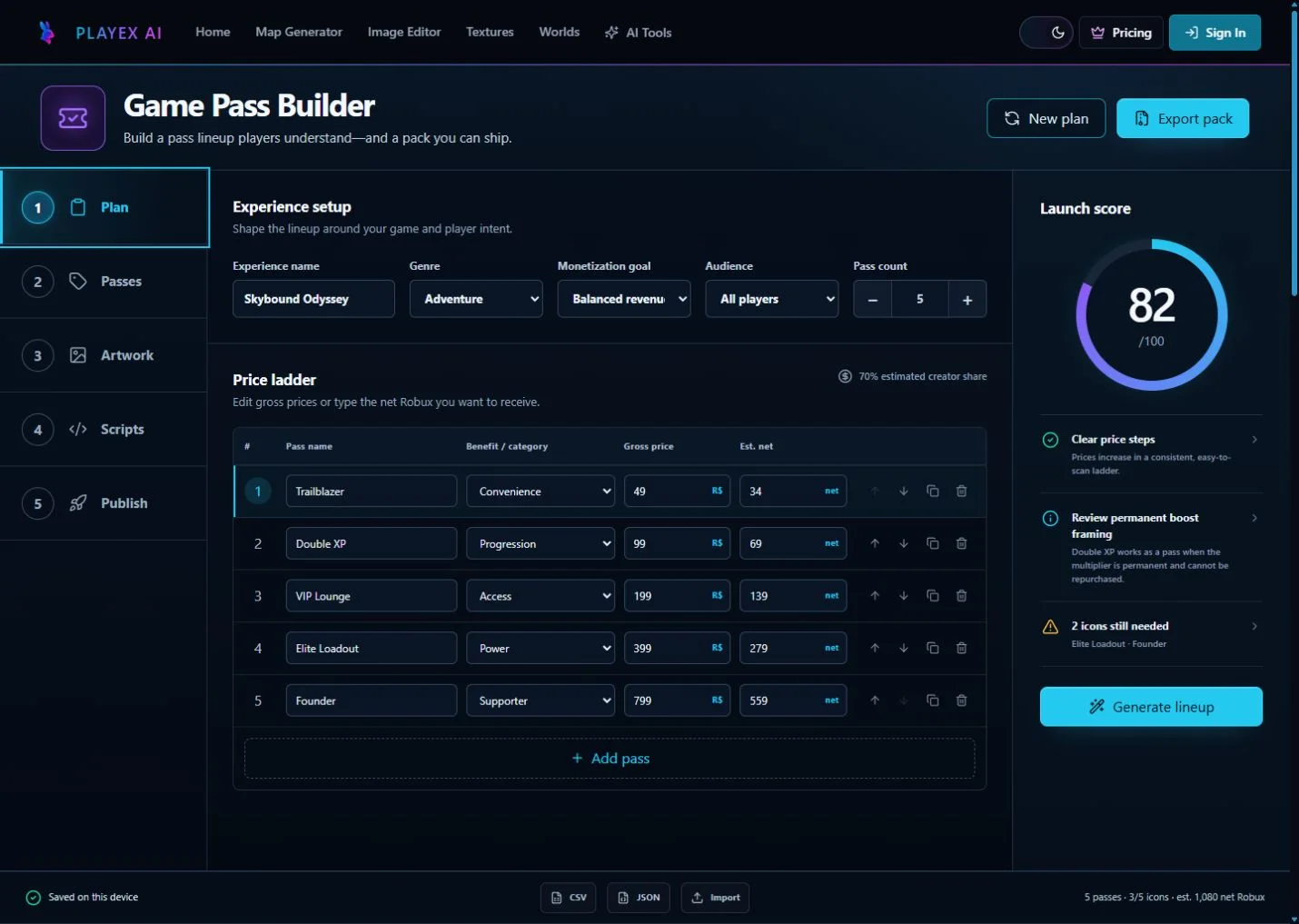
In the builder: Set the experience name, genre, audience, goal, and number of passes. Generate a lineup, then edit every promise so it names a concrete permanent benefit.
2. Build the price ladder from gross or desired net Robux
The builder estimates the documented 70% creator share for a creator selling their own pass inside their own experience. It rounds estimated earnings down to whole Robux and can reverse the calculation from a desired net amount.
In the builder: Edit the gross price directly, or enter the net target. Keep each tier far enough apart that a player can tell why the next benefit costs more.
3. Write the name, description, and benefit text
A strong listing says what changes, whether the benefit is permanent, and where it works. Avoid vague names such as Ultra or Mega unless the description identifies the exact value.
In the builder: Open Passes, review the generated name and description, select a category, then make the benefit line specific enough to reuse in your store UI.
4. Crop the icon for Roblox's circular presentation
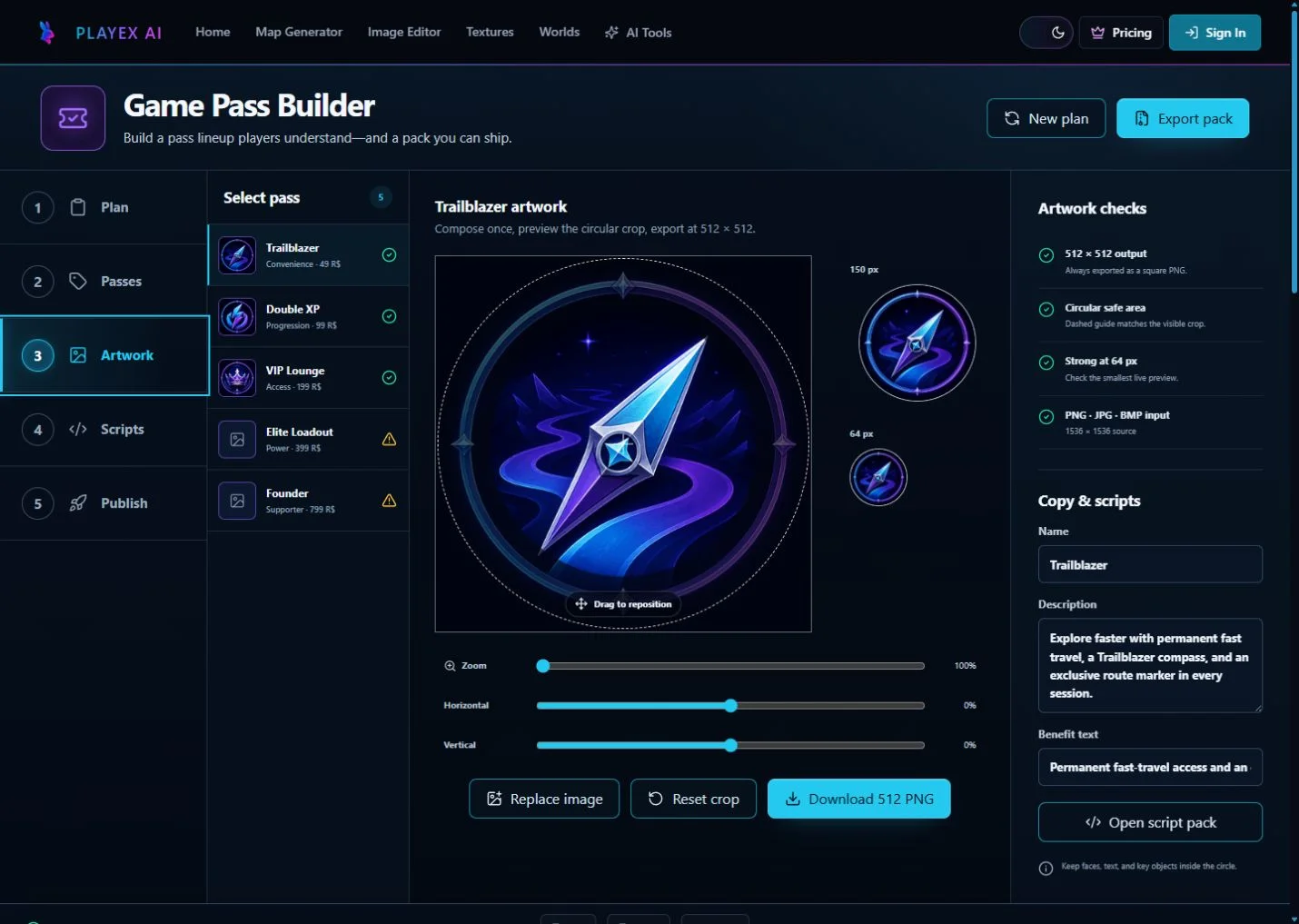
Roblox accepts JPG, PNG, or BMP pass icons no larger than 512 x 512 pixels. The source is square, but the live presentation is circular, so faces, symbols, objects, and essential text need breathing room inside the circle.
In the builder: Upload the source, drag and zoom it inside the dashed safe area, inspect the 150 px and 64 px previews, then export the 512 x 512 PNG.
5. Export scripts and finish the publishing checklist
The script pack separates the client purchase prompt from server-side ownership and entitlement logic. After Roblox creates the pass, paste its Asset ID into the builder so the exported configuration matches the published item.
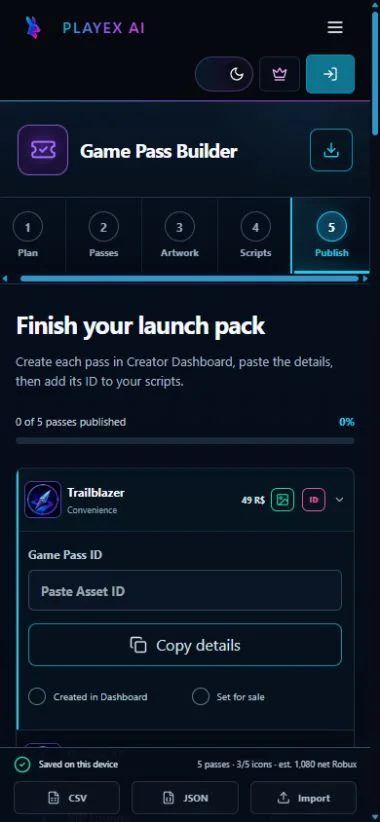
In the builder: Open Scripts to review the config, server grant template, client prompt, and cleanup notes. Open Publish to copy each listing, record its Asset ID, mark the dashboard checks, and export the final ZIP.
How to make a game pass in Roblox Creator Dashboard
The official path is Creations, select the experience, Monetization, Passes, then Create a Pass. The experience must already be published and accessible.
1. Publish the experience first
Roblox requires the experience to be published and accessible before you can create a pass for it.
2. Open the experience in Creator Dashboard
Go to Creations, select the experience, then open Monetization and Passes. Choose Create a Pass.
3. Upload the prepared listing
Upload the exported icon and paste the name, description, and category from PLAYTEX AI. Check the circular preview before you create the pass.
4. Set the pass for sale
Open the pass sales settings, enable the sale, enter the gross Robux price, and save. Roblox documents a minimum of 1 Robux and a maximum of 1 billion Robux.
5. Copy the Asset ID back to the builder
Open the three-dot menu on the pass card and choose Copy Asset ID. Paste that number into the matching Publish row in PLAYTEX AI before exporting scripts.
6. Test ownership and the actual benefit
Test in a published private environment with a non-owner account. Cover purchase success, cancellation, existing ownership, rejoining, and the exact privilege promised in the listing.
Game pass price calculator and 70% net examples
For a creator selling their own pass inside their own experience, Roblox documents a 70% creator share. Estimate the net with floor(gross price x 0.70). Find the minimum listing price with ceil(desired net / 0.70). Dashboard reporting remains authoritative.
| Gross price | Estimated net at 70% | Possible role |
|---|---|---|
| 49 R$ | 34 R$ | Low-friction convenience or cosmetic tier |
| 99 R$ | 69 R$ | Clear mid-tier progression or utility pass |
| 199 R$ | 139 R$ | Permanent access or stronger bundle |
| 499 R$ | 349 R$ | High-value power, access, or premium bundle |
| 999 R$ | 699 R$ | Top supporter or founder tier |
| Desired net | Minimum listing price |
|---|---|
| 50 R$ | 72 R$ |
| 100 R$ | 143 R$ |
| 250 R$ | 358 R$ |
| 500 R$ | 715 R$ |
Display the live price: managed regional pricing and eligible Roblox Plus discounts can change what a specific buyer sees. Keep the builder value as the planning default, then load current product information in the experience UI.
Game pass vs Developer Product vs subscription
| Product | Choose it when | Examples | Implementation focus |
|---|---|---|---|
| Game pass | The benefit is bought once and should remain owned. | VIP area, permanent multiplier, extra equipment slot, cosmetic title. | Check ownership and grant the permanent entitlement. |
| Developer Product | The same player should be able to purchase it repeatedly. | Currency, revive, potion, spin, temporary boost. | Process each receipt once and persist the delivered purchase. |
| Subscription | The benefit is recurring and should end when billing stops. | Monthly benefits, recurring allowance, membership perks. | Check current subscription status and define lapse behavior. |
Prompt on the client; verify and grant on the server
A purchase-finished signal is a reason to re-check ownership, not proof by itself. Keep the entitlement decision on the server, handle MarketplaceService failures, make grants idempotent, and re-apply persistent privileges when an owner rejoins.
- Load current product information before showing a price.
- Prompt from the player-facing interface.
- Verify pass ownership on the server.
- Grant only the named benefit and make repeat grants harmless.
What changed · As of August 2026
Roblox game pass updates checked for 2026
May 30, 2026
Cross-experience pass sales were disabled
Roblox says a pass should now be sold inside the same experience it belongs to. Do not design a store that sells another experience's pass.
Current guidance
Managed regional pricing can change the buyer-facing price
Managed pricing is enabled by default. Roblox documents regional prices as no higher than the default and potentially as low as 30% of it, so store UI should retrieve live product information.
Current guidance
Eligible Roblox Plus buyers may see a subsidized discount
Roblox documents 10% to 20% discounts on eligible pass purchases. The discount is subsidized by Roblox, so the creator receives the same amount as the undiscounted default-price purchase.
Beta
Cloud APIs can create and update passes
Roblox exposes Beta endpoints to create, update, list, and retrieve passes. PLAYTEX AI keeps the public builder unauthenticated today; these APIs leave a path to an opt-in publisher later.
Common game pass mistakes and fixes
| Mistake | Why it hurts | Fix |
|---|---|---|
| Treating a repeat purchase as a pass | A player can own a pass only once, so repeatable currency or consumables stop converting after the first purchase. | Use a Developer Product for anything intended to be bought again. |
| Hard-coding the displayed Robux price | Managed regional pricing and eligible Roblox Plus discounts can make static UI text wrong for the viewer. | Load the current product information for the player before displaying the price. |
| Putting important art at the square corners | The circular presentation hides the corners and can clip faces, text, or the item silhouette. | Keep essential content inside the circular safe area and inspect it at 64 px. |
| Granting the benefit from client-only code | Client claims can be spoofed, creating free entitlements or duplicated grants. | Verify ownership and grant benefits on the server. Make grants safe to repeat. |
| Testing only as the experience owner | Owner behavior can differ from a real buyer, hiding prompt, ownership, and persistence problems. | Test a published build with a non-owner account and cover both new and existing owners. |
Roblox game pass maker FAQ
Is a Roblox game pass maker the same thing as a Robux generator?
No. A legitimate game pass maker prepares a product you can publish and sell in your own experience. It cannot create free Robux. PLAYTEX AI never asks for a Roblox password, session cookie, or account token.
How do I make a game pass in Roblox?
Publish an accessible experience, open it in Creator Dashboard, choose Monetization and Passes, create the pass with an icon and listing, enable sales, set the Robux price, then copy the Asset ID into your scripts.
Can I make a Roblox game pass on a phone?
You can use the PLAYTEX AI builder on a phone and open Creator Dashboard in a mobile browser. The page keeps the workflow touch-friendly, but Roblox controls which dashboard actions are available for your account and device.
What size should a Roblox game pass icon be?
Roblox accepts JPG, PNG, or BMP icon uploads no larger than 512 x 512 pixels. Keep the important content inside the circular presentation area even though the uploaded source is square.
How much Robux do I receive from a game pass?
For a creator selling their own pass inside their own experience, Roblox documents a 70% creator share. PLAYTEX AI uses floor(gross price x 0.70) as a planning estimate, so a target of 100 net Robux needs a listing price of at least 143 Robux.
Should a permanent multiplier be a pass or Developer Product?
Use a pass when the multiplier is permanent and bought once. Use a Developer Product when the boost expires or the player should be able to purchase it repeatedly.
Does PLAYTEX AI publish the pass directly to Roblox?
No. The current builder is unauthenticated. It prepares the listing, icon, price plan, Asset ID checklist, and Luau pack, then sends you to Creator Dashboard to perform the official publishing steps.
Why should my game load the live pass price?
Regional pricing and eligible Roblox Plus discounts can change the amount shown to a specific buyer. Loading current product information prevents a hard-coded store label from disagreeing with the purchase prompt.
Official Roblox documentation used for this guide
Checked August 10, 2026. Product policy and Beta APIs can change.
Creation path, icon requirements, sale settings, Asset IDs, price range, scripting notes, and the May 2026 sales change.
Roblox Creator Hub: Monetize experiences
The documented 70% creator share for an owned pass sold inside the creator's own experience.
Roblox Creator Hub: Regional pricing
Managed regional pricing behavior and the need to avoid hard-coded prices.
Roblox Creator Hub: Roblox Plus
Eligible 10% to 20% subscriber discounts and Roblox-subsidized creator earnings.
Roblox Creator Hub: MarketplaceService
Purchase prompts, ownership checks, and current product information.
Roblox Creator Hub: Game Pass API (Beta)
Beta endpoints for creating, updating, listing, and retrieving passes.