Agent Workflow
Image to Three.js: Turn a Reference Image into Procedural 3D Code
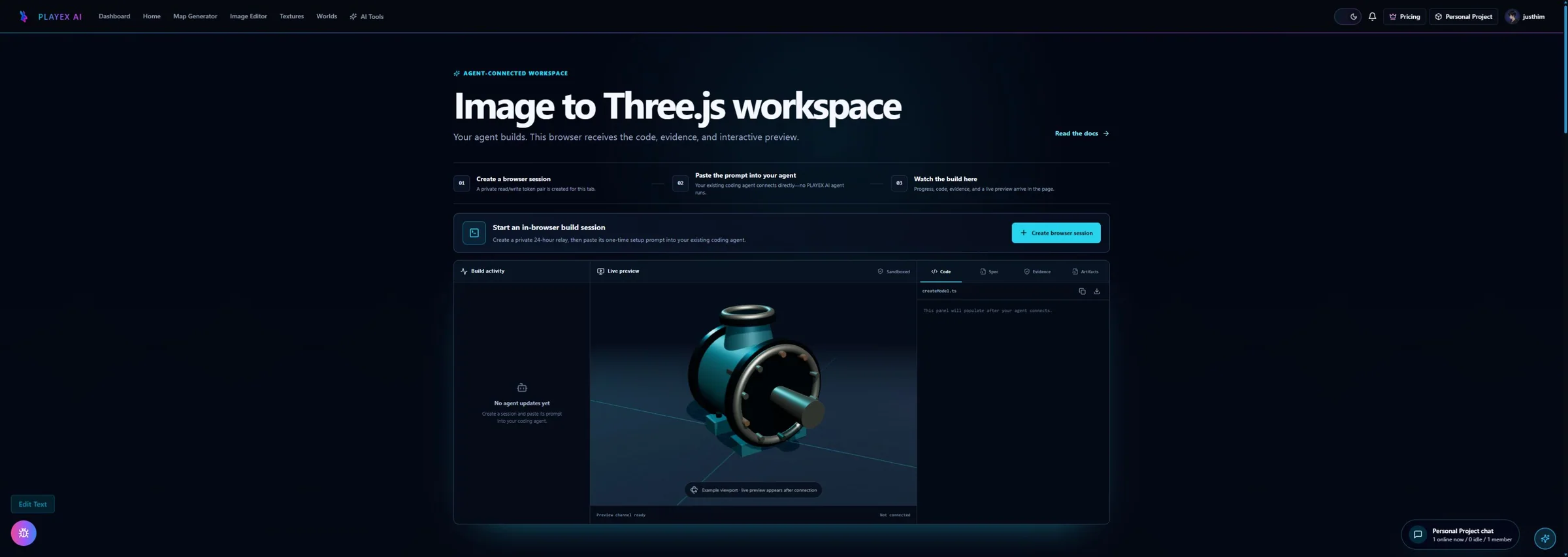
Connect the coding agent you already use to a short-lived browser relay, watch a staged procedural Three.js reconstruction, and review the live preview, source, sculpt spec, and evidence together.
Direct answer
What does Image to Three.js actually create?
Use this as a supervised code workflow, not a one-click image-to-mesh converter. A good result is an editable THREE.Group factory with honest assumptions, useful hierarchy, and review evidence—not only a beauty render.
How PLAYTEX AI helps: PLAYTEX AI provides the short-lived browser relay and review workspace. Your coding agent builds the asset; the workspace keeps its activity, live preview, code, sculpt spec, evidence, and downloadable artifacts visible together.
What you will get
- Create an expiring browser relay without giving PLAYTEX AI access to the reference image.
- Connect your existing coding agent and see its progress, source, evidence, and preview in the page.
- Review, copy, and download the quality-gated artifacts without running a second agent.
Best use cases
- You have a prop or character reference and want an editable procedural Three.js reconstruction.
- You need a reusable THREE.Group factory with named parts, pivots, sockets, and material controls.
- You want your own coding agent to build locally while the open PLAYTEX AI page acts as its live display.
Acceptance test
Approve the asset only when these are true
- The reference clearly shows the silhouette and identity-defining details the agent is expected to reproduce.
- The intended use states whether the asset needs animation, close-up fidelity, destruction, or a lightweight prop hierarchy.
- The returned factory creates a THREE.Group with named parts, sensible pivots, and only intentional runtime metadata.
- The preview is reviewed from more than the source camera angle and the unseen surfaces are documented as assumptions.
- Source, sculpt spec, result notes, and comparison evidence are saved before the 24-hour relay expires.
- The session write token is treated as a short-lived secret and is never committed or shared.
Why the user-owned agent model matters
Image to Three.js is deliberately different from a hosted generation button. A procedural reconstruction is a coding task: the agent must inspect the project, write and run scripts, create a component hierarchy, render the current pass, compare evidence, and revise the source. Running that loop inside the user project keeps the agent close to the real codebase and avoids a second remote agent that cannot see local conventions.
The PLAYTEX AI page is the live connection surface for that work. It creates a private expiring session, provides the exact publishing contract, and polls for structured status, source, preview, and evidence. The visitor keeps talking to the coding agent they already trust while the browser becomes a focused display and review surface.
The privacy boundary is explicit: the reference remains local, while generated output is transmitted because showing it in the browser is the purpose of the session. Capability tokens are separate by role, retained only in the browser tab or agent conversation, and invalid after the session expires.
Why a staged sculpt is more reliable than one-shot code
A recognizable model usually fails through accumulation: a slightly wrong silhouette, generic topology, detached appendages, flat materials, missing fasteners, and a camera chosen to hide the weak side. A one-shot prompt can produce many lines of Three.js and still miss the object identity. The staged workflow makes those errors observable before they become expensive.
The quality contract locks the important features first. Blockout proves scale and silhouette. Structure proves hierarchy and attachment. Form adds the characteristic contours. Material work separates albedo, roughness, metalness, normal, and other physical channels. Lighting exposes the form. Interaction adds pivots, sockets, and colliders. Optimization reduces cost without deleting the features that made the object recognizable.
How to ask for a useful revision
A good revision request names the observed mismatch and the evidence view. For example: the top flange is too wide in the three-quarter comparison, the rear housing collapses from the orbit view, or the paint is too glossy compared with the reference crop. The agent should decide whether that means the sculpt spec is wrong or the implementation failed to match a sound spec.
Preserve unrelated parts when revising. Ask the agent to update the factory, spec, result notes, and evidence together. That keeps the artifact set internally consistent and prevents a model from looking revised while its documented hierarchy, material values, or limitations still describe the older version.
Settings Reference
Reference and intent inputs
These inputs determine whether the agent can make honest geometry and which build path it should use.
- Reference image: Defines the visible silhouette, proportions, materials, and identity-defining details that the model must preserve. Use a clear three-quarter view when possible. Add more views when hidden geometry or exact likeness matters.
- Intended use: Changes hierarchy, topology, detail density, pivots, sockets, collision planning, and performance targets. State whether the output is a browser prop, game object, hero render, playable object, destructible asset, or animation rig.
- Quality direction: Sets how much time the agent spends inventorying details, reviewing angles, and correcting mismatches. Use a fast draft for direction, balanced for most real-time assets, and precise when the single reference contains enough detail to justify it.
Quality gates
The workflow separates deterministic checks from visual judgment so weak geometry does not pass on a vague overall score.
- Suitability and reference admission: Rejects unreadable, fragmented, tiny, duplicated, or contradictory references before expensive build work begins. Replace the image when the subject is cropped, blurred, occluded, or too small to support the requested fidelity.
- Quality contract and detail inventory: Names the critical silhouette, material, proportion, attachment, and small-detail targets that must survive every pass. Add explicit priorities when a logo, fastener pattern, contour, appendage, or material finish carries the object identity.
- Multi-angle review: Checks that the result behaves like a volume instead of a flat plane that only works from the reference view. Require more useful orbit angles for complex, organic, asymmetric, or action-ready assets.
- Bounded correction: Stops infinite agent loops by detecting repeated defects, oscillation, plateaus, and hard ceilings. Provide another reference or narrow the fidelity target when the loop correctly reports that the single image is insufficient.
Output contract
A complete run returns source that can be used and inspected, not only a beauty render.
- createModel.ts: Exports a zero-argument-compatible factory that returns a THREE.Group with an editable runtime hierarchy. Ask for project-specific TypeScript style, scale conventions, or material injection without removing the base factory contract.
- object-sculpt-spec.json: Records components, materials, topology choices, attachments, pivots, sockets, passes, and review targets. Revise the spec first when a component, proportion, or material interpretation is wrong rather than patching around it in code.
- Review evidence and result notes: Preserves comparison sheets, scores, assumptions, fidelity, and known limitations for later review. Request more evidence when a critical feature is claimed as complete without a reference-versus-render comparison.
Connect your agent and run the build
Connect the coding agent you already use to a short-lived browser relay, watch a staged procedural Three.js reconstruction, and review the live preview, source, sculpt spec, and evidence together.
Step 1: Create a private browser session
Open Image to Three.js and click Create browser session. PLAYTEX AI creates separate read and write capability tokens for one 24-hour session; the reference image is not uploaded.
Step 2: Copy the session prompt to your agent
Paste the generated prompt into the coding agent that can access your project. It contains the short-lived relay endpoint, session ID, write token, event contract, and standalone-preview requirements.
Step 3: Attach one clear reference
Give the agent a readable PNG, JPG, or WEBP image and state the intended use. A real-time browser prop is the default; say when the result must support animation, destruction, close-up rendering, or a stylized character.
Step 4: Watch the staged gates in the browser
The agent validates the reference, creates the sculpt spec, builds one pass at a time, and POSTs meaningful progress updates. The page refreshes its activity, code, and preview about every two seconds.
Step 5: Review and download the result
Orbit the sandboxed preview, copy or download the factory, inspect the sculpt spec and comparison evidence, and read the fidelity and limitation notes. The relay expires automatically after 24 hours.
Common failure modes
- Do not describe the task as a generic image-to-3D conversion; ask for procedural Three.js source and the full img2threejs quality gates.
- Do not expect a single front view to reveal exact back-side geometry, internal construction, or real-world scale without additional cues.
- Do not accept a render without the TypeScript factory, sculpt spec, comparison evidence, and limitation notes.
- Do not confuse this workflow with photogrammetry, neural mesh extraction, or downloading a stock 3D asset.
- Do not put reference-image bytes, project credentials, environment variables, or unrelated source into a relay request.
- Do not commit or share the session write token; it is a short-lived capability for publishing into one browser workspace.
Does Image to Three.js convert a picture into a mesh automatically?
No. It is a supervised agent workflow that produces editable procedural Three.js code, a live preview, a sculpt specification, and evidence. The agent must infer unseen geometry and document those assumptions.
What kind of reference image works best?
Use a clear image with a readable silhouette, limited occlusion, visible identity-defining parts, and enough perspective to understand depth. Add side or rear references when those surfaces matter.
What should the generated Three.js code return?
A practical result returns a THREE.Group factory with named parts, sensible local pivots, reusable materials and geometry where appropriate, and a hierarchy that can be edited or animated.
Why is the browser session short-lived?
The relay is designed as a temporary handoff between your agent and the browser workspace. Save the code, spec, notes, and evidence before the session expires, and never commit its write token.
Can I export the procedural result as glTF or GLB?
Yes, when the returned scene hierarchy and materials are compatible with Three.js GLTFExporter. Review custom shaders, unsupported metadata, and animation requirements before treating the GLB as the final source.
Primary sources
Official specifications and renderer documentation
PLAYTEX AI guidance is paired with official specifications and platform documentation where the handoff depends on an outside convention.
Open the live workflow that this guide is documenting.
How to Make Game Textures with PLAYTEX AI: Complete WorkflowStart with the asset you actually have, move through only the tools that solve its current problem, and finish with a repeatable material or lighting handoff.
PBR Map Generator: Create Normal, Roughness, AO, Height, Metallic, and Emission MapsTurn one viable image or source-guided hybrid setup into a coherent map stack, review every channel as part of one material system, and export for the renderer you actually use.